

I absolutely love this program.
I am trying to find a way, so that if you reply to an email received from ProjeQtor, the reply gets attached to the correct activity or ticket so that there is a history of the reply emails specific to that activity or ticket.
Is this possible? If so, how do I get it working?

Yes, it is possible.
You have to configure the IMAP mailbox for the "reply to" email address.
Look at Global Parameters in the IMAP part, and user user manual [F1] for help on how to configure parameters.
Hi There,
I thought this was solved, but none of the emails are actually being saved in the activities.
Here are my IMAP settings, so I am not sure what I am doing wrong?
Your help would be greatly appreciated.
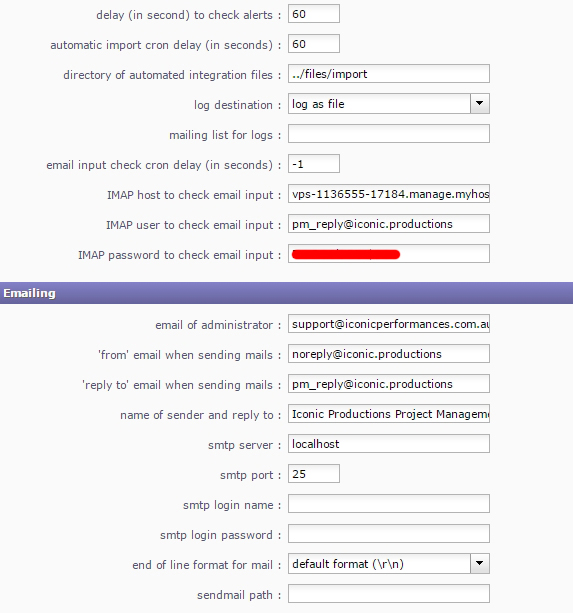
First, "email input check cron delay" is set to -1 : this disables the feature.
Also, imap host must be defined as an IMAP mailbox (see user manual).
For instance : {imap.gmail.com:993/imap/ssl}INBOX
Thank you for the quick reply.
What is the default setting for "email input check cron delay" that I should put.
The user manual only refers to gmail IMAP mailbox. For a non-technical person, like myself, it makes it very difficult to know what to put here. Is there any more detailed instructions/information I can have to help me work out how to define it?
I have tried to create the host connection string, but it still doesn't seem to work. Here is a copy of the string
{vps--...com:993/imap/ssl}@
Is this the way it is meant to be displayed
What is the default setting for "email input check cron delay" that I should put.
seconds between each chack of the mailbox. 60 for a check every minute.
The user manual only refers to gmail IMAP mailbox. For a non-technical person, like myself, it makes it very difficult to know what to put here.
The user manual gives the example I gave.
Is there any more detailed instructions/information I can have to help me work out how to define it?
You can find detail at the php imap_open instruction : http://php.net/manual/fr/function.imap-open.php
Is this the way it is meant to be displayed
No, it would rather be :
{--...:993/imap/ssl}INBOX
It still does not seem to work for me. I don't know what I am doing wrong. The php link you sent me was in French. After a while I worked out how to show it in english, but this is more for the technical savvy.
I am not sure what to do here now. Your further assistance would be appreciated.
I have checked the username, I have checked the password, but it just doesn't work. When I reply to an email that came from ProjeQtor, my reply does not get attached to that specific activity in the notes section.
Please help as this would be a very useful feature for me, if I can get it working.
Important step : after configuration change, you need to STOP and START the CRON process...
Did you do it after each test ?
Also set debugLevel to 3 in parameters.php file (re-STOP/START CRON process)
You should get extra information in log file.
I didn't know i had to do this. Thank you for the instructions. How/where do i stop and start the Cron job?
Where do I find the parameters file.
How/where do i stop and start the Cron job?
On Administration screen
Where do I find the parameters file.
Default location is /files/config, but you should have changed it.
Location is defined in /tool/parametersLocation.php
I have all that you said and it is still not working. I have attached the log file here.
You provided Apache log file.
I need ProjeQtOr log file.
Here is the correct log file
Error is clear :
2015-12-24 00:08:18.977 ** ERROR ** ERROR **
2015-12-24 00:08:18.977 ** ERROR ** on file '/home//public_html//model/ImapMailbox.php' at line (82)
2015-12-24 00:08:18.977 ** ERROR ** cause = imap_open(): Couldn't open stream {--...***:993/imap/ssl}INBOX
2015-12-24 00:08:18.977 ===== TRACE ===== Cron::run() - Error on checkEmails()
You could not connect to mailbox.
So either this is not a valid mailbox of imapserver refuses connection or you have some network issue.
Contact your mail server administrator for information.
Thank you for your continued support. Much appreciated. With your help and guidance, I was able to work out, that because we use a SSL certificate, we needed to add "novalidate-cert" to the host string.
Again your continued help is gratefully appreciated.
Have a very Merry Christmas.
Is this the way it is meant to be displayed
No, it would rather be :
{..***:993/imap/ssl}INBOX
Can we please remove the host string to protect my company's server Host String.
[Babunus] B) Done
Error is clear :
2015-12-24 00:08:18.977 ** ERROR ** ERROR **
2015-12-24 00:08:18.977 ** ERROR ** on file '/home//public_html//model/ImapMailbox.php' at line (82)
2015-12-24 00:08:18.977 ** ERROR ** cause = imap_open(): Couldn't open stream {..:993/imap/ssl}INBOX
2015-12-24 00:08:18.977 ===== TRACE ===== Cron::run() - Error on checkEmails()You could not connect to mailbox.
So either this is not a valid mailbox of imapserver refuses connection or you have some network issue.
Contact your mail server administrator for information.
Can we please remove the Host String to protect it from spammers and other guests. I don't wish for this to be published now that it was solved.
[Babunus] B) Done