

aide en ligne

Online
manual

Online manual

All features are explained in the user manual (in English).

Frequently Asked Questions

    • Yes. Thanks to our User Qlub, you can vote on priority of improvements, share your feedback, and directly influence the future orientation of ProjeQtOr.

      You can also suggest improvements in the dedicated section of our forum.

    • No, the services we offer are the same for everyone, with the same commitments.

      We do not adapt our services and commercial terms to public, non-profit, or other organizations.
      The software is open-source; you can use it for free, but our services are non-negotiable.

      See our general terms and conditions of sale.

    • We offer free support without any guarantee on our forum.

      We also propose a professional support service with a guaranteed response time to ensure your secure use of ProjeQtOr.

      Our experts can also provide assistance with installation, configuration, and best practices for use.

    • You can control the coverage of requirements, validate deliverables, record non-conformities and automatically generate compliance reports.

    • Yes. The software includes dedicated modules: requirements, testing, risks, indicators, deliverable management, and complete traceability.

      You can track everything on your projects in ProjeQtOr.

      In addition, all updates are logged: you know who changed what and when.

    • Yes. ProjeQtOr allows you to import projects, resources, activities, tickets, or any other type of object from other systems using several mechanisms:

      • Importing CSV or Excel structured files,
      • REST web service API for automated data exchange,
      • Import projects from MS-Project XML files using our add-on plug-in

      This allows for a gradual transition and integration into your information system.

    • Yes, ProjeQtOr automatically calculates dates based on workload, availability, constraints, resources, and milestones.

      It's possible to schedule a global calculation for all projects at frequencies you define, allowing you to reallocate resources according to project priorities.

    • ProjeQtOr offers several ways to interface with an external system

      • CSV and XLSX exports and imports
      • Automatic imports
      • A REST web services API
      • Webhook publishing with an additional plug-in
      • GitHub integration with an additional plug-in

    • ProjeQtOr does not include any specific modules for interfacing with a given ERP system—there are simply too many: SAP, Sage, Oracle ERP, Microsoft Dynamics, Zoho One, Dolibarr, Odoo, Excel, internal tools, and more. However, ProjeQtOr offers a secure REST web services API that can be called from any third-party application.

      We can also assist you in implementing such interfaces or develop a custom interface for you. Contact us.

    • ProjeQtOr is a web based application with simple components: Apache, MySQL or PostgreSQL, and PHP.
      ProjeQtOr does not require a large infrastructure: 2 CPUs, 100 MB of disk space, and 4 GB of RAM are sufficient.


    • ProjeQtOr is available in both modes.

      As an open-source application, it can be installed on-premises, on your own servers, for complete control over your data and infrastructure.
      We also offer a turnkey cloud hosting solution: your instance is installed in SaaS mode, maintained, secured, and backed up by the ProjeQtOr team, without any technical management required from you.

    • ProjeQtOr can be installed on your server (Linux, Windows) or used via our hosted service. Installation requires a web server, PHP, and a MySQL/MariaDB database.

      Download the application and unzip it into your web server directory.

      See installation video
      See prerequisites

    • Yes. The tool is fully customizable.

      While it's particularly well-suited to IT professionals (IT services, IT companies, CTO), it can be used in all sectors.

      We have examples in industry, construction, services, engineering, healthcare, logistics, training, consulting firms, and food industry.

      But there are no limits, and ProjeQtOr is adaptable to all contexts.

    • Each object (project, activity, ticket, deliverable, etc.) has an integrated discussion thread. You can also attach files, track the history, and automatically notify your colleagues.

    • Yes. The Documents module allows you to manage versions, reviews, validations and access restrictions per project.

    • Yes: ProjeQtOr is compatible with Scrum terminology. You can manage Sprints, User Stories, Epics, Product Backlogs, and Sprint Backlogs.

      But ProjeQtOr is also compatible with traditional methodologies, waterfall modeling, and hybrid approaches.

      You can get more information on Agile features and how they work in ProjeQtOr.

    • Yes. You create your User Stories, group them into Epics, and distribute the User Stories across Sprints through the Product Backlog.

      You can then easily manage the progress of your current Sprint in the Sprint Backlog, using Kanban board.

Can't find what you're looking for?

Our forum is full of information that may interest you, and for more information about our services,
software coverage or terms of use, you can contact us directly.

To get started with ProjeQtOr

Software installation

Install your preferred PHP/MySQL stack and enjoy collaborative mode!

Technical information & prerequisites

ProjeQtOr is a web application. Therefore, you will need:

  • An HTTP server: Apache or NGINX
  • A database: MySQL, MariaDB, or PostgreSQL
  • A web server: PHP

Consult the compatibility tab to check the compatible versions of these infrastructure elements based on the ProjeQtOr version.

Compatibility Matrix
ProjeQtOr Versions PHP Versions MySql Versions
ProjeQtOr V1.0 to V6.4 PHP 5.2 to PHP 7.0 MySql 5.6 to MySql 8.0.19
ProjeQtOr V6.5 PHP 5.2 to PHP 7.1
ProjeQtOr V7.0 to V8.3 PHP 5.4 to PHP 7.3
ProjeQtOr V8.4 à V8.5 >PHP 5.4 to PHP 7.4
ProjeQtOr V8.6 MySql 5.6 to MySql 8.3
ProjeQtOr V9.0 to V9.5 PHP 5.6 to PHP 8.0
ProjeQtOr V10.0 PHP 5.6 to PHP 8.1
ProjeQtOr V10.1 to V10.2 PHP 7.0 to PHP 8.1
ProjeQtOr V10.3 to V11.1 PHP 7.0 to PHP 8.2
ProjeQtOr V11.2 to V12.0 PHP 7.4 to PHP 8.2
ProjeQtOr V12.1 to V12.2 PHP 7.4 to PHP 8.3
ProjeQtOr V12.3 PHP 8.0 to PHP 8.3
ProjeQtOr V12.4 to V13.0 PHP 8.0 to PHP 8.4
ProjeQtOr V13.1 and above PHP 8.0 to PHP 8.5

ProjeQtOr requires some PHP extensions to function correctly.

  • gd ⇒ for graphical reports
  • imap ⇒ to import tickets through emails
  • mbstring ⇒ for UTF-8 compatibility
  • mysql ⇒ for access to the database
  • openssl ⇒ for email sending if using authentified SMTP server
  • pdo_mysql ⇒ for access to the database
  • pdo_pqsql ⇒ for access to the database
  • pgsql ⇒ for access to the database
  • xml ⇒ for XML parsing
  • zip ⇒ for plug-ins management and for exports to Excel format
  • zlib ⇒ for SSO
  • curl ⇒ for some plugins

Overall, your server sizing will depend on your use of ProjeQtOr, specifically:

  • how many users are connected simultaneously,
  • what operations they perform (calculating plannings for many projects is more resource-intensive than viewing tickets),
  • how many projects, activities, tickets, etc.

To give you an idea, here are recommendations for the minimum configuration for reasonable use by an average team (ten to twenty users).

Processors
– Minimum 2 CPUs – especially if MySQL and Apache/PHP are on the same server.
– Choose the best possible CPU frequency.

Disk Space
– Minimum 100 MB for the application
– 100 MB to 1 GB for the database and attached files
– We recommend using SSD drives

Memory
– Minimum 4 GB of RAM

Configuration for MySql

To be modified in the my.ini or my.cnf file:

  • innodb-default-row-format=dynamic
  • Collation at database creation
    For ProjeQtOr < V10.0: utf8_general_ci
    For ProjeQtOr >= V10.0: utf8mb4_general_ci

Configuration for PHP

To be modified in php.ini (the one for the Apache module):

  • max_input_vars = 4000;
    This must be greater than 2000 for the Timesheet screen to function correctly.
  • max_execution_time = 30;
    Recommended minimum.
  • memory_limit = 512M;
    Recommended minimum for PDF generation.
  • file_uploads = On;
    To allow adding files and managing documents.
  • error_reporting = E_ALL & ~E_DEPRECATED & ~E_STRICT
  • disable_functions = exec, system, shell_exec, passthru, popen, proc_open, proc_close, proc_get_status, proc_nice, proc_terminate, pcntl_exec

Version history

Transparency and continuous improvement are part of ProjeQtOr’s DNA.
Consult the complete version history to follow, step by step, all the changes made to the tool.

V13.1.0 : A new version has just been released. It includes many new features Update : V13.1.1 has been deployed as sets this release stable

New version with many improvments
V13.1.0 : A new version has just been released. It includes many new features and it fixes all the bugs known at this time.
Update : V13.1.1 has been deployed as sets this release stable


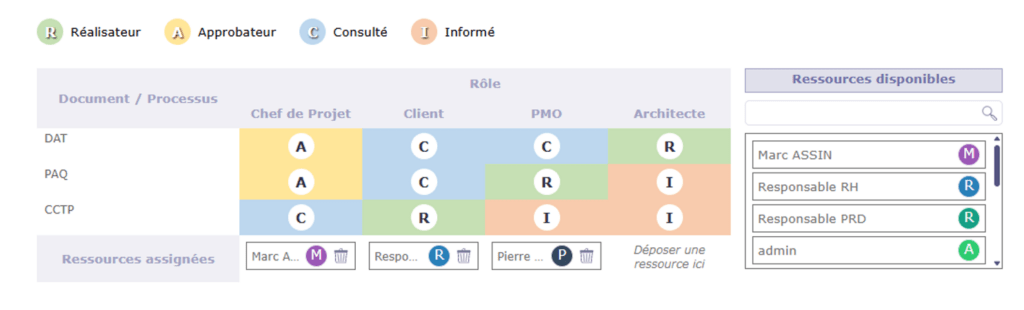
RACI

  • New management of RACI
  • Definitiion of template RACI
  • Use template on Project
  • Select role for resources on Project

New “Document” interface

  • Shows directories in tree like view
  • Select directory show documents existing in the folder
  • Select a document show detail (meta data, versions)

Filtering criteriea improvements

  • Possibility to add filter criteria “at a given place”
  • Possibility to have up to 3 (at least) levels of groups

Improvement of import process

  • Add import progress
  • Possibility to leave import screen during long import
  • Preserve last import result and view it on import screen

Mention with @

  • Pop-up opens to easily select resource/user
  • Small icons will show what will be done depending of selected resource/user and user option

Project Dashboard

  • Tornado graph on detail
  • RACI on detail
  • Button to download attached files
  • Sort by end date
  • Sort by creation date (most recent)

Global search

  • New button to search globally on any item
  • Will open result in Global List
  • Can restrict to select projets or not (then extends to all visible projects)

New design for the application windows

  • Change display for messages (save, control issue)
  • Change display for alerts (bottom righ pop-ups)


Possibility to force addition of a note on status change

  • Definition of status that will force a note on Type
  • Opens pop-up to add a note
  • Does not require note if a note already recently added (less than 5mn ago)

OTP system

  • Possibility to request code sent to email adress
  • Allows 2FA (2 Factors Authentication)
  • Can request 2FA for connections of admin users
  • Can request 2FA for direct connections when SSO in enabled
  • Can request 2FA for new users on first connection
  • Additional controls may use this system on next versions (validation from approver, some “signature”, …)

CRM improvments

  • New Prospect quotation to estimate possible revenue from prospect
  • Recors prospection actions on Client and Contact
  • Concolidated Dashboard view from Prospects / Clients / Contacts
  • Dashboard view lists all prospection actions from any source
  • Dashboard view lists financial parts from Prospect (Quotations) and Client (Quotations, Commands, Invoices)

You can check all ProjeQtOr features or assist to a demonstration

You can also consult the conplete changelog. 

Scroll to Top