New version with many improvments
V13.1.0 : A new version has just been released. It includes many new features and it fixes all the bugs known at this time.
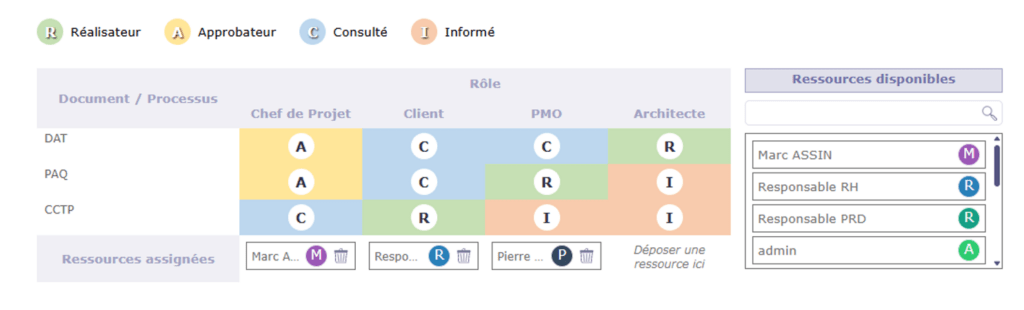
RACI
- New management of RACI
- Definitiion of template RACI
- Use template on Project
- Select role for resources on Project
New “Document” interface
- Shows directories in tree like view
- Select directory show documents existing in the folder
- Select a document show detail (meta data, versions)
Filtering criteriea improvements
- Possibility to add filter criteria “at a given place”
- Possibility to have up to 3 (at least) levels of groups
Improvement of import process
- Add import progress
- Possibility to leave import screen during long import
- Preserve last import result and view it on import screen
Mention with @
- Pop-up opens to easily select resource/user
- Small icons will show what will be done depending of selected resource/user and user option
Project Dashboard
- Tornado graph on detail
- RACI on detail
- Button to download attached files
- Sort by end date
- Sort by creation date (most recent)
Global search
- New button to search globally on any item
- Will open result in Global List
- Can restrict to select projets or not (then extends to all visible projects)
New design for the application windows
- Change display for messages (save, control issue)
- Change display for alerts (bottom righ pop-ups)
Possibility to force addition of a note on status change
- Definition of status that will force a note on Type
- Opens pop-up to add a note
- Does not require note if a note already recently added (less than 5mn ago)
OTP system
- Possibility to request code sent to email adress
- Allows 2FA (2 Factors Authentication)
- Can request 2FA for connections of admin users
- Can request 2FA for direct connections when SSO in enabled
- Can request 2FA for new users on first connection
- Additional controls may use this system on next versions (validation from approver, some “signature”, …)
CRM improvments
- New Prospect quotation to estimate possible revenue from prospect
- Recors prospection actions on Client and Contact
- Concolidated Dashboard view from Prospects / Clients / Contacts
- Dashboard view lists all prospection actions from any source
- Dashboard view lists financial parts from Prospect (Quotations) and Client (Quotations, Commands, Invoices)
You can check all ProjeQtOr features or assist to a demonstration
You can also consult the conplete changelog.