
Welcome to ProjeQtOr new Forum. We migrated old forum to the new website.
You will find all your posts here, with your usual account.
Just one point : you’ll have to reinitialize your password. Use “Lost password” feature.

Good morning,
is it possible manage absence in "Real Work allocation"?
My problem is following:
there is an activity between 1 and 15 april assigned to a specific resource. This resource is absent on 10 april, so Planning is updated until 9 april despite has sumbitted untile 15 april. How can I do to manage this days?
I must add an activity "Absence"?
Thanks.

Yes.
Administrative projects are done for this.
Create new Project "Out of work" (or else) with project type "Administrative".
Add activities as you with : "holidays", "sickness", "training", ...
Enter real work in the future on these tasks...
Ok, but in my Planning I see Real work committed also for sickness days. I believe that green bar was filled only for committed days.
Thanks.
Ok, but in my Planning I see Real work committed also for sickness days
You don't see administrative projects in planning view.
But you see them in Real work allocation.
I believe that green bar was filled only for committed days.
I don't understand which green bars you're dealing with.
See attachments for green bar of Planning.
Resource in attachment file has not committed on 13 and 15 April (sickness) but Planning shows a filled green bar for those days. So I must see these days in Real Work Allocation.
Also I understand that in an Activity I must set only Validated Start Date and Assigned days for a Resource to view work percentage.
Thanks.
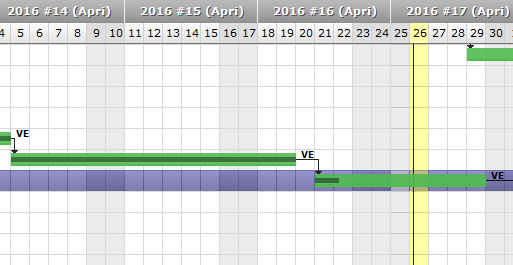
Th e grey line does not represent days where real work is entered.
The greay line represents the progress of the activitiy, in %. The lenght of the progress bar fills the activity bar proportionnaly to the progress.