
Welcome to ProjeQtOr new Forum. We migrated old forum to the new website.
You will find all your posts here, with your usual account.
Just one point : you’ll have to reinitialize your password. Use “Lost password” feature.

Hi all,
In the Logo Area clicking the Help icon will NOT open the online user manual but issues "404 not found".
I have already read the topic Manual - File does not exist, but this topic does not solve my issue.
ProjeQtOr has been installed as suggested at a web hosting provider and will be called by using a sub-domain e.g. "pm.examples.com" and the Help icon calls "pm.examples.com/manual/manual.php?section=Today" which leads to "404 not found".
The access rights for the directories are set to 755 and for the files they are set to 644 respectively.
Any suggestions how to solve this issue?
Thanks for your answers.
Gary

Strange : it works fine on Demo instance, with similar configuration.
It must be something with Apache configuration.
Maybe you can find interesting message in Apache log files.
As an example, in the Apache log file, the following can be found:
[23/Sep/2014:02:20:03 +0200] "GET /manual/manual.php?section=User HTTP/1.1" 404 409 "http://sub-domain.domain.com/view/main.php" "Mozilla/5.0 (Windows NT 6.3; WOW64) AppleWebKit/537.36 (KHTML, like Gecko) Chrome/37.0.2062.120 Safari/537.36"
[23/Sep/2014:02:20:04 +0200] "GET /errors/404.jpg HTTP/1.1" 200 50656 "http://sub-domain.domain.com/manual/manual.php?section=User" "Mozilla/5.0 (Windows NT 6.3; WOW64) AppleWebKit/537.36 (KHTML, like Gecko) Chrome/37.0.2062.120 Safari/537.36"
Because I'm only a web application user not a web application developer, I cannot interpret the text and numbers.
So do YOU see anything in these lines what could lead to a solution for the problem?
Hi,
Second error line is just an Apache default behavior to try and display an error image (404.jpg).
Only first error must be concidered.
Page /manual/manual.php is not fond : possibly the root directory is not the expected one.
Check for root directpry of your virtualhost sub-domain.domain.com, it should point to Projector root directory, where /manual can be found.
Check for root directpry of your virtualhost sub-domain.domain.com, it should point to Projector root directory, where /manual can be found.
The sub-domain pointing is defined like the following:
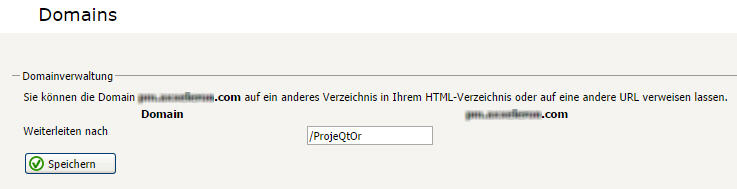
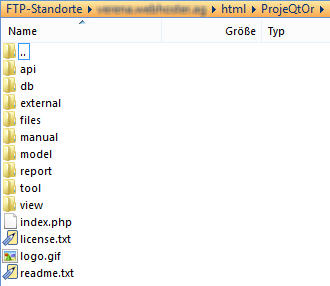
The /ProjeQtOr folder looks like the following:
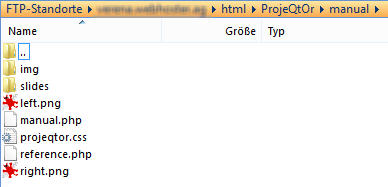
The /ProjeQtOr/manual folder looks like the following:
Any further ideas or suggestions?
Very strange, all seems correct.
Could you try to directly access to http://sub-domain.domain.com/manual/manual.php
and check for apache error if any.
Accessing sub-domain.domain.com/manual/manual.php directly, results to this apache log file entry, which I guess is similar:
"GET /manual/manual.php HTTP/1.1" 404 409 "-" "Mozilla/5.0 (Windows NT 6.3; WOW64) AppleWebKit/537.36 (KHTML, like Gecko) Chrome/37.0.2062.120 Safari/537.36"
Still further ideas or suggestions?
It really seems to be an apache configuration.
Maybe you have some directory directive with deny clauses or something like that (I'm not an apache expert)
It may be in httpd.conf or other included files or in .htacces file (do you have any .htaccess file ?)
What you can try, as a test :
1) set access right to 777 to this /files/manual directory and contained files, and then try and access directly to sub-domain.domain.com/manual/manual.php
2) then retrieve /manual directory from install package, copy it for instance under /files, set access right to 777 to this /files/manual directory and contained files, and then try and access directly to sub-domain.domain.com/files/manual/manual.php
If 1) works, then it is the solution.
If 2) works but not 1) then it is sure it is an apache configuration issue.
Maybe you have some directory directive with deny clauses or something like that (I'm not an apache expert)
I'm sorry, but I do know nothing about "directory directive with deny clauses".
It may be in httpd.conf or other included files or in .htacces file ...
I guess that httpd.conf is accessible only by using my web hosters' web application menu (called Httpd Spezial) and it looks and is set for the sub-domain like the following:
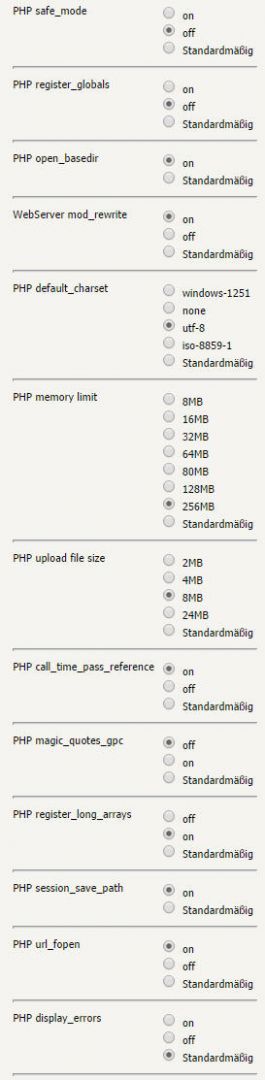
... (do you have any .htaccess file ?)
In all the directories which are accessible for me, I could not find any .htaccess file.
1) set access right to 777 ...
The access rights are currently 755 for all directories and 644 for all files. I have not changed any access rights, but renamed the directory /manual to /man and called manual.php directly by using sub-somain.domain/man/manual.php and - voila - this works! So the directory where manual.php resides can be named anything you like but NOT "/manual"!?
Do you have any idea what is going wrong here?
Maybe you should ask your web hoster about this limitation.
(why /manual cannot be reached ...)