
Welcome to ProjeQtOr new Forum. We migrated old forum to the new website.
You will find all your posts here, with your usual account.
Just one point : you’ll have to reinitialize your password. Use “Lost password” feature.

a {
text-decoration: none;
color: #464feb;
}
tr th, tr td {
border: 1px solid #e6e6e6;
}
tr th {
background-color: #f5f5f5;
}Hi,When I create a filter as an admin to show all tickets in the current sprint, the filter appears in my Saved Filters list.However, once I promote this saved filter to a Common Filter so that other team members can use it, the filter disappears from my Saved Filters list. The filter is still visible in the dropdown menu accessed via the Filter icon, but I cannot find any option to manage or delete obsolete common filters.How can I delete common filters, or remove the “common filter” attribute from an existing filter?Best regards,
Cramer

Hello,
Which version of Projeqtor are you using? Are there any errors in the console log (F12)? Any errors in the Projeqtor PHP logs?
To remove the generic filter, click the padlock icon and select “Remove this generic filter.”
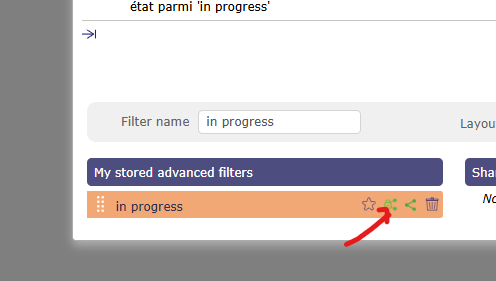
But since you can't see your filter (for whatever reason), another solution is to change the value in the database.
Have a nice day,
Hello,
I think something in the database may be broken.
I do not see any errors in the logs when I modify existing filters or create new ones.
When I click the “share” icon, it turns green and the filter remains in the stored filter list.
However, when I click “common” in this list, the filter disappears from the list.
Despite this, a green confirmation message is displayed indicating that the filter was successfully flagged as “common.”
As an admin, I have created several filters and marked them as both “common” and “shared.”
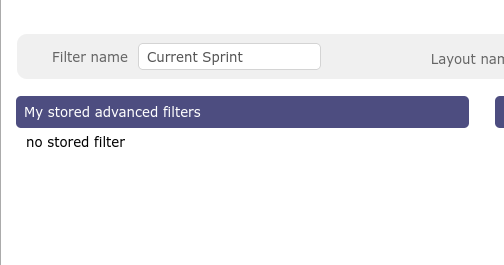
I can use these filters with other user accounts, but the stored filter list appears empty, as shown in the attachment.
There also seem to be some random issues related to data access rights.
I installed the Screen Customization plugin, which I purchased, but I have never received any updates for it.
Therefore, I assume it is a one-time payment plugin.
I also haven’t updated it since the initial installation, as I don’t know where to find newer versions of this plugin.
The initial ProjeQtor version when I installed the plugin was v9.x; I am currently running v12.5.1.
During the upgrades to reach this version, I encountered some errors.
However, when running the Issue Check tool, no errors were reported.
Are there any additional tools available to check database consistency and automatically repair issues, if possible?
Thanks in advance!
Hello,
"During the upgrades to reach this version, I encountered some errors."
=>That’s probably where the problem lies. Without knowing what the errors are, we can’t help you any further on the forum; I’d advise you to contact Projeqtor’s support team.
"There also seem to be some random issues related to data access rights."
=> That's too vague for us to be able to help you
"I installed the Screen Customization plugin, which I purchased, but I have never received any updates for it."
=>Try logging in with the details from your purchase to see if you have access to the plugin update
Have a nice day,