
Welcome to ProjeQtOr new Forum. We migrated old forum to the new website.
You will find all your posts here, with your usual account.
Just one point : you’ll have to reinitialize your password. Use “Lost password” feature.

Here is the issue I am facing:
(1) I was using version 5.3.1 and had created WBS, consisting of Activities and Milestones. They are logically linked to each other.
(2) When I create a new instance of version 5.3.2, I want to replicate the WBS created in earlier version.
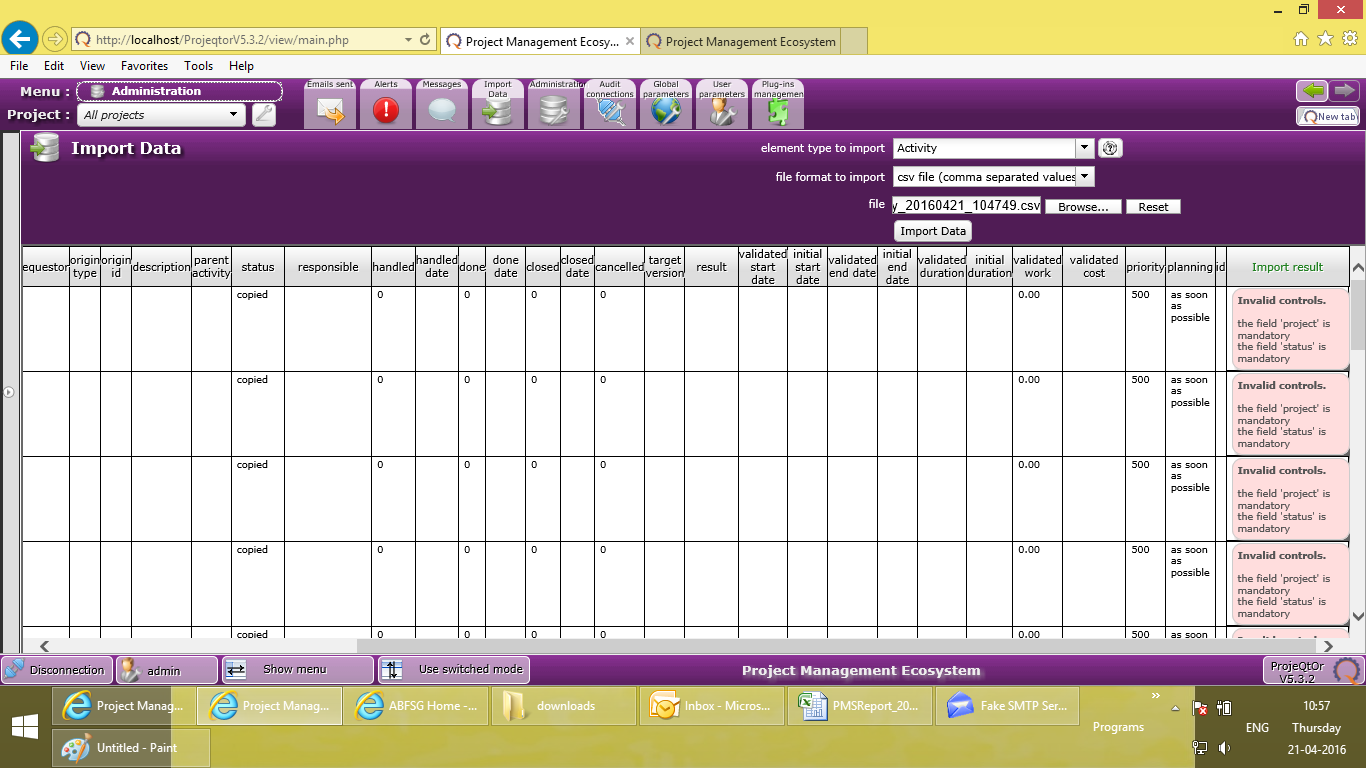
(3) So I export the Activities & Milestones from 5.3.1 and then import it into 5.3.2 --- I get multiple errors.
Please refer the screenshot. The error says: Project/ Responsible is mandatory. However, in all line items, there is a valid project and responsible person mentioned. Yes, it is very much present there. I am not sure why the import facility is not able to recognize it. I have not made any changes to the exported csv file.
One observation: I noticed that while exporting, a few fields are selected by default. I can obviously select/ deselect all. However, while importing, the tool shows a list of fields that it expects -- but this list does not match with the pre-selected list during exporting. I think, the list of fields selected during exporting (by default?) should be the same as the list of fields expected during importing. Am I right?
I am an Eagle. On a mission to help those who want to help themselves...
Oops. I figured it out myself... In 5.3.2, I did not create the Project, and was trying to import activities directly. Hence the tool was throwing the error. After I created the project, I (re)imported the data and it accepted!! Voila....
I am still curious to know about this, though:
I noticed that while exporting, a few fields are selected by default. I can obviously select/ deselect all. However, while importing, the tool shows a list of fields that it expects -- but this list does not match with the pre-selected list during exporting. I think, the list of fields selected during exporting (by default?) should be the same as the list of fields expected during importing. Am I right?
I am an Eagle. On a mission to help those who want to help themselves...

I noticed that while exporting, a few fields are selected by default. I can obviously select/ deselect all. However, while importing, the tool shows a list of fields that it expects -- but this list does not match with the pre-selected list during exporting. I think, the list of fields selected during exporting (by default?) should be the same as the list of fields expected during importing. Am I right?
No, list of importable fields is not linked to imported fields.
You must consider that import is not always follows export, so there is no reason to link both.
List of Imported fields is all fields available for update.