Welcome to ProjeQtOr new Forum. We migrated old forum to the new website.
You will find all your posts here, with your usual account.
Just one point : you’ll have to reinitialize your password. Use “Lost password” feature.

Hi,
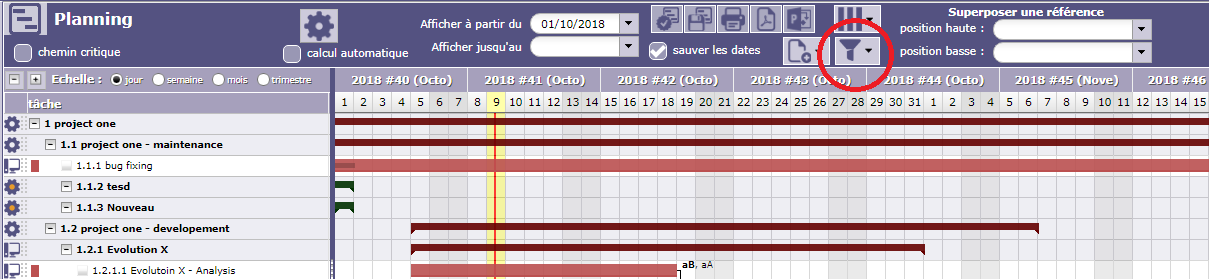
Great tool you have, there is however a couple of queries i have, in the Gantt task is there a way to show tasks that are logged no activity to not show on the Gantt at all, we have occasions where we will know we have a number of tasks coming up but have no dates, currently Projeqtor shows the tasks on the day you are on and keeps on rolling, this is not helpful when running through a project with someone as it shows false information.
Also is it possible in the calendar to see tasks and who they are assigned to or can it only be done through time tracking, or is there even a way to assign time tracking in the task rather than having to go into a separate selection?
Thank you.

Great tool you have, there is however a couple of queries i have, in the Gantt task is there a way to show tasks that are logged no activity to not show on the Gantt at all, we have occasions where we will know we have a number of tasks coming up but have no dates, currently Projeqtor shows the tasks on the day you are on and keeps on rolling, this is not helpful when running through a project with someone as it shows false information.
Yes, you can apply some filter with criteria "assigned resource is not empty"
Also is it possible in the calendar to see tasks and who they are assigned to
No, the Diary view is the viexw of a single resource, so won't show assignments.
or can it only be done through time tracking,
Timesheet also restricts visibility to resource assignments, but possibly "Resource Planning" can bring so view you need.
or is there even a way to assign time tracking in the task rather than having to go into a separate selection?
No, you must use timesheet.
Hi,
Where can i apply the filter? I can't see this anywhere.
Thanks