
Welcome to ProjeQtOr new Forum. We migrated old forum to the new website.
You will find all your posts here, with your usual account.
Just one point : you’ll have to reinitialize your password. Use “Lost password” feature.

Dear all,
I would like to know if is it possible to know "how many working time" is still free by ressource ?
I explain : we have 4 projects. We want to know if we have enough ressources (humain, mainly) to start a new project.
Where I can't find this information ?
Thanks a lot for your help and for the real good open source software
All the best
Christophe Noisette

Follow-up > Reports > Resource availability
Thanks, I found the function.
I can't understand something : we have a meeting in January, 9th (duration : 7,5 hours) (cf. attachment 1738)
In the meeting's detailed form, I could read that for LV (but for every body) has 0,99 h of time non planned. But, in the form "Resource availability " I can see the LV has a lot of available time (attachment 1739).
So the datas seem not comptatible, no?
All the best
Christophe
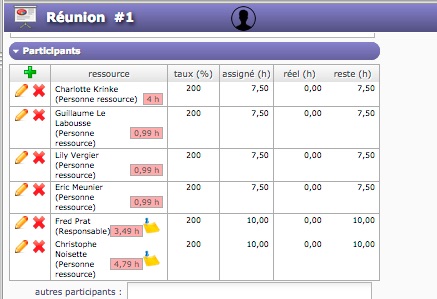
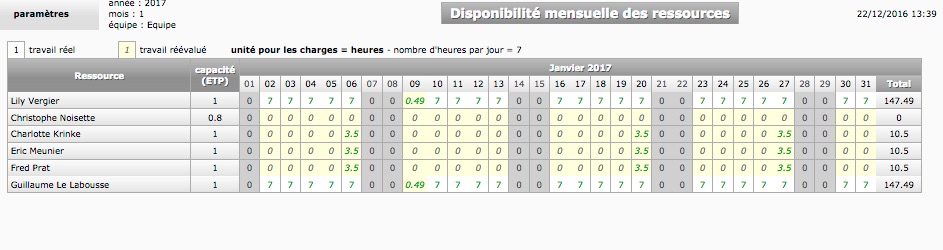
On the assignment, "not planned work" means that resource has not enough avaailability "on the meeting date".
Meetings have specific planning mode : date is fixed.
But some uncompleetness of the availability is to be concidered...
Please check Real Work allocation for the resource on meeting date and if issue is confirmed, please report.
Thanks again.
I don't understand the last sentence : "Real Work allocation for the resource on meeting date and if issue is confirmed, please report.
Could you be more precise?
Christophe
I don't understand the last sentence : "Real Work allocation for the resource on meeting date and if issue is confirmed, please report.
Go to real work allocation, select Resource LV, go to week corresponding to meeting date, check "show planned work" and see what is planned (or real) for resource on meeting date.
If nothing is planned (connect as admin to be sure you see all data) nor real, this seem to be an issue.