
Welcome to ProjeQtOr new Forum. We migrated old forum to the new website.
You will find all your posts here, with your usual account.
Just one point : you’ll have to reinitialize your password. Use “Lost password” feature.

Hi,
I do not know why i get the attached error message that do not able me to add a new absence (as this kind of absence has no limit).
Thanks for your lights.


This employee does not have an open period to add off days.
What do you mean by open period ? As this kind of absence has no limit and period ?
I mean "absence rights earned"
I'm sorry, i do not understand your reply...
Could you please illustrate by a screenshot?
Here you can see that Analyst A can take "RTT" but not "Congés Payés" yet.
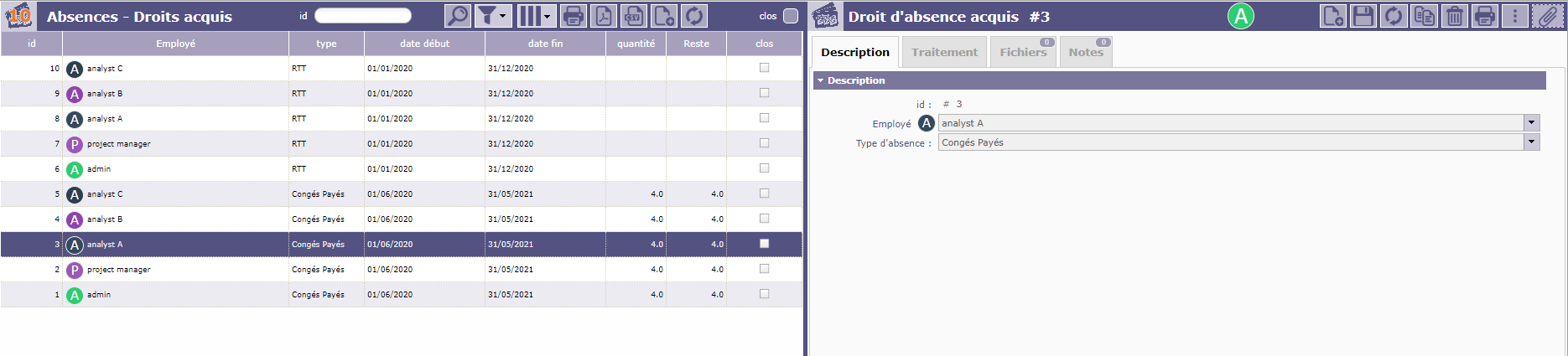
With new line added, he can now book "Congés payés"

Hi
I confirm that in the example you give for Analyst A, he is able to book "congés payés" even if he does not enter yet in that period... which shall not be possible...
Could you please give me your position next to my question?
Moreover, if I take the example you mention, i reproduce it, but i'm still not able to get a RTT if a period for Conges Payes corresponding to current date is note created. It seems that Congés Payés is like a prerequisite even for RTT period.
In the screenshot i attach here, you can see that my RTT period is opened, but from the calendar view, i'm not able to choose RTT (greyed)
I just precise that the consumed RTT has been done directly via the classical screen "absences reglementees", because not working from calendar view, it's look like a bug.
Could you please clarify ?


I think the issue is in the workflow.
The process of this module is very sensitive to the workflow.
It seems you changed default one, and maybe prerequisites to correct input is not respected anymore.