
Welcome to ProjeQtOr new Forum. We migrated old forum to the new website.
You will find all your posts here, with your usual account.
Just one point : you’ll have to reinitialize your password. Use “Lost password” feature.

Hi,
My configuration :
Ubuntu 22.04 LTS
Apache 2.4.52
PHP 7.4
ProjeQtor 9.5.3
I follow all instruction and after saving configuration, all are green
So, I'm on fist login page with admin/admin to finish the installation.
But when I try to login, nothing append. The database is empty and I'm on login page again
The files are created
I Have no error on logs (Apache, PHP and ProjeQtOr.)
I try with
- ../files/...
- ../../files/...
- /var/www/html/files...
Notice : The directory of Projeqtor is /var/www/html/dir_of_projeqtor/
I take here the screen with console...
Thanks for help
Regards
Sylvain
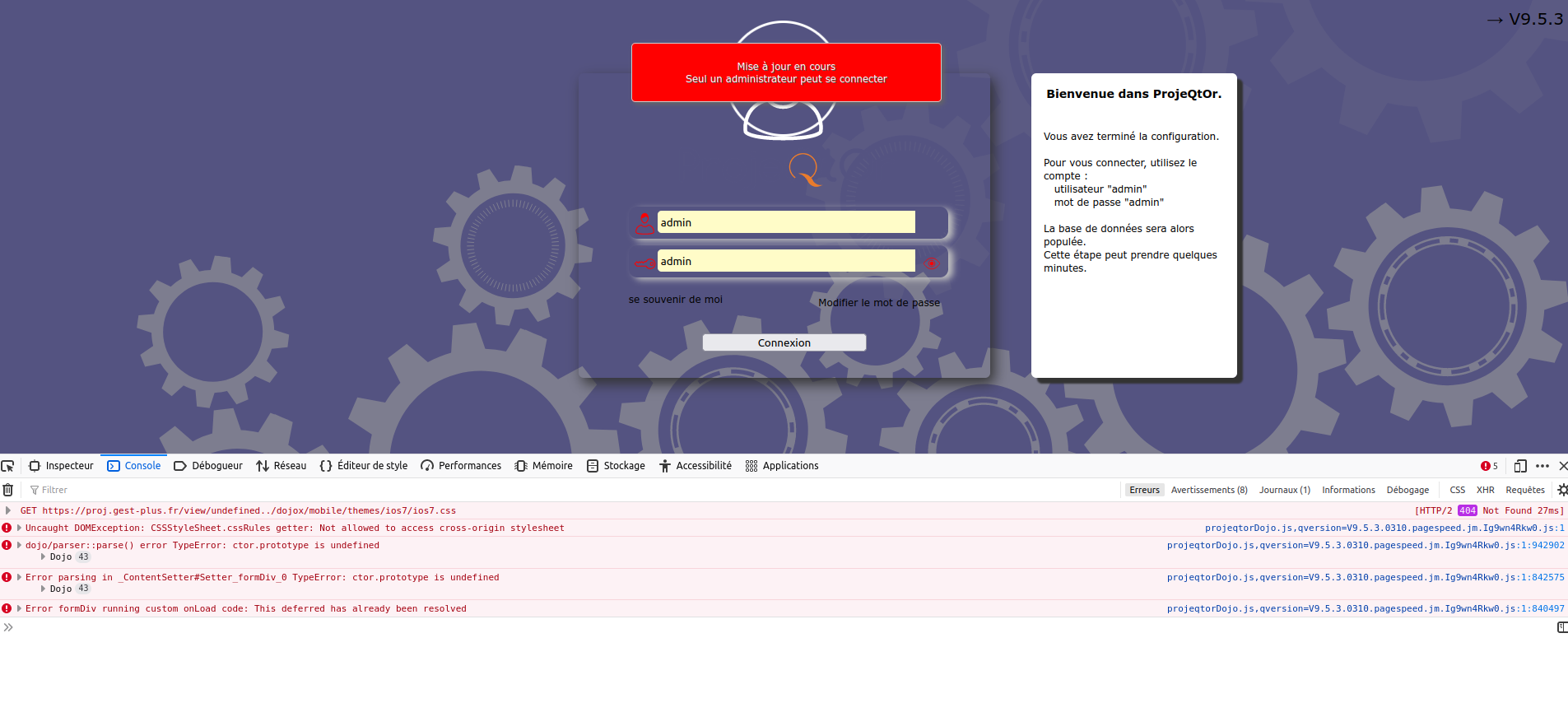

Hello,
have you cleared your cache ?
Hi,
Yes I've cleared cache from browser, from pagespeed, and test with fastcgi php, cgi php et mod apache...
And I try with Firefox, Brave, and Chrome
The result is same for all
Where can I find a manual installation method ?
I don't find any sql file for that.
Regards
Sylvain

You seem to have an error on browser side.
Load for ios7.css is weird : should only apply on Mobile device, when mobile plugin is installed.
What is the OS / Browser on client side ?
Hi babynus,
My OS is Ubuntu desktop 20.04 LTS
Browser used :
- Firefox 100.0.2 and no protection, no adblock or other same
- Brave 1.38.119 and no protection like Firefox
- Chrome 101.0.4951.64 no protection like firefox
With this system, I'm able to install PrestaShop, NextCloud, WordPress et lot of web application without this problem.
The server have no firewall at this time and just installed.
I'll try installing old version like 9.4.5 for example
Regards
Sylvain
Note : It's the first time i see this problem
Never saw this issue either...
Maybe a conversion issue ?
What seems strange is the error refering to ".js.qversion=9.5.3" where code writes ".js?version=9.5.3"
Maybe apache is configured to transform some urls ?
Also to be sure, you unziped file directly on the server ?
Or unzipped on client side and then transfered to server ?
(first option is advised)
As soon as I have connexion (issu of box) I show you apache configuration...
I usé wget to download zip file.
I use unzip on the server
The apache configuration is very simple.
Just use http to https.
On documentation, there is no specific indication for rewriting URL.
Regards
Hi,
My connexion come back...
Well, I see you :
[list=1]
1 - All commande
1 - VPS with ubuntu 22.04 LTS
2 - apt update
3 - apt upgrade
4 - echo Europe/Paris > /etc/timezone
5 - dpkg-reconfigure locales fr_FR.UTF-8 UTF-8
6 - add-apt-repository ppa:ondrej/php
7 - apt install php7.4 php7.4-bcmath php7.4-bz2 php7.4-cli php7.4-common php7.4-curl php7.4-fpm php7.4-gd php7.4-geoip php7.4-imagick php7.4-imap php7.4-json php7.4-mbstring php7.4-odbc php7.4-opcache php7.4-soap php7.4-xml php7.4-xsl php7.4-zip apache2 mariadb-server mariadb-client certbot python3-certbot-apache zip unzip
8 - a2enmod http2 ssl proxy_fcgi setenvif rewrite headers mpm_worker
9 - a2enconf php7.4-fpm
10 - systemctl reload apache2
11 - service php7.4-fpm reload
12 - nano /etc/apache2/sites-available proj.conf
12 - a2ensite proj.conf
13 - certbot --non-interactive --agree-tos --apache --redirect -m **@** -d proj.gest-plus.fr
14 - cd /var/www/html
15 - wget  https://sourceforge.net/projects/projectorria/files/projeqtorV9.5.3.zip
16 - unzip projeqtorV9.5.3.zip
17 - mv projeqtor projeqt
18 - mariadb -u root -p
18.1 - create database...
18.2 - create user...
18.3 - grant all privileges for user tot database of projeqtor...
19 - chown 33:33 ./ -R

20 - Afer all this commande, with a browser... You know the story
2. Configuration http apache
# or 443 for SSL support
Protocols h2 http/1.1
ServerName proj.gest-plus.fr
DocumentRoot /var/www/html/projeqtRewriteEngine on
RewriteCond %{SERVER_NAME} =proj.gest-plus.fr
RewriteRule ^ https://%{SERVER_NAME}%{REQUEST_URI} [END,NE,R=permanent]
# enable the .htaccess rewrites
AllowOverride All
Options +Indexes
Require all granted
# Disable back office token
# SetEnv _TOKEN_ disabled
ErrorLog ${APACHE_LOG_DIR}/error.log
CustomLog ${APACHE_LOG_DIR}/access.log combined
3. https apache configuration
# or 443 for SSL support
Protocols h2 http/1.1
ServerName proj.gest-plus.fr
DocumentRoot /var/www/html/projeqt
# enable the .htaccess rewrites
AllowOverride All
Options +Indexes
Require all granted
# Disable back office token
# SetEnv _TOKEN_ disabled
ErrorLog ${APACHE_LOG_DIR}/proj.error.log
CustomLog ${APACHE_LOG_DIR}/proj.access.log combinedSSLCertificateFile /etc/letsencrypt/live/proj.gest-plus.fr/fullchain.pem
SSLCertificateKeyFile /etc/letsencrypt/live/proj.gest-plus.fr/privkey.pem
Include /etc/letsencrypt/options-ssl-apache.conf
I try an older version later...
It's time to sleep 
Regards
Hi,
May issue is the rewrite rule
RewriteRule ^ https://%{SERVER_NAME}%{REQUEST_URI} [END,NE,R=permanent]
I don't understand what it does, I'm not an expert on that side, but Projeqtor does not need any rewrite rule.
So tyry and remove it, it may work better.
RewriteEngine on
RewriteCond %{SERVER_NAME} =proj.gest-plus.fr
RewriteRule ^ https://%{SERVER_NAME}%{REQUEST_URI} [END,NE,R=permanent]
Well, when you write hhtp://... (port 80), the rule rewritte https://...
It's existe only on port 80. But if you wriite url with https, the rule doesn't apply
http is not secure, and some information on your soft can be sensitive... https is a basic protection
Apache listen to port :
First : port 80 (https) =>
Second : port 443 (https) =>
When you write an URL, you don't write the protocole. So, https is the fist
This rule change http to https. That is the only function of this rewritting rule
Projeqtor don' run with https ?
Of course projeqtor work over https
We also use rewrite rule but with slightly different syntax
RewriteRule ^(.*) https://subdomain.projeqtor.org$1 [QSA,L,R=301]
I don't know if the rewrite rule is really the source of your issue, but I don't know where the problem can come else.
It is the stange syntax in your logs refering to ".js.qversion=9.5.3" where code writes ".js?version=9.5.3" that leads le to this possible source.
Hi,
I try yous suggestion. It's the same result 
I try wthout https. It's the same result
This week-end, I try to re-install the VPS and I note all action and résult...
Like you, it's the first time I see a problem like that.
I used to install servers and installations.
I know and I know ProjeQtOr and I know it works really well.
There must be either:
- A bad deed on my part
- An incompatibility with a parameter...
I will find and I will tell you
The VPS is intended to have several applications (ProjeQtOr, PrestaShop, Dolibarr)
All work fine on ubuntu 22.04 with php 7.4 and apache 2
This week-end :
Test with fresh install (ubuntu 22.04, apache2, php7.4, MariaDB)
Test with fresh install (ubuntu 22.04, Nginx, php7.4, MariaDB)
To be continued 
Where can I find initial file.sql for an manual installation ?
Regards
Note : I you went, You can access into the VPS
Where can I find initial file.sql for an manual installation ?
DB update is incremental.
All files are in projeqtor/db
Hi,
Thanks for this information.
I try to use that later. I haven't time now 🙁
I'll come back with success (or not) and with the explinaition...
Thanks for all
Regards