
Welcome to ProjeQtOr new Forum. We migrated old forum to the new website.
You will find all your posts here, with your usual account.
Just one point : you’ll have to reinitialize your password. Use “Lost password” feature.

Hi
PQ version: 6.5.4
Maybe it is the same case I reported recently but nowadays I have very nice example and I can repeat it easily.
I just created new activity and this activity has WBS: 14.10.1.9
Next I move it to locate in hierarchy I expected so in result WBS was modified to: 14.10.1.7 and here is interesting thing - please take a look for picture:
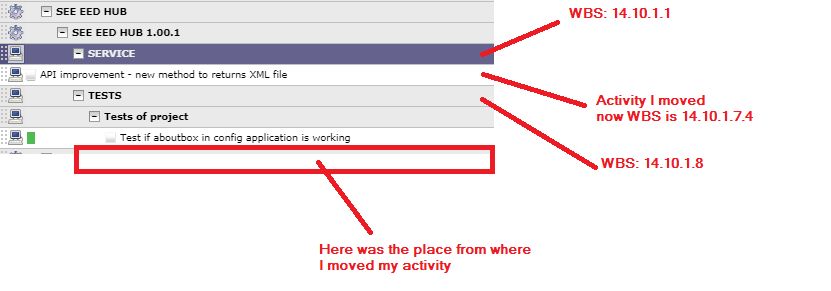
Important information is I have NOT CHECKED checkbox "show cloed items" but seems during move of activity on planing view you operate on ALL hierarchy not only visible hierarchy. Seems my activity was moved under hierarchy which exists but is not visible.
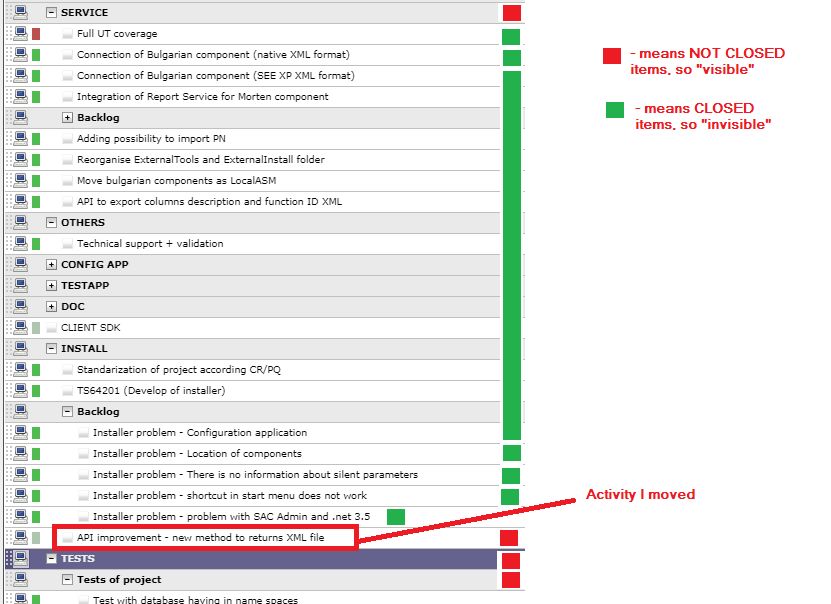
When I check "show closed item" ON I see:

OK,
I now understand the issue !!!
The WBS is correctly calculated (I thought the issue was here).
In fact, it is the move that is incorrect, it moved the non closed item under a closed item (what should be forbidden)
Issue recorded as Ticekt #3235.
I think I have correct use case to be able to reproduce (and so fix)
Thanks for your efforts and description of the use case.
NB : just to help, you may have checked "show WBS" on planning view to show the wbs of each task...