
Welcome to ProjeQtOr new Forum. We migrated old forum to the new website.
You will find all your posts here, with your usual account.
Just one point : you’ll have to reinitialize your password. Use “Lost password” feature.

Hi
An activity can have multiple assigned recourses, but only one responsible.
However, in the resource planning, the assigned resource is displayed in the responsible column, even if this resource is not responsible.
Can this be changed?
If not, what is the idea for this behavior?
Thanks in advance
Greetings
Oliver

Hello,
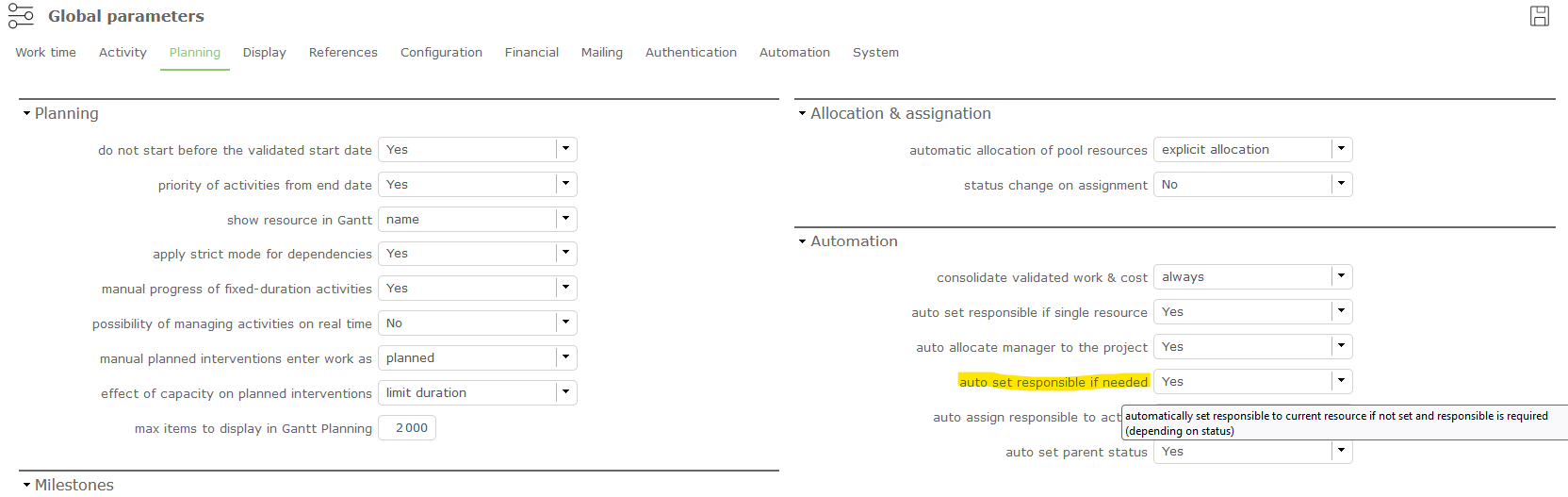
You may check (connected as an administrator) in Global Parameters, Planning tab, Automation, "auto set responsible if needed", and below "auto assign responsible to activity"
Hi
Thanks for the quick response, but unfortunately the setting does not help.
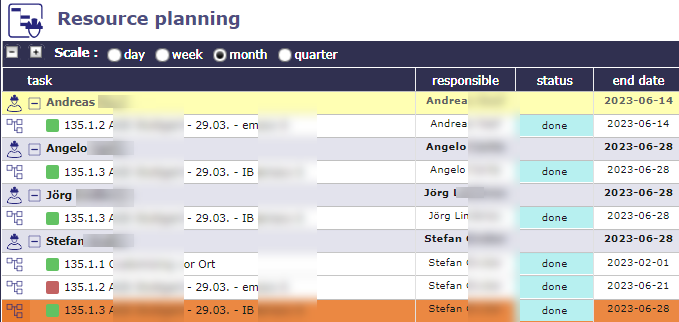
In the example you can see that several resources were active on the same activity, but Stefen is responsible for all activities.
Basically the column is just a repetition of the grouping.
So the question remains if this can be changed.
Greetings
Oliver

You're right.
In the resource planning, the data in the column "Responsible" is the name of the current resource (the resource under which the activity is displayed).
Ticket #7338 recorded
Thank you
everything is fine in V10.4.4