
Welcome to ProjeQtOr new Forum. We migrated old forum to the new website.
You will find all your posts here, with your usual account.
Just one point : you’ll have to reinitialize your password. Use “Lost password” feature.

Hello,
I have a problem of understanding on the use of milestones.
I want an activity begins after milestone (milestone = hardware delivery, activity = hardware configuration).
If I set a milestone and a successor activity, there is no problem in the schedule.
After, if I assign a resource to the activity, it starts before the milestone (the current day). The planning activity is configured as "as soon as possible".
Is it normal ?

We would need more details to understand.
But as you describe use case, I guess you just did not run planning calculation...
No precisely, is after calculating planning that the problem happens.
Here, the planning before assigning the work.

And there, the planning after assigning work and calculated planning.

Only the fixed milestone, has a valid date.
Activities have working duration in hours.
Can you please show detail of first task "Configuration Windows", with details of assignments.
The detail of first task

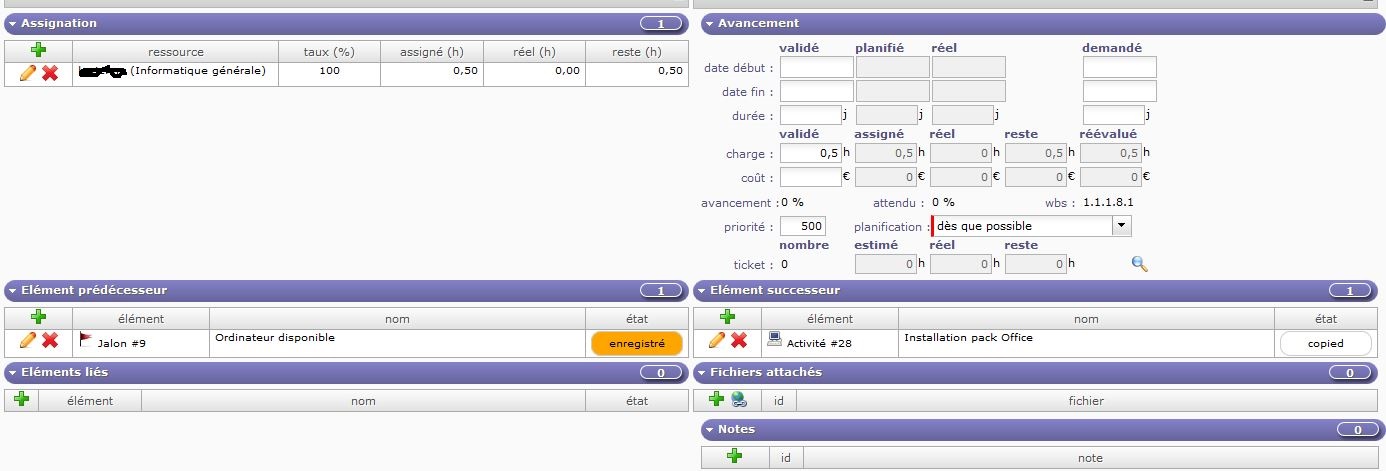
Strange, all seems correct, and I can confirm that correct result is exactly what you expect ... and what I get.
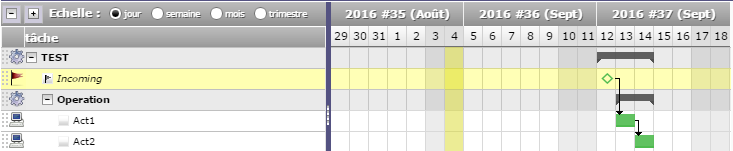
What is the project type of your projects ? (Configuration PC and its parent)
Can you try and create dependency from milstone to sub-project "Configuration PC" ? What is the result ?
I made your example, and it works.
Then I moved my sub-projects in this new project, and everything works. When I put them back in the old project that no longer works.
I searched everywhere, but I have not found any difference between the two projects.
By cons, now I have another problem. If I take your example, if Act1 takes 1 hour and Act2 also 1 hour, the two tasks should be done the same day. And it's not the case.
I searched everywhere, but I have not found any difference between the two projects.
Difference can be project type.
Take care of "Template" project type, as it behaves not like others (it is only dedicated to be copied)
By cons, now I have another problem. If I take your example, if Act1 takes 1 hour and Act2 also 1 hour, the two tasks should be done the same day. And it's not the case.
It is because by defaut dependencies are strict. A tack must start "the day after" its predecessor.
It you want to have tasks the same day, select dependencies mode not strict in global parameters.
The master project was created directly with a type other than template.
The sub-projects are template copies, but I changed the type when copying.
For the other task problem, it's ok. I just wondered what was the influence of this parameter.
Thank you