
Welcome to ProjeQtOr new Forum. We migrated old forum to the new website.
You will find all your posts here, with your usual account.
Just one point : you’ll have to reinitialize your password. Use “Lost password” feature.

Hi,
Firstly, thank for the wonderful software. I'm quite new in management and ProjeQtOr.
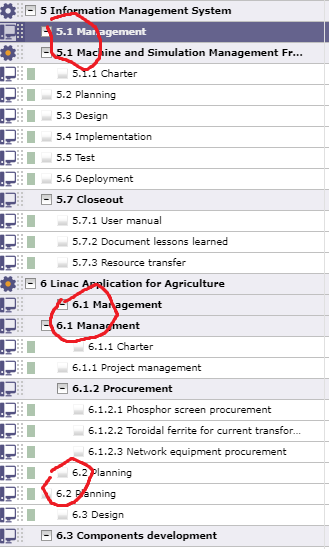
I try to construct my projects in ProjeQtOr and everything seem fine. However, in one of my project which contain sub-project, the WBS codes of the activity and sub-project are the same. This cause activities from the parent project and sub-project mixed in the planning view.
Am I do something wrong? Or maybe, can I exclude the sub-project when viewing the parent project?
Thank you.

Of course not, it is not normal.
You can fix this through Administration screen :
Non consistency check / fix
If you remind how you got this, please tell us so we may fix source of issue.
Also indicate which version of projeqtor you are using.
Hi, thank you for very fast reply.
With the non consistency check/fix, it solved my problem.
I assume that this happen because I move a project to sub-project after create it.
The version I use is V8.1.3.
Thank you.
As I can you on your screenshot, you reproduced several times the issue.
On my side, I cannot reproduce.
Could you please explain stap by step how you create a project with this issue ?
- how you create each project (copy or create from scratch)
- how you move a project as sub-project (set "is sub project of", or drag & drop or with indentation button.
It seem like I can reproduce this behavior.
Let's say I have 2 projects with few activities. Their WBS code are as follow:
3 Project1
3.1 activity1-1
3.2 activity1-2
7 Project2
7.1 activity2-1
7.2 activity2-2
Then I set Project2 "is sub project of" to Project1, on my instant the Project2 will now have WBS code 3.1 conflicting with activity1-1. And other activities' WBS codes will also mess up. However, if I remove "is sub project of" from Project2, the WBS code seem to return to the old value that making sense.
Hope this help.
Thank you.
OK,
I could reproduce the issue the way you explain it.
This will help us find a fix.
Thanks for your detailed steps by step use case.
[Edit] Ticket #4151 recorded