
Welcome to ProjeQtOr new Forum. We migrated old forum to the new website.
You will find all your posts here, with your usual account.
Just one point : you’ll have to reinitialize your password. Use “Lost password” feature.

Hi,
My question is around how time tracking works, as i understand it the following is how the intended work is set up.
Activities are basically the tasks of a Project and the tickets are the individual components of a task to be done.
On the timesheet there is the activities that have boxes to input time work, however the guideline says this can be set to a day or hours in a day so either 8 hours or 1 day.
If you configure it as 8 hours but put 1 in for real work, it takes it as 1 hour.
In order to track time of the team do we have to create tickets and assign out time that can then be used to track time for each task, or can the timesheet be used to track time against the task which is set up in activities?
I hope i was clear in my question.
Thank you.

Hello,
You should read our user guide. Press F1 on timesheet screen.
Thanks for the reply, i did already do this, but it doesn't seem to be quite clear.
It mentions in global parameters to set the working day, does this mean putting 1 in, will enter 8 hours or 1 hour.
Also in order to track time effort per task do we actually need to create tickets, or are activities fine to track work by hour?
Thank you.

In order to track time of the team do we have to create tickets and assign out time that can then be used to track time for each task, or can the timesheet be used to track time against the task which is set up in activities?
Timesheet is designed to enter work on Activities.
You assign resource on activities, then resource enters real work.
You also "see" work entered on tickets on Timesheets
I've noticed in reporting that adding a 1 in the timesheet on an activity shows it as one hour.
Does this then mean that you only need to use activities to track people time?
If i wanted to show a task has 4 hours planned and the person doing the task has gone over by 2 hours can i only do this through a ticket and link it to the activity?
Right now it seems we may be duplicating effort, we create activities then create tickets to assign out time and the workers on the tasks then use the timesheet to show the real work done on a ticket. Can we just use the activity to do this?
Thanks
Yes, you can track time only with activities.
You don't need tickets to track time spent on activities.
Thanks for clearing that up.
I think we have some confusion around some of the terms used.
Validated = I'm not sure what this is for
Assigned = Is this the time assigned in hours to an activity?
Real = How much work was actually done
Left = How much is left of the assigned work, i.e 6 hours was planned and 2 were used so 4 hours are left
Reassessed = Not sure on this
I've added a screenshot, where can i assign time in hours to an activity?
Thank you.
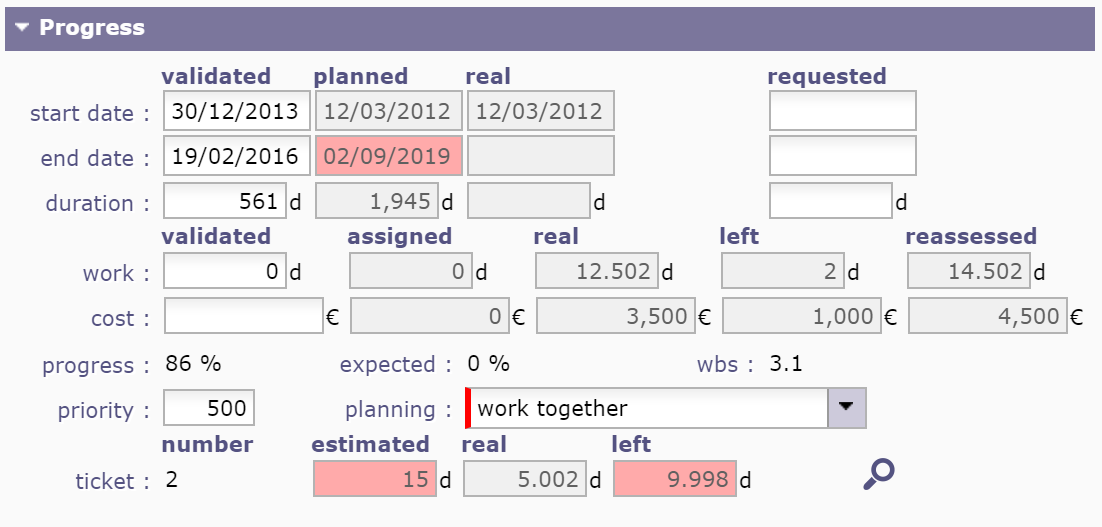
Validated = Initial estimate (what is "sold")
Assigned = time assigned to the resource(s) to execute activity?
Real = time actually done
Left = time left to finish the activity (it can be different from Assigned - Real)
Reassessed = Real + Left = total time that will be needed to execute the activity
You'll find thses definitions on user manual (F1)
Thank you for letting me know 🙂
Sorry just one final thing that wasn't answered.
where can i put planned time in the activity, as in the planned hours?
This is what would make it really useful for us, to show how many hours we planned against what was used as real work.
Hope you have a great New Year 🙂
Planned time is defined by planning calculation.
You can see it on reports or on Timeshhets (check corresponding parameter)
I've tried doing planning someone's time through just activities but no it's not possible to add a start time which you can do in tickets.
Is there no way to assign a start time to the activity? This will allow us to plan out someone's day with a combination of start time and the amount of time an activity will take.
Thank you.
Is there no way to assign a start time to the activity? This will allow us to plan out someone's day with a combination of start time and the amount of time an activity will take.
Yes, you can change planning mode to "must not start before validated start date"
or add dependency with fixed milestone.
Sorry i don't think i explained well enough.
What we need to do is assign out time in hours and better plan our workers time in the day so for example planning the following:
Gaël has an 8 hour day so we would want to plan out the following.
09:00 - 11:00 -- Activity 1 (2 Hours)
11:00 - 12:00 -- Activity 2 (1 Hour)
12:00 - 13:00 -- Lunch
13:00 - 17:00 --Activity 3 (4 Hours)
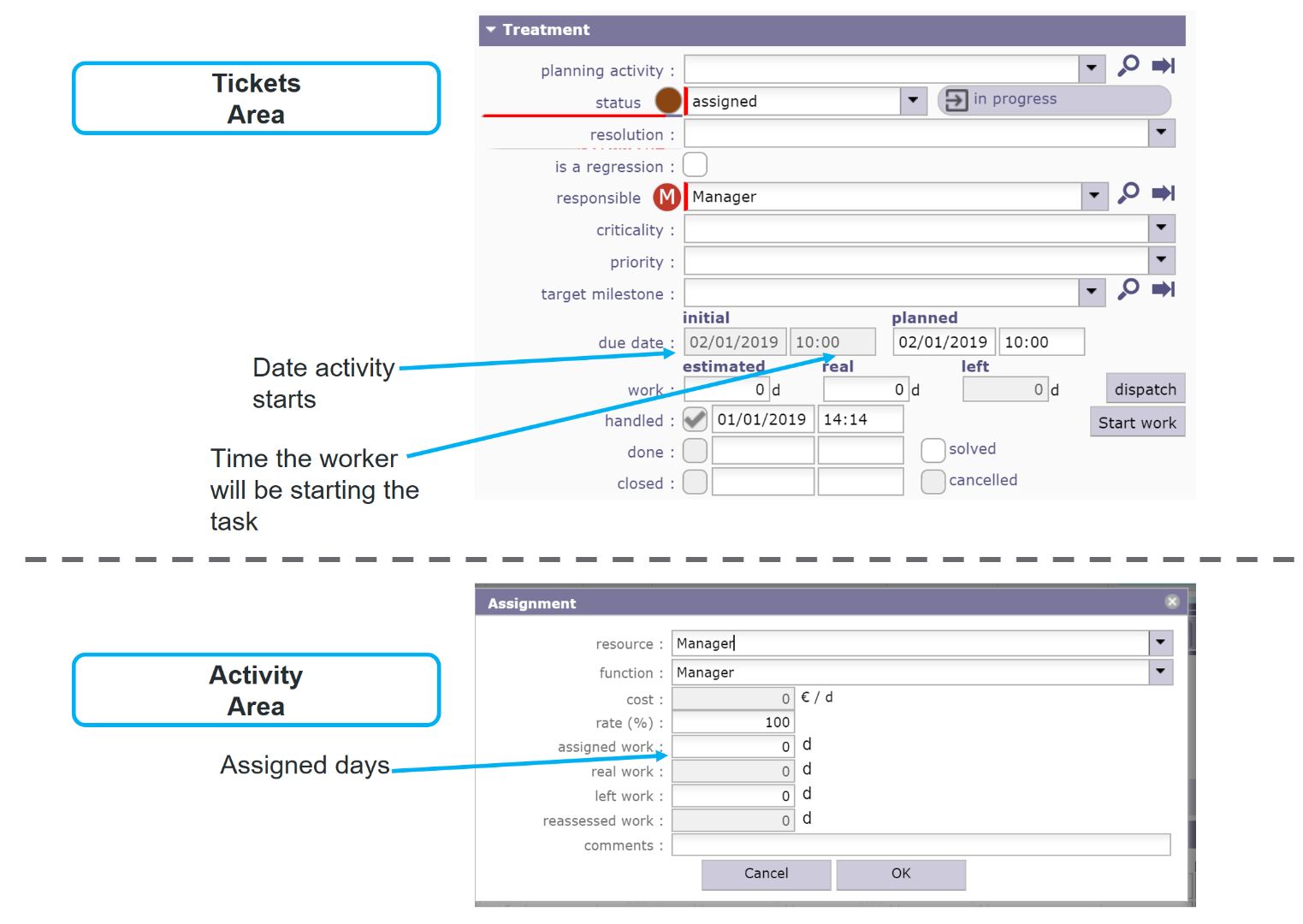
In the tickets area you can assign an initial due date and time from the list with estimated days, now we can make the days as hours which is fine but what we need to do is have this ability in the activities area, in the assignment you can only assign out days and no start time, we can change this to hours but is there any option to show the start time of the activity then all we need to do is plus the amount of hours an activity will take on top of the start time.
Please see screenshot attached
No,
ProjeQtor does not manage time on activities.
Ok thank you, is there a plan to add this feature in the future?
No