
Welcome to ProjeQtOr new Forum. We migrated old forum to the new website.
You will find all your posts here, with your usual account.
Just one point : you’ll have to reinitialize your password. Use “Lost password” feature.

Hello,
In the [parameter] menu :
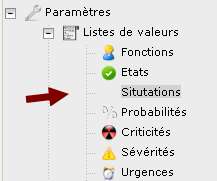
there is no icon for situation.
Best regards babynus.

Hi,
I could not reproduce.
Could you try and refresh the page ?
i tried another time, refrech the page, clear history and browser cache (Firefox) but icon does not appear....
an idea ?
Can you check on the server the presence of files :
view/css/images/iconHealth16.png
view/css/images/iconHealth22.png
view/css/images/iconHealth32.png
re,
These files are present on the server in the indicated folder.
Strange they are not displayed then..
Can you then ckeck file
/view/css/projectorIcons.css
lines 196-198 should be :
.iconHealth32 { background-image: url(images/iconHealth32.png); background-repeat: no-repeat; width: 32px; height: 32px; }
.iconHealth22 { background-image: url(images/iconHealth22.png); background-repeat: no-repeat; width: 22px; height: 22px; }
.iconHealth16 { background-image: url(images/iconHealth16.png); background-repeat: no-repeat; width: 16px; height: 16px; }
Other idea : if you're on linux, try a "touch" on the three png images, or refresh your apache cache.
Maybe your apache has not taken into account these images yet.
Yes lines are identicals :
.iconHealth32 { background-image: url(images/iconHealth32.png); background-repeat: no-repeat; width: 32px; height: 32px; }
.iconHealth22 { background-image: url(images/iconHealth22.png); background-repeat: no-repeat; width: 22px; height: 22px; }
.iconHealth16 { background-image: url(images/iconHealth16.png); background-repeat: no-repeat; width: 16px; height: 16px; }
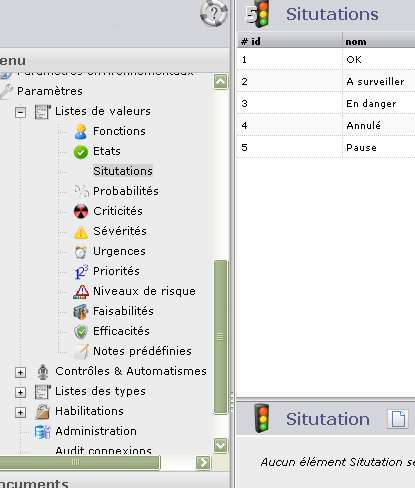
as you can see icons are correctly displayed in part, but not in menu.
I'm not on linux but Windows, and apache server has been restarted since the 3.2.2 update. i Tried to restart it now.
Can you try to change, in Global paremeters, in display section, the icon size to set it to Big (32px).
Does this display the icon ?
And set icon size to small : is the icon dosplayed ?
still not working.
but paid attention in french "situation" is writen "situtations" in Projector'ria.
Hi,
Issue on label has no effect on displayed icon.
Translation is fixed (thanks)
But this does not explain why icon is not displayed.
Have you got the possibility to restart your PHP server ?
Hi babynus,
i reboot the server, and the problem still alive.
I tried to change the icon menu size, and the icons does not appear whatever the size.
??
I don't know how to help you.
I cannot reproduce your issue : I get the picture on all my environments (On Windows an Linux).
I'm pretty sure it is some configuration on your server, but don't know what.
Maybe next deployment (V3.3.0 ?) will fix this issue.

Hi Babynus,
I have the same problem here. I created a new menu (named "Skill", got my inspiration from another topic, only for testing), and I linked the "Work" icon to it.
I did everything you said (switching size and reseting server) several times and nothing worked..


Did you define your iconClass on /view/css/projectoIcon.css ?
Did you refresh your browser cache ?
Did you define your iconClass on /view/css/projectoIcon.css ?
I did 🙂
.iconSkill32 { background-image: url(images/iconSkill32.png);  background-repeat: no-repeat; width: 32px; height: 32px; }
.iconSkill22 { background-image: url(images/iconSkill22.png);  background-repeat: no-repeat; width: 22px; height: 22px; }
.iconSkill16 { background-image: url(images/iconSkill16.png);  background-repeat: no-repeat; width: 16px; height: 16px; }
Did you refresh your browser cache ?
I did too :/
Edit : I did everything another time today, and now it works.
Thanks for your help Babynus ! 🙂