
Welcome to ProjeQtOr new Forum. We migrated old forum to the new website.
You will find all your posts here, with your usual account.
Just one point : you’ll have to reinitialize your password. Use “Lost password” feature.

I don't know if it's really an issue but here is my fact
I want to see my planning from date x to date y with action and milestones
So I made my planning view from date x to date y in planning view.
planning is adjusted to show that, but as my planning got plenty of fixed milestones after date y, so I also see the definition lines of milestones after that date y.
As I don't want to see those milestones lines after date y, I defined a filter with "real end date <= date y"
But as soon as I define that filter, ALL milestones are masked and disappeared from planning view, even those before date y and only action remained shown on planning.
Normal Behavior ?
Regards

Yes, it is normal.
The filter you expect is "planned end date <= date y"
Real end date is set only when Milestone is "done".
Same result all milestones disappeared.
BTW as I want to see only real ended milestones during that period, that's why I chose 'real end date'.
But one or another, they just disappeared from project view
A quick view for some disappeared milestones Without/With filter ( 'planned end date < 31/12/2016' in my case for example)
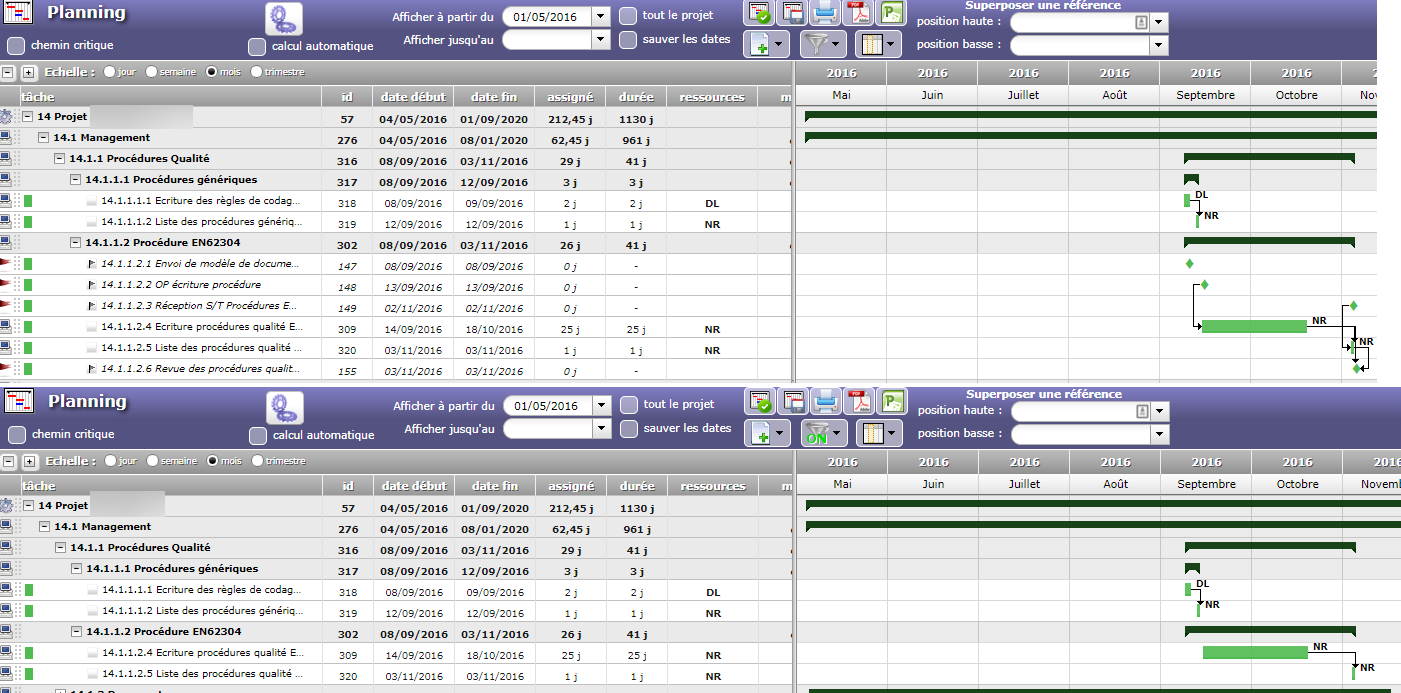
Yes, filter on Gant chart is applied to Activities (if you create a filter on Activity screen, you'll see it on Gantt chart).
So it's normal that milestones are hidden then.
so there is no way to see gant with milestones for a specific period only ?
no
ok.
Just for my knowledge, why this filter is only applied to activities ? Is it a wanted feature or a limitation because it's seems obvious that it is interesting to be able to see milestones, delivery etc. that has been done during a time Lapse ?
Because Projeqtor framework does not know how to filter on several objects at once.
It can filter projets, or activities or milstones, but not the three at once.
So we decided to apply filter on most accurate object, which is activity.