
Welcome to ProjeQtOr new Forum. We migrated old forum to the new website.
You will find all your posts here, with your usual account.
Just one point : you’ll have to reinitialize your password. Use “Lost password” feature.

Hi,
I'm using 10.0.3 version.
When creating or updating a meeting, impossible to enter :
- "From" and "to" fields
- location field
in the database, start and end dates have 0:00:00 time
I did not find a column talking about "location" in the "meeting" table schema.
Thanks !

Possibly you have an issue ion the description of this table.
Please post DESC for table meeting
Here is the DESC :
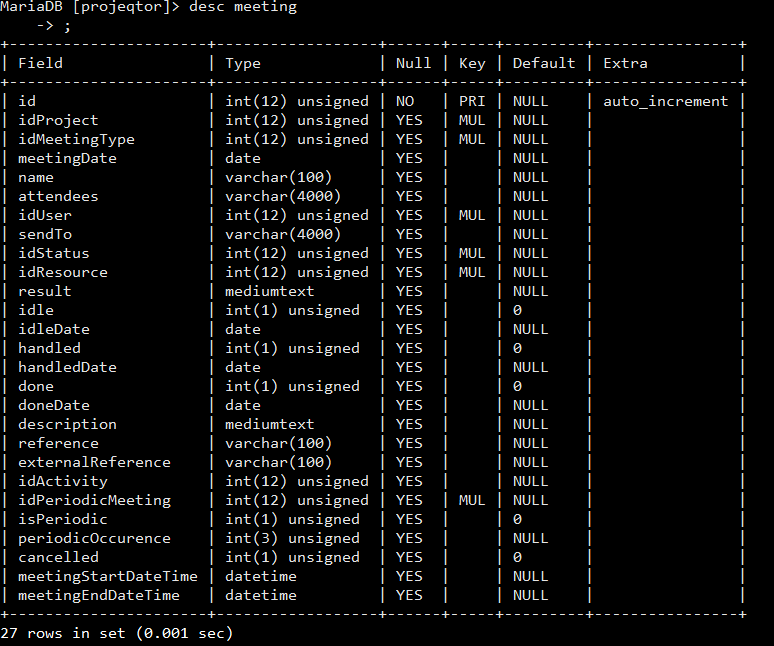

Very strange, you don't have all columns expected on table meeting.
What is your DB / Version ?
Can you try and execute :
ALTER TABLE `meeting` ADD COLUMN meetingStartTime time,
ADD COLUMN meetingEndTime time,
ADD COLUMN location varchar(100);
I'll try, in fact, Sorry, I was looking the wrong log. I have errors telling these column are missing. I try you script and come back.
Hi, OK, it works fine now. thanks. Any idea on why these fields was not created ? was it a wrong way from my side ?
No, I cannot find why this part of script did not execute correctly.
It is strange as it is part of script from version V2.2.0, quite old, and we never had issues on that part.
Do you have logs for Installation of ProjeQtOr (if you installed recently, maybe) ?
Sure; No error in installing but error while connecting as admin for first time.
Anyway, I tryied a fresh installation from the zip 10.0.3 and this is correct., the fields are there.
I add the installation log.
My other issue, impossible to enter dates and location is still existing after the patch.
OK i did remove the projeqtor tree and refresh from the zip file and it works fine.
sorry for bothering you. Maybe a problem at installation. Tou can close the ticket; Many thanks and congratulation for your product.
Very strange
Log shows no error and correct update of table meeting.
I guess I'll rebuild completely my instance because I still have strange things. Nos I've lost all strings with accents.
I will juste drop this instance and réinstall from scratch projeqtor.
By the Way, is it possible to import timesheets ? I would like to avoid my teams to re-enter all figures.
Thanks !
You don't need to reinstall from scratch.
You can reimport the DB, just take care of charset conversion.
Check your dump (open it with notepad++) to verify if accents are correct and if file format is UTF8. If not, you should convert before importing.
Great ! Thanks for the advice. I'll do that tonight or tomorrow.