
Welcome to ProjeQtOr new Forum. We migrated old forum to the new website.
You will find all your posts here, with your usual account.
Just one point : you’ll have to reinitialize your password. Use “Lost password” feature.

After creating a new client invoice the full ammount after tax is incorrect, with a 0,05€ margin error
e.g:
expected value: 399,75 €

Very strange, I cannot reproduce :
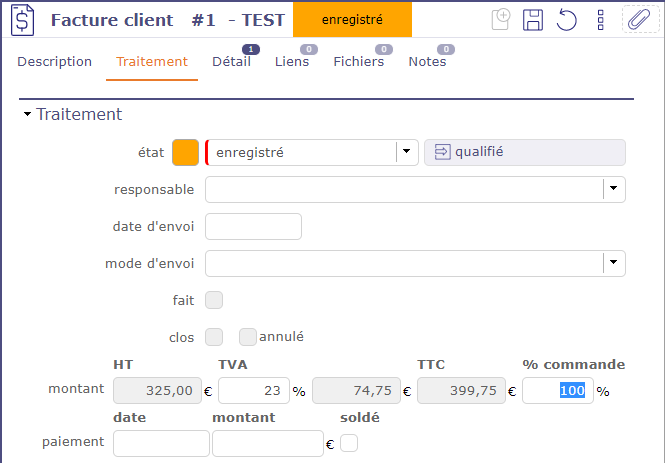
Which version are you using ?
v9.0.5
It's a bug that you guys have if you insert the Tax first the outcome will come "bugged", to fix this I needed to remove the tax and insert it again. But when saving it goes back to the 0,05€ our 0,5€ diference
Hi,
I really cannot reproduce, even with tax first.
It is highly surprising as I use this every day, with tax pct always defined first (copied from client), and I never faced the issue.
Could you please try and reproduce the case on Demo ( https://demo.projeqtor.org) ?
Everything seems in order there, I really don't know why it's happening on our side.
What I see is that if the full ammount goes for e.g: 1150,50 where 0,50 > it will get us 1151
or if it's < it goes 1150, is there anything in the options related to the decimal place rounding?
Hi,
It may be due to decimal character.
1) Do you manage devimals with point '.' or comma ',' ?
2) If on a cost value, you hit the point '.' on the numpad, does it enter a point or a comma ?
Strange. I could not reproduce the behavior showed on video.
For me, after refresh, amount is still 399,75.
Could you please replay the two questions on previous post ?
) Do you manage devimals with point '.' or comma ',' ?
2) If on a cost value, you hit the point '.' on the numpad, does it enter a point or a comma ?
Could you also please try and reproduce on Demo so that we has a test case ?
In invoice line when creating, since this is a single number with no ,00€ (325€) I don't use , or . but if I were to use, it would only accept ,
And numpad point on cost fields (for instance on validated cost on Activity), does it enters point '.' or comma ',' ?
This is not the question.
I understand that depending on your locale, decimal requires a comma as decimal separator.
My question is : on a numeric field (cost), if you hit the point "." on the numeric key pad (on right part of the keyborad), does it draw a point "." or a comma "," ?
It draw a point "."
So issue may come from here.
Decimal point is not completely correctly identified.
We'll have a look.
Ok, after a week or so doing invoices, I've a list of bugs that happened during that, do you want me to give it here, or open on the bug report forum?
Please open a thread for each issue (or group of similar issues)