
Welcome to ProjeQtOr new Forum. We migrated old forum to the new website.
You will find all your posts here, with your usual account.
Just one point : you’ll have to reinitialize your password. Use “Lost password” feature.

Hello everybody,
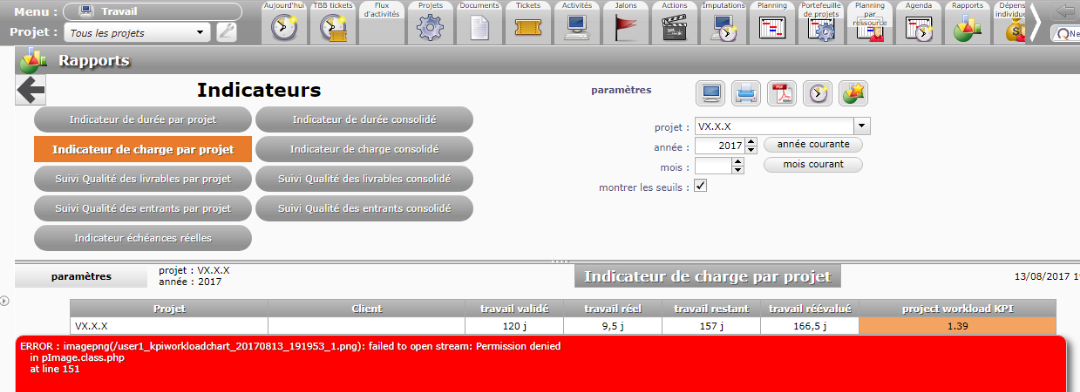
For information we are using ProjeQtor v6.3.3 (same error in 6.2.5) and we are facing an issue about KPI work load chart :
When we go to 'Reports' --> 'Indicators' --> 'Workload Indicator'.
We load a project and click on 'computer icon' which launchs and shows the report (same error on Printer or PDF Output)
And we have only the array of the project and the message below :
ERROR : imagepng(/user1_kpiworkloadchart_20170813_192128_1.png): failed to open stream: Permission denied
in pImage.class.php
at line 151
The file is: /data/www/projeqtor/external/pChart2/class/pImage.class.php
Rights to apache:apache on all projeqtor folder.
I attached a screenshot of the error we have.
Could you please help us on this point please ?
Thank you and have a nice day.
Regards.

You need to give acces rights to web users to files in roports folder (defined by default in projeqtor/files/reports, but can be changes on configuration and in global parameters)
This folder must be in web access.
You need to give acces rights to web users to files in roports folder (defined by default in projeqtor/files/reports, but can be changes on configuration and in global parameters)
This folder must be in web access.
Hello
Thank you for your answer.
But all folders have access yo webuser, in my case : Apache
🙁 but only reports do not work.
Any other idea please ?
What is defined as reports folder in global parameters ?