
Welcome to ProjeQtOr new Forum. We migrated old forum to the new website.
You will find all your posts here, with your usual account.
Just one point : you’ll have to reinitialize your password. Use “Lost password” feature.

Trying to login as admin this morning and login fails with 'Invalid login parameters'.
I thought I forgot the password, so I used the password reset as described in other forum posts.
UPDATE resource SET password='newPassword', crypto=NULL, isLdpa=0 WHERE id=1;
This worked and I was able to login and reset the password.
However, after logging out and trying to login again the password again did not work.
I tried deleting cookies and recent browsing data and also logging in with a completely different web browser, and I still get the same results, 'Invalid login parameters'.
I then dropped the database (I did not have any data in it yet) and upgraded/recreated the install with version 6.4.4. I am still getting the same results. admin/admin does not work for initial login. I had to use the reset code to set a temporary password, then reset it. It allows the login the first time after the reset, but logging out and attempting to login again gives 'Invalid login parameters'.
This post probably belongs in the 'Submit Issues' category, is there a way to move it there?

1) check you PHP installation : are all required modules installed ? (openssl, hash, mbstring mcrypt)
2) check for errors in log file
3) check for errors in browser console
(report here any error)
I have 2 installations of Projeqtor. One that is working and the newer one with the above issue.
Here are the differences in the install.
Working version:
Apache Version Apache/2.2.15
PHP Version 7.0.21
OpenSSL 1.0.1e-fips 11 Feb 2013
Problem Version:
Apache Version Apache/2.4.6
PHP Version 7.0.24
OpenSSL 1.0.2k-fips 26 Jan 2017
The other modules hash, mbstring, and mcrypt are identical for each.
From the log file, after changing the password to 'test1', password, salt, and crypto (sha256) updated in database, and then trying to log in again
2017-11-08 12:35:14.170 ..... SCRIPT .... 192.168.1.21 Page=loginCheck.php
2017-11-08 12:35:14.173 ..... SCRIPT .... 192.168.1.21    ->/tool/loginCheck.php
2017-11-08 12:35:14.186 ----- DEBUG ----- loginCheck : current db version = 'V6.4.4'
2017-11-08 12:35:14.189 ----- DEBUG ----- User->authenticate('admin', 'sAJE+4FqA1rZV73brQ==')
2017-11-08 12:35:14.193 ----- DEBUG ----- User->authenticate : sha256 encryption
2017-11-08 12:35:14.193 ----- DEBUG ----- User->authenticate : wrong password 9299877901692c7e3eda27e408f75ff8ec47d4e0590b0396cb84744aa8bbd7ba!=sAJE+4FqA1rZV73brQ== (exit)
2017-11-08 12:35:14.194 ----- DEBUG ----- loginCheck : unidentified incorrect authentification
2017-11-08 12:35:14.194 ===== TRACE ===== Login error for user 'admin'
No errors in browser console.
Any ideas on what else to look at?
Does the Apache version matter?
I will try installing on v6.4.4 on the working version server and see if it works there.
Apache version may be source of issue if you are using virtual hosts.
Try and check for errors in apache error log file.
To follow up, I copied the entire installation over to the other server running Apache/2.2.15 and the password issue has gone away. I don't understand what is different that allows this to work on Apache/2.2.15 and not on Apache/2.4.6. If I have time I will try and debug this and figure it out, unless someone already knows the answer.
Check for errors in apache error log file.
I did not find any errors in the apache log, or the php log
Please post apache error log for analysis

Hello,
I have the same problem in worse, I never can login with any login/password.
I tried everthing I found in the forum like "UPDATE `resource` SET `name` = 'admin', crypto=NULL, isLdap=0 WHERE `resource`.`id` = 1 "
I also try to erase the browser cache, change browser from IE to Firefox, put NULL password, and I changed Xampp about 5 times...
As you can see in the attached file, the configuration looks to be good.
Can you help me ?
Thanks
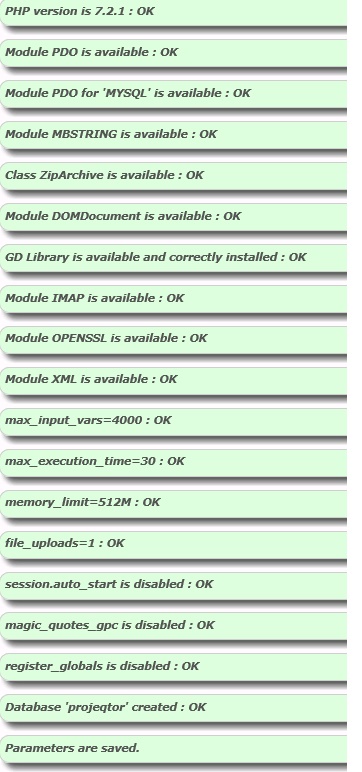
What is your set-up step ?
Database empty ? Full ?
Please post projeqtor error log file and apache error log file
Hello,
I followed all the prerequisites on the Read Me file, I changed options on the php.ini (wit the extensions needed by the program) and everything was OK (green) when I validated the configuration.
After read coments on the forum, I also tried to change de execution time to 600 seconds without effects.
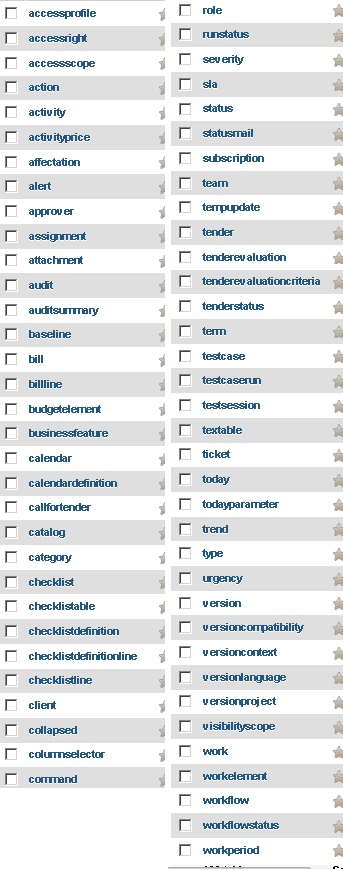
The database is not empty as you can see on the picture attached.
Thanks
Apache Log file show error in php_mysql module, that does not run correctly.
This may be source of your issues.
Try and fix your php setup.