
Welcome to ProjeQtOr new Forum. We migrated old forum to the new website.
You will find all your posts here, with your usual account.
Just one point : you’ll have to reinitialize your password. Use “Lost password” feature.

Hello,
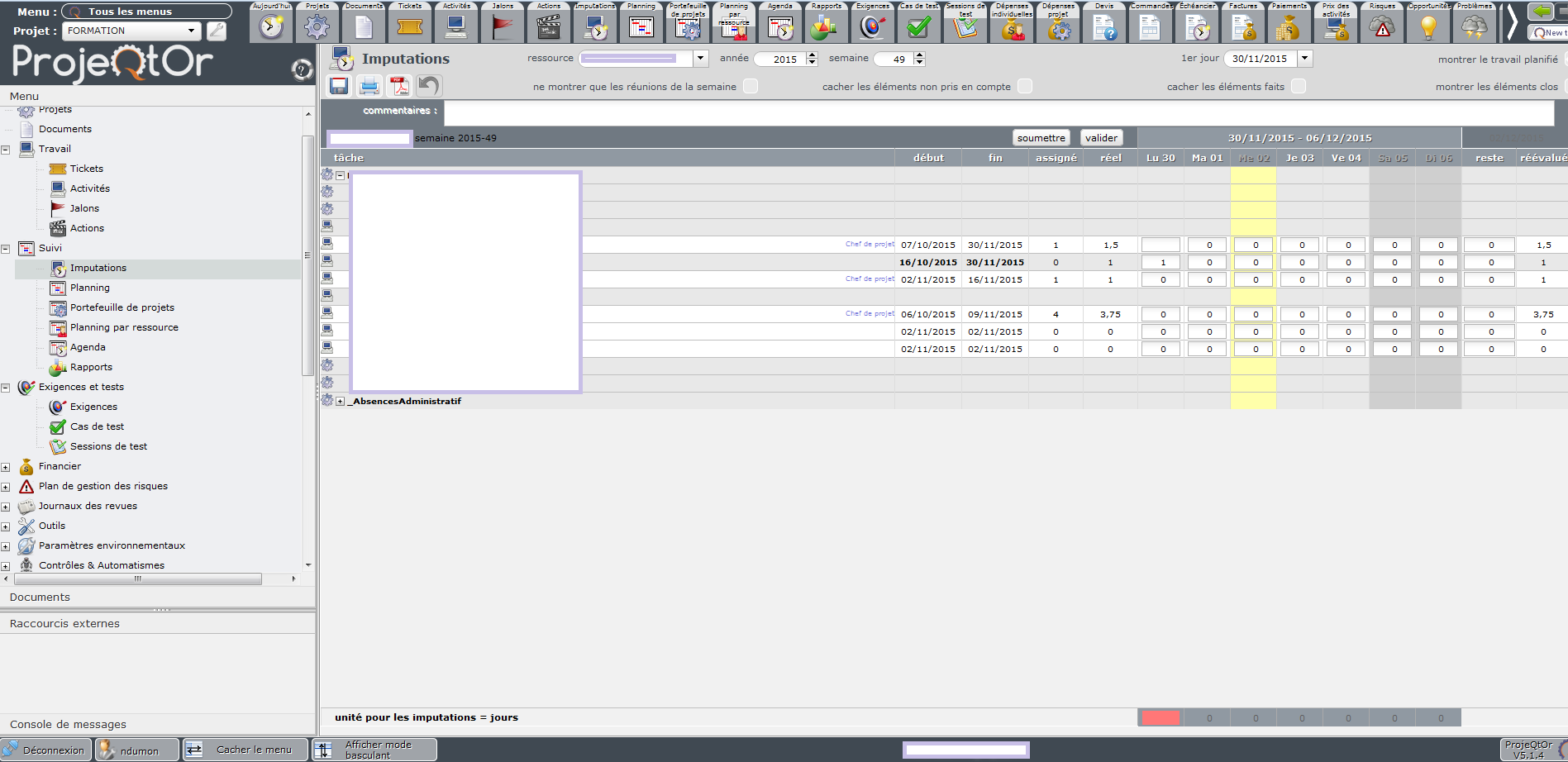
I try ton use real-work allocation in v5.1.1 and I have some problems to use it on Chrome
I input some values with coma : 0,5 or 0,25
When I do the input and save no problem (see Diapositive 1).
If I go to another screen and come back on my Real-work allocation, Projeqtor didn't display my different inputed values and the sum is also not displayed. (see Diapositive 2)


I cannot reproduce.
It is sure there is a problem as there should not be "blank" cells, zero values should appear as zero...
1) Could you try and reproduce on Demo ?
2) Could you please check for errors in the browser console or in the log file ?
3) Could you check values stored in database (and post values here ?
Thx
1 ) It's almost OK : just the information show in column Real and Reassessed are not totaly good because the 0 is not displayed
2) Any message
3) I couldn't access to the database
I use Chrome
1 ) It's almost OK : just the information show in column Real and Reassessed are not totaly good because the 0 is not displayed
Could you give more hints about your test : which use did you connect with, which day did you enter work, on which line, ...
2) Any message
Do you mean no message ?
Could you post log file ?
3) I couldn't access to the database
It will be hard to analyse withouit reproducing on demo and with extra information. Maybe your db format is not as expected so it would be very usefull to get information about your db.
I use Chrome
So do I.
I don't think it is a browser dependent issue (unless you reproduce only on chrome and not on other browser.
Just to be sure, could you try again after disableing all extentions and plugins in the browser ?
(some extensions such as "Skype click to call" are known to set a mess in the application)
I have new element.
When I input 0,5 in a cell, I can save my real-work allocation and after saving the value displayed is ok.
When I change my inputaion week and come back to the precedent where I inputed my 0,5, my cell is always empty.
BUT, now I try to modify my 0,5 by an other value with a coma (ex : 0,25) and in the column Real I've got "NaN" displayed.
I made the update in v5.1.4. (cg attachment)
Thank you for your help
Do you have PphMyAdmin ?
How does it display work.work (field work in table work) for concerned lines ?
(for instance add new decimal value and check line with highest id)
In the DB the value is correct :
id idResource idProject refType refId idAssignment work workDate day week month year dailyCost cost idBill idWorkElement
394 92 29 Activity 86 86 0.50000 2015-11-30 20151130 201549 201511 2015 0.00 NULL NULL NULL
Do you have same issue only on Real Work allocation, or do you reproduce for instance on Activity (validated work) and Ticket (work) ?
I've got the same issue.
When I try to input 0,5 in the estimated work, when I click on Save, after the refresh the value is no more displayed. :silly:
I've got the same issue.
When I try to input 0,5 in the estimated work, when I click on Save, after the refresh the value is no more displayed. :silly:
Do you have same issue only on Real Work allocation, or do you reproduce for instance on Activity (validated work) and Ticket (work) ?
Sorry my last message talk about Tickets
Maybe I didn't understand what you want to say with "instance" ?
Sorry my last message talk about Tickets
So you face issue on Tickets...
Can you verify that you can also reproduce this issue on Real Work Allocation and possibly on Activity (for work fields)
For the ticket in real work allocation, the value 0,5 is not displayed
In the detail of activity after saving, the value is no more displayed.
Thanks it gives me some hints.
Other question if you "print" Ticket or Activity, do you see correct value or not ?
When I print an activity, a ticket or the real work allocation the value is well displayed.
Thank you.
Could you please have a test :
In /projeqtor/view/objectDetail.php, add 1 line before line 965, from this :
echo ' value="' . htmlEncode($val) . '" >
to
traceLog("$col=$val=".htmlEncode($val));
echo ' value="' . $val . '" >Then try again to display Ticket with non displayed decimal value.
Does it display correcly now ?
What is is the log file ? (please post log file content here)
Thank you.
What is you PHP Version ?
If it is 5.6, can you please check pnp.ini, what is value for default_charset ?
Found issue.
It seems to happen on PHP 5.6 (could reproduce on PHP 5.6 but could not on PHP 5.5)
Fix is to add new line after line 61 in /model/NumberFormatter52.php :
    }
    setlocale(LC_NUMERIC, 'C');
    if (array_key_exists('browserLocaleDecimalPoint', $_SESSION)) {
      $this->decimalSeparator=$_SESSION['browserLocaleDecimalPoint'];
    }
Fix will be deployed in Patch 5.1.5 (coming soon)