
Welcome to ProjeQtOr new Forum. We migrated old forum to the new website.
You will find all your posts here, with your usual account.
Just one point : you’ll have to reinitialize your password. Use “Lost password” feature.

Hello,
User CJK, with the Login Profile of Project Member and Project Profile of Project Leader, is experiencing an issue while editing the main project "XYZ." When attempting to edit project "XYZ," the system automatically shows Project "ABCC" against the "Is sub-project of" field under the "Description" tab on the detail page. As a result, any project edited by CJK as a Project Leader is being converted into a sub-project. Consequently, Project "XYZ" is now incorrectly listed as a sub-project under Project "ABCC."Please find attached the screen recording


It is because on your instance is-sub-project is a required field.
Either you set it required through Screen Customization, of user has no right to create projets at root, only under his own projects.
Hi,
Could you please assist me with the navigation path to configure as you suggested? I tried to find it in the global parameter and administration pages and looked through the user guide, but I wasn't successful.
Thank you.

Hello
the field has been made mandatory by a plugin. The screen customization.
You need to go to this plugin --> Menu --> ScreenCustomization, look for the corresponding field on the project element and deselect the box "required"
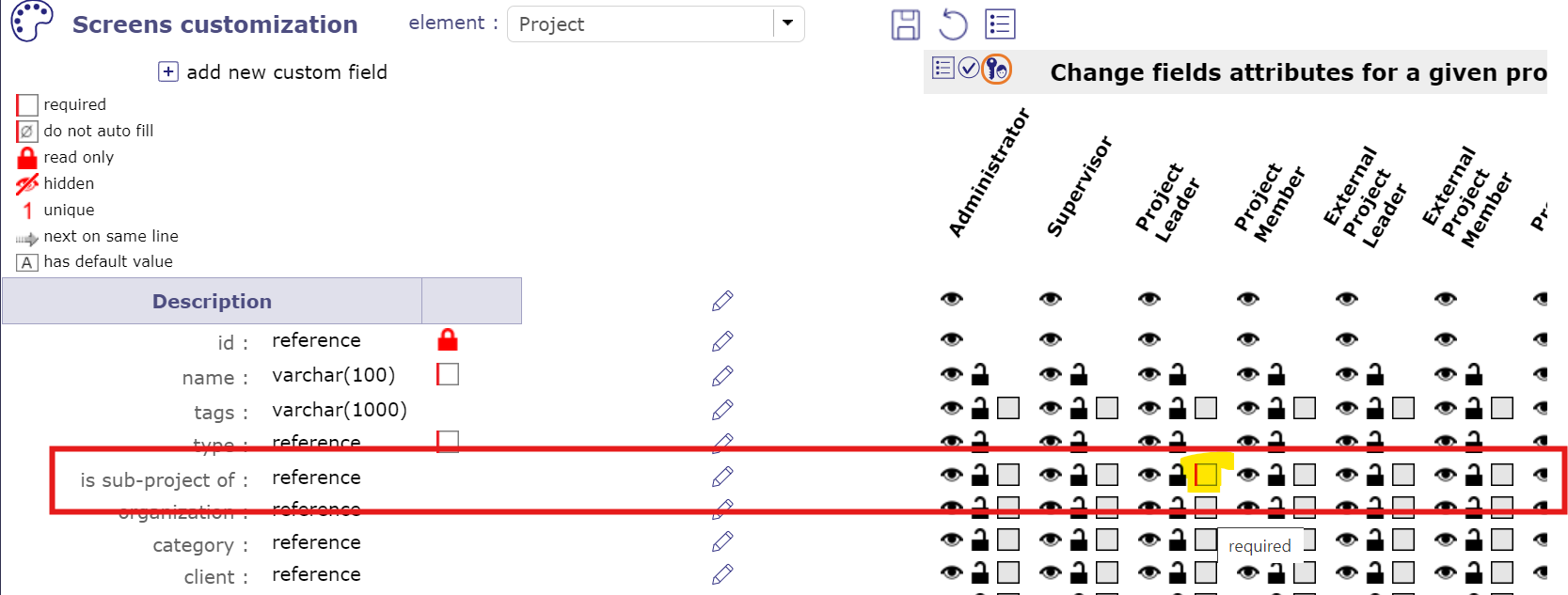
ps: This user's profile is his default profile. It can change on each project or subproject. Make sure his profile is on the project itself.
Hi,
My issue specifically concerns editing an existing project with the "Project Leader" profile, as I detailed in my initial post on this subject. Could you please assist me in resolving this? Additionally, I'd like to inform you that I am not using any plugins.
Thank you for your help.
Best regards,

Hi,
I have the same issue. Can someone help me?
Many thanks!
Cesare
PS: I have no plugin installed.
What version of ProjeQtOr are you using ?
Whar is definition of access rights for your user un Project screen ?
Hi Babynus,
I'm using version 11.3.2 and the user role for that specific project is "manager".
In others project the role of that user is "reader"
Many thanks
Cesare
Hi,
I have just tested this scenario in version 11.4.1, and the issue is still occurring.
Can you please confirm that the projects impacted are project "at the root of WBS", I mean without parent project ?
Hi,
Yes, I confirm that the projects impacted are project "at the root of WBS", without parent project.. I have attached the screen recording in my first post in this communication for the better reference. I think it will be possible to reproduce the case at your end too.
Regards.
Hi,
This issue has just been fixed.
Fix is already available through subscription service.
It will be included in next version.