
Welcome to ProjeQtOr new Forum. We migrated old forum to the new website.
You will find all your posts here, with your usual account.
Just one point : you’ll have to reinitialize your password. Use “Lost password” feature.

Hi,
We're experiencing an issue with the display in the Links tab of a customer invoice.
When adding or modifying an item, the tab displays correctly.

However, as soon as we leave the item and return to it, the display problem reappears:
- we see three items displayed: "montant, montant et soldé" in French.
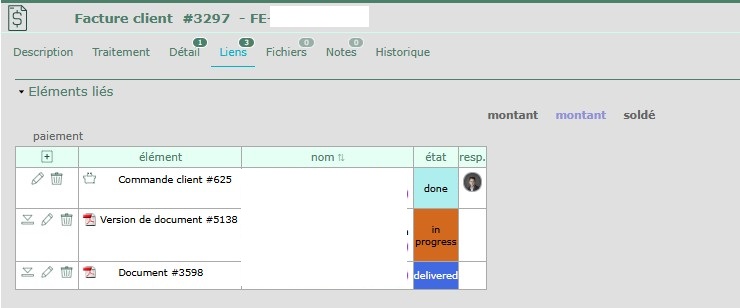
I've looked through all the configuration settings, but I can't find anything.
Thank you and have a good day.

Hello,
Which version of Projeqtor are you using?
Are you seeing any console errors (F12)?
Have you customized the interface using the “Screen Customization” plugin?
Hava a nice day,
Hi,
Oh yes, sorry, I forgot to mention the version. We're on v12.5.0, but we already had the problem with v12.3.0.
Yes, we have the "Screen Customization" plugin.
Are you seeing any console errors (F12)?
Sorry, I'm not familiar with that console, so I'm not really sure what to look for.
...
Well, I just went to the Screen Plugin menu, and I got an error message asking me to reload the "Customer Invoice" window.
Without making any changes, I can no longer reproduce the problem. I imagine you already have the explanation.:-)
Thanks
Have a nice day

When you migrate to new version, customized screen may not be consistent any more : new fileds are added at the end of fields list instead of their explected place
This is reported on migration message.
It lists Screens that should be fixed.
Just open Screen customization on the expected Screen class will automatically fix this kind of issues.
As only 1 filed can be fixed at a time, interface requests to reopen screen several times to fix all issues, until no new error appears.