
Welcome to ProjeQtOr new Forum. We migrated old forum to the new website.
You will find all your posts here, with your usual account.
Just one point : you’ll have to reinitialize your password. Use “Lost password” feature.

There are two ways for recording time on a ticket :
- The buttons "start work" and "stop work"
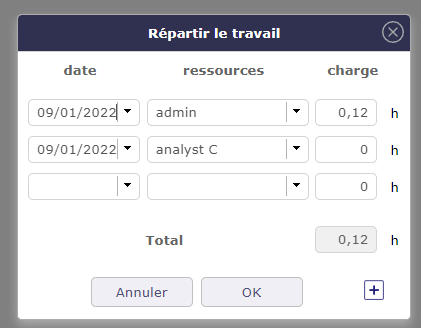
- The button "Dispatch".
When I recieve a phone call, I create my ticket and immediately click on "start work".
After a few minutes, I hang out, then click on "stop work".
It stores my actual spent time on the ticket. Let's say 0.12 hours.
Now, a few hours later, a developper opens the ticket, then work on it for 2 hours.
He clicks on "Dispatch".
My 0,12 time is not visible in the popup, it shows "0".
Now he add a new line today and type 2 hours.
When he saves the popup, the ticket has only 2 hours stored on it, the 0.12 hours previously stored are converted to 0.
I guess the problem is in the popup : it should not show 0 but 0.12
Edit: We use version 9.3.5

Strange, I cannot reproduce.
Can you check history for ticket ?
Possibly someone directly changed real work to zero...
Hello,
Thank you for your quick answer.
We were doing a demo to a key user, so the ticket was deleted.
But I created a new one this morning and I can't reproduce the issue.
I mark this discussion as solved, and would open it again if I get the problem again.