
Welcome to ProjeQtOr new Forum. We migrated old forum to the new website.
You will find all your posts here, with your usual account.
Just one point : you’ll have to reinitialize your password. Use “Lost password” feature.

Often we have to zoom in or out the browser, by holding down the CTRL key and rolling the mousewheel (or by using the CTRL key with the + or - keys).
Bug#1:
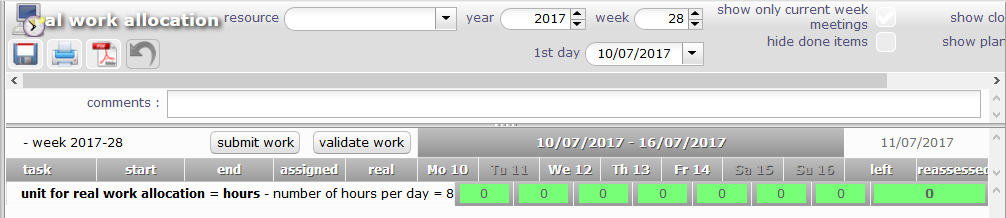
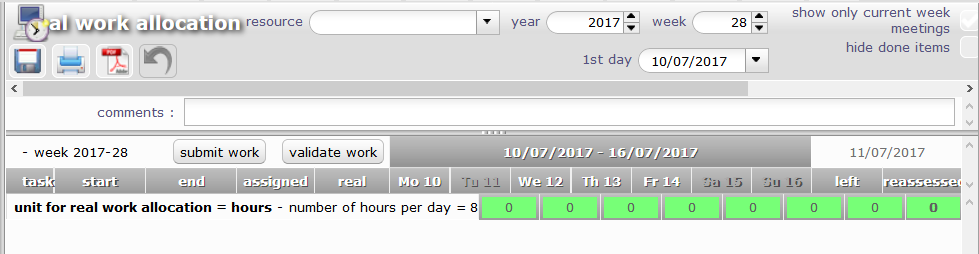
The Actual work allocations table looks aligned only at 100% zoom.
When the browser has any other zoom factor, the table's header rows do not appear aligned with the data rows below.
This makes it very difficult to read the table.
Desired: The table should not get misaligned at any zoom factor.
Bug#2:
The text above the table also gets truncated when browser is zoomed in.
(in the attached screenshots, the controls at the right edge of the screen have got cut off.).
Desired: Controls should not get cut off at any zoom factor.


Bug#1:
The Actual work allocations table looks aligned only at 100% zoom.
When the browser has any other zoom factor, the table's header rows do not appear aligned with the data rows below.
This makes it very difficult to read the table.
I tried is on chrome and got issue only zooming more than 150% when left menu is displayed and at 200% when left menu is hidden...
Desired: The table should not get misaligned at any zoom factor.
This is very difficult to manage, and quite impossible to have this work with all browsers (as browsers do not behave exactly the same on zooming).
If you can ropose a fix we'll be glad to include it.
Bug#2:
The text above the table also gets truncated when browser is zoomed in.
(in the attached screenshots, the controls at the right edge of the screen have got cut off.).Desired: Controls should not get cut off at any zoom factor.
This is partly improved on V6.3