Welcome to ProjeQtOr new Forum. We migrated old forum to the new website.
You will find all your posts here, with your usual account.
Just one point : you’ll have to reinitialize your password. Use “Lost password” feature.

Hi all,
in section "email sent", we have a huge number of emails as the system is configured to send many notification: so far we reach 40k emails.
To improve performance, I would like to close them, of course not one by one but I would like to "massively close them". However:
1. If I download the list, change the status and try to import, in "Import Data" email sent is not available
2. the button "Bulk Edit" is not available for emails
Is there any other way to perform it? May I go directly in the DB and change the "close" fileld there? Is it a good practice?
Thank you
Silvia
Hi all,
any idea about it?
Thank you,
Silvia

Hello,
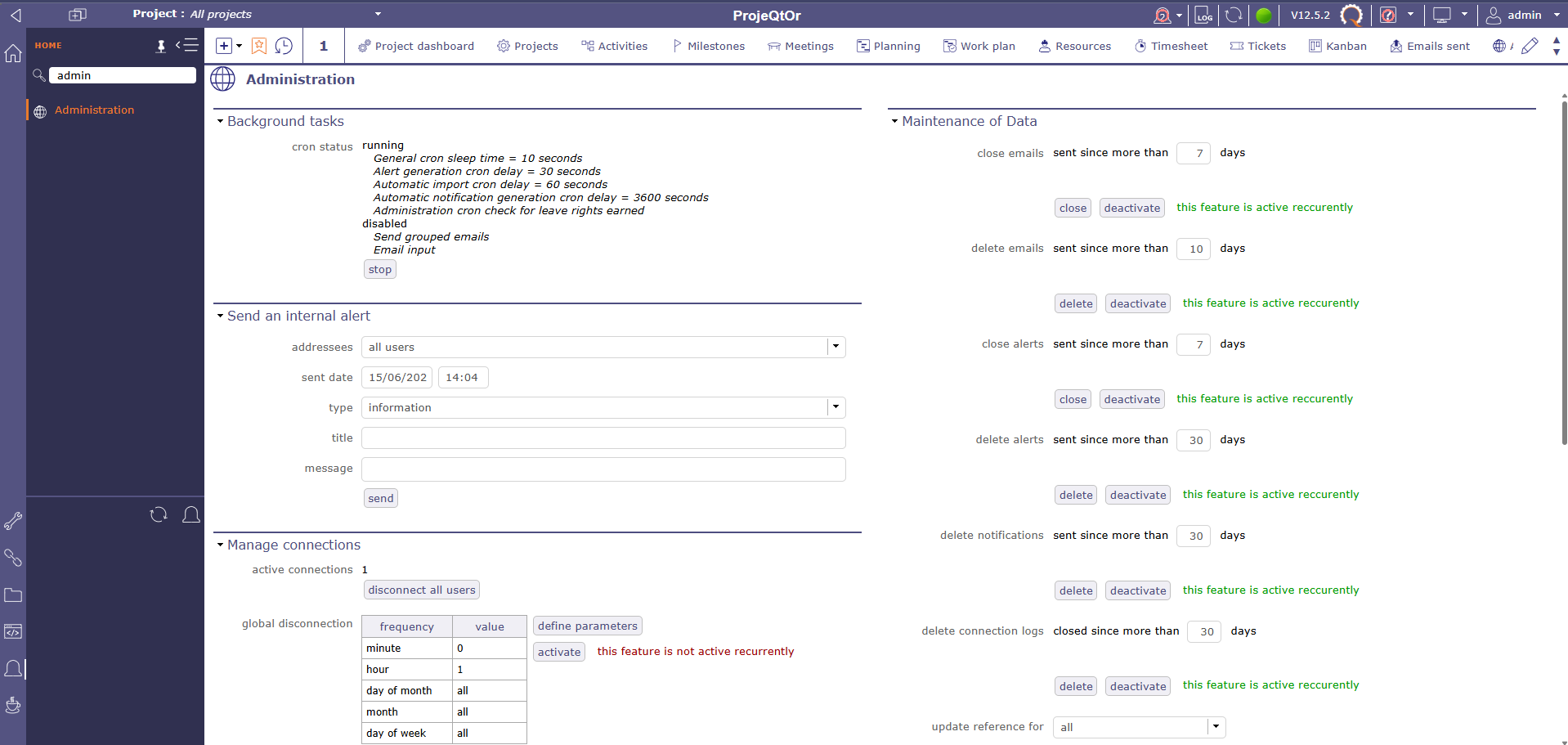
You will find the features related to email management in the administration interface. ( this interface is accessible only for the administrator )
In the screenshot, you can see that in the "Maintenance of Data" section, the first two options are used for managing emails.
You can set the timeframe after which emails are marked as "closed" and/or deleted.
There are also buttons to perform these actions immediately, the action will apply the defined delay filter.
Example, you have 9 emails from 11 days ago and 1 email from 2 days ago. If you configure the filter of your actions to be over 10 days, then only the 9 emails older than 11 days will be deleted and/or closed depending on the option you have made or configured.
Hoping that this explanation will allow you to solve your issue.
Have a nice day.