
Welcome to ProjeQtOr new Forum. We migrated old forum to the new website.
You will find all your posts here, with your usual account.
Just one point : you’ll have to reinitialize your password. Use “Lost password” feature.

Hello,
I've got a problem with planning. I have defined a main project and subprojects, assigned resources to the project and tasks with dates and rates compatible with the workload validated. I checked also that globally no resource is assigned at more than 100% on all projects.
However, when I try to calculate planning for the project (the goal is to get the workload assigned so each resource gets its assignation and manager can see resource availability in the reports), the tasks where resources are assigned work cannot be planned with an error.
Here is an example of error found :

In this example, the green tasks have resources in assignation with no workload assigned, tasks in purple have at least 1 resource with workload assigned. In this case, all tasks with resources with workload assigned are planned at a date in the future, and only planned on 1 day while all tasks should be running on multiple days.
No problem is found until at least 1 resource gets assigned work in a task. But without that assignation, there is no possibility to plan anything correctly.
Do you have any clue on how to solve this problem ? I may have done something wrong but I have made tests on a test server without this kind of problem before, so I'm a little bit lost.
Thanks a lot !

You way to plan your projects is correct :woohoo:
But you have a message that says that some activities cannot be planned : it is all about affectation start and (more likely) end dates.
This message is displayed when you have a resource that will leave project before finishing his tasks.
Let's explain with an example :
=> Bob is affected to project A from 2016-03-01 to 2016-03-31 (this period includes 23 work days).
=> On project A Bob is assigne 15 days on task A1 : no issue
=> On project A Bob is also assigned 10 days on task A2 : you will get the message, because Bob will leave the project (affectation end date) before being able to finish the tasks : the message will say that 2 days cannot be planned on task A2 for Bob.
Hope this is clear 😉
Hello,
Thank you for the reactivity. I just tried to solve the first problem by playing with affectation dates. I'm pretty sure the dates I entered where correct, but just in case...
Looking at task "Etablissement BOM", it is assigned to Jean-Yves for 0.5 day of workload. In the project, Jean-Yves was affected from the 3rd of March to the 4th of March, at 50% rate.
I changed Jean-Yves's affectation from the 2nd of March to the 7th of March, still with 50% rate (to keep global affectation <= 100%).
In the task, I have 0.5d of work assigned to Jean-Yves, with planning constraint "as late as possible" and end date to the 4th of March. When I try to recalculate planning, I still have the same error, and activity is planned on 1 day on the 8th of March (i.e. finally the open day after the validated end of the task).
Is there any other idea to look at to be able to solve this problem ?
Thanks !
In your use case, what is doing Jean Yves except "Etablissement BOM" ?
Maybe your issue is a misundestanding of affectation rate. Read user manuel on the subject 😉
Well I reread the manual before answering. I didn't saw anything bad in my affectation (but I must be wrong obviously!).
So here are some screen captures to show you the affectation and try to find where I'm wrong. I'm still concentrated on Jean-Yves's case on Etablissement BOM task.
Jean-Yves's affectation summary (still not all projects/tasks entered in projeqtor) :

Jean-Yves's resource planning for the period :

Jean-Yves's resource affectation to the task Etablissement BOM :

For this one, I tried both 50% rate and 100% rate in assignment, but the result is still the same.
Are these screenshots sufficient for you to find where I'm wrong ?
Thank you again for you help !
Can you show reports "Availability of resources" and "Monthly planning Resource/project/activity" for march showing all lines for Jean Louis.
Sure !
Here it is (not much work assigned due to the problem I face :S )
Availability of resources

Monthly planning Resource/project/activity:

Sure, Jean Louis is available.
But why is he not working ? :silly:
Can you show all affectations For Jean Louis (in the resource screen)
Yes,
You will find here all affectations for Jean-Yves (and yes, he has a lot of work but not yet implemented correctly in Projeqtor 😉 )
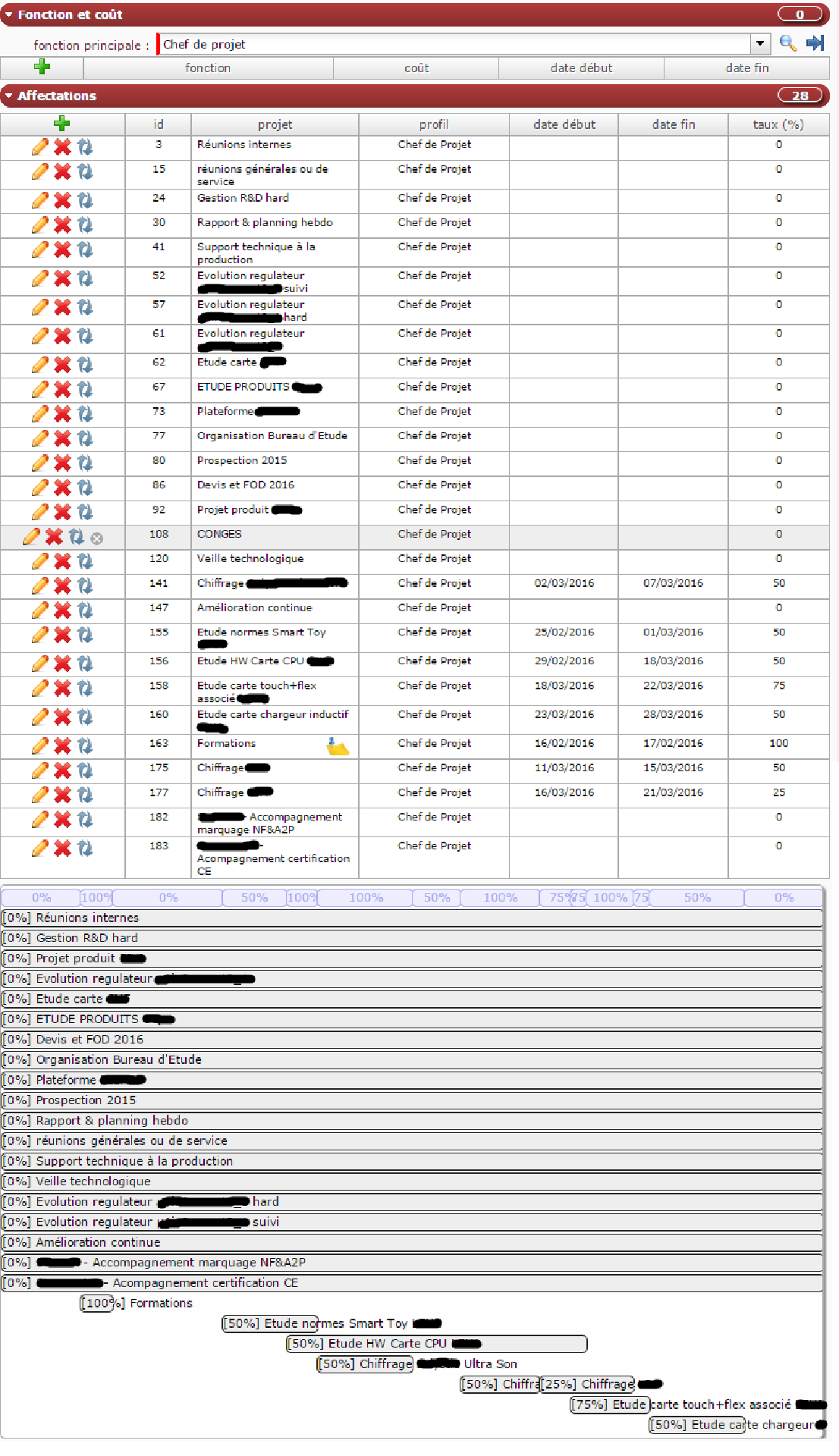
OK.
First, which line correspond to project with WBS 166.1 ?
Second : are you sure all these are projects ?
You may quickly face performance issues and great difficulty to manage project if you define project for waht could be a task...
Avoid to define projects for only few-days tasks.
Prefer to define it as an activity in a more generic project.
At a quick glance, five first project on the list could be an activity in a single project, then 3 following anoter project....
First, which line correspond to project with WBS 166.1 ?
It's affectation ID 141
Second : are you sure all these are projects ?
You may quickly face performance issues and great difficulty to manage project if you define project for waht could be a task...
Well, I have to synchronize with an ERP where all these projects were existing... I think in the future we will try to limit the number of projects, but :
- We have defined subprojects in projects for several reasons :
- Some subprojects do not follow the same type as others (I don't think this is manageable at activity level
- In most subprojects there are already quite a lot of activities. People affected in each subproject are not the same as on others. Maybe there could be a better mean to manage this.
A little bit more precision about the way I have understood projeqtor (once more, I may be wrong !).
Avoid to define projects for only few-days tasks.
Currently there are no projects defined for only few days. Projects are created for :
- Customer project, whatever the time it takes (from 1 week (rare !) to 2 years)
- Internal and administrative tasks, which can be repetitive. For example, the "Reunions internes" project is a constant opened project to place all internal meetings not linked directly to an other project.
For these types of project (ex. Reunions Internes), I assign people at 0% rate, and they can enter the real work in real work allocation. I don't see how to do better.
You may quickly face performance issues and great difficulty to manage project if you define project for waht could be a task...
I tried this morning to define a project with tasks as phases instead of subprojects, but I'm facing a problem :
Resources are working on multiple projects. Most of the time, there are some days or some weeks on a project, at 50% or 100% rate on this project, then work on another project, and back to the original project. This is due to time to get prototypes or time to get other teams work finished or time to get customer's validation.
To assign a resource on a task the resource must be affected in the corresponding project. But it can be quite easy to slice affectation on specific subprojects, but it is quite hard to do it on main project (we have to maintain <100% global project affectation for each resource). What is the best way to do then ?
we have to maintain <100% global project affectation for each resource
This is not mandatory.
And maybe your issue come from fact that you try to maintain this constraint.
Resource can be affected 100% on several projects for same period.
Constraints will decide which will be first planned.
For instance, I have 1 resource 100% on 2 projects

You can split tasks and with dependencies get what you want.
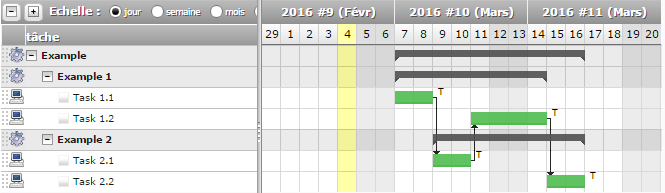
Or you can also play with priorities...