
Welcome to ProjeQtOr new Forum. We migrated old forum to the new website.
You will find all your posts here, with your usual account.
Just one point : you’ll have to reinitialize your password. Use “Lost password” feature.

Bonjour,
Nouveau venu sur Projector, je teste le produit afin d'en comprendre la philosophie et voir les adaptations possibles selon mes besoins. Pour l'instant , je suis satisfait des premiers résultats. Félicitation pour le travail accompli.
Alors qu'hier tout s'est passé normalement, je me reconnecte aujourd'hui et constate sans avoir fait aucune modif que tout fonctionne sauf ... le planning par ressource qui reste en attente (sablier en cours), sans aucun résultat. Si je change d'option, j'obtiens le message "requête en cours".
Je suis sur la version 3.3.2.
Un peu inquiet car évidemment si cela arrive en production ...
Merci d'avance

Hi Tremples,
would it be an effort to post in English? :dry: May some more people could help you.
Klaus
Hi,
This time in english.
As administrator, only since this morning and without any modification before, I'm not able anymore to see the planning by resource. Everything else is functionnaly ok, but the planning by resource is running without result. Connected as user, no problem, he can see his planning.
Thanks in advance.

Hi,
Could you check the log file and report any error in this file ?
Could you also check for any javascript error reported in the console ?
Hi,
In response to you Klaus (Weisst Du, dass Du viel Glück hast, in München zu leben?) : no message, no error.
I found the solution to unlock the problem, but without understanding the cause and the real solution to recover something clean. Obviously I've done something wrong. As I said (in french) I'm new on the product and I do a lot of tests too see if I can use it for real.
Under Resource Planning, the option "Show Project level" was checked; unchecked it resolved the blockage. Now in the Task column appears a blank resource in the firt line with an activity. When I look at this activity, I can see the normal assigned resource and another resource "1" (I can't delete it, maybe because there is real work on it). This resource is not in my resource list. Is this an automatically resource when the activity is assigned without resource ? In this case, what is the explanation for my initial problem (temporaly resolved with the option ""Show Project level") ?
Thanks in advance for any idea.
Could you please post a print screen of the Resource planning as is appears now (I don't fully understand the explanation)
Print screen of my Resource Planning
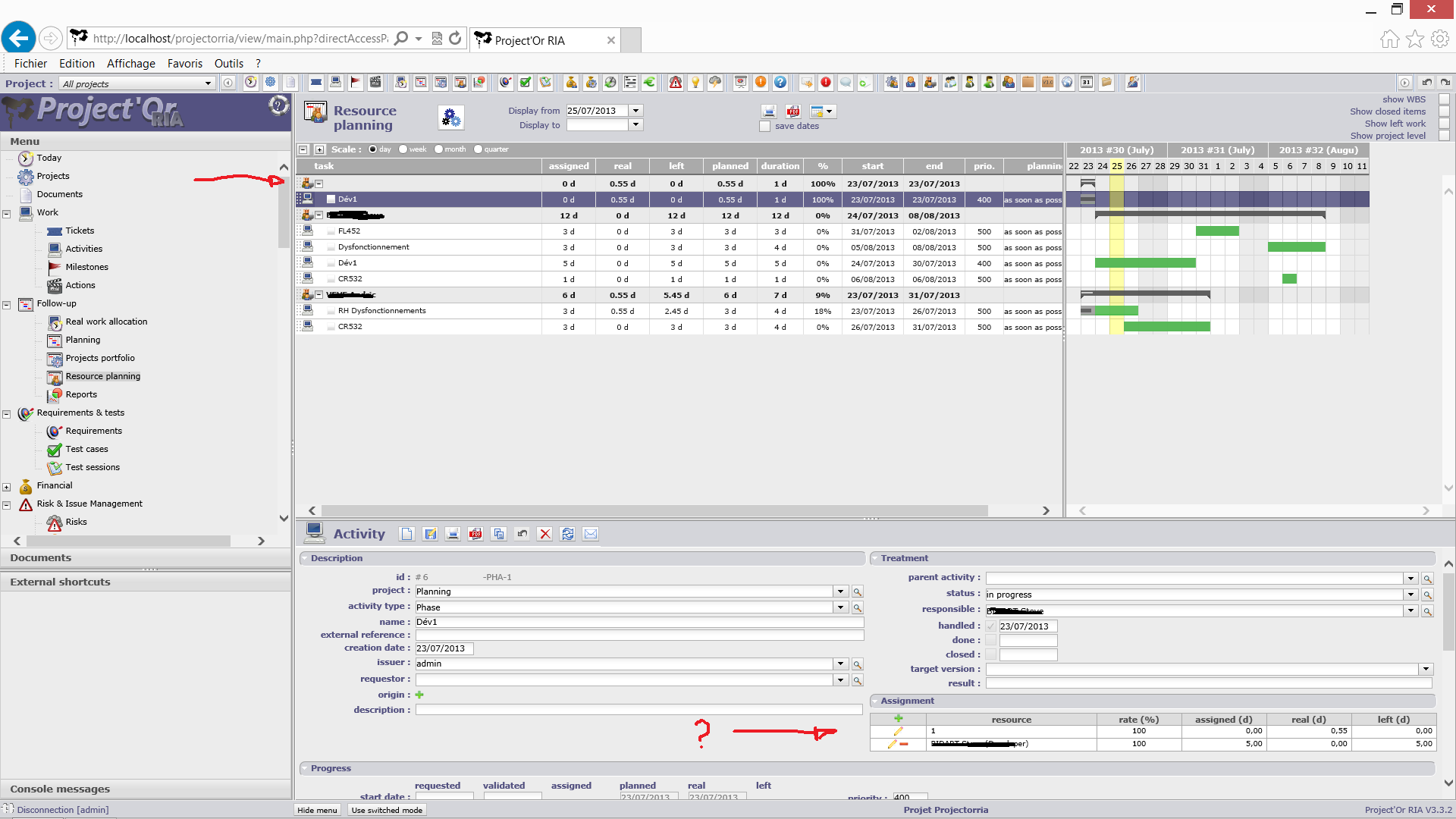
Thanks for the print screen.
I understand better now.
I recorded your issue as Ticket #1149.
It seems that Admin is assigned to the activity, but is not a resource any more.
Maybe you unchecked 'is a resourse' is the user screen for admin.
I will try this.
Hi Trempels,
I didn't catch the point, where you replied:
In response to you Klaus (Weisst Du, dass Du viel Glück hast, in München zu leben?) : no message, no error.
Could you enlighten this a little bit?
Thanks,
Klaus
Klaus,
Just a misunderstood.
I was just responding to the question of Babynus and made a confusion with you, who was the first answering to my post.
That´s all.