
Welcome to ProjeQtOr new Forum. We migrated old forum to the new website.
You will find all your posts here, with your usual account.
Just one point : you’ll have to reinitialize your password. Use “Lost password” feature.

Hello,
Very thanks for your project, i use this since 8 years, on every new versions nice surprises with more and more amizing fitures !
On the last version (8.0.1) when i use rapport for check availability, new informations are display in ETP colon for ressources pool. My understand is the ETP capacity for the pool but my question is, why the capacity is negative for eatch month ? can you explain the algorith for calculate number of days availaible ?
Thanks


Availability for the pool is the (max capacity during the month) x (opened day) - (planned work).
It could be negative with real work that exceeds capacity of resource.
But it should not be negative when there is only planned work.
I found an issue in the calculation of (max capacity) for pools that may lead to capacity = 0, so negative value fits the planned work.
Fix will be included in next patch.
thanks for your answer, and in ETP colum what is the signification of the label "max(1)
" ?
I think i have found a probleme. With this last version, when i add new ressources in the pool the planification (duration) don't change. New ressources in pool not included in global capacity of pool in planning calculation. If i add directly new ressources on the task the planification is good.
thanks for your answer, and in ETP colum what is the signification of the label "max(1)
It is the max capacity of the resource for the period.
It can be variation in allocation for a pool, or variation in capacity for a resource.
I think i have found a probleme. With this last version, when i add new ressources in the pool the planification (duration) don't change. New ressources in pool not included in global capacity of pool in planning calculation. If i add directly new ressources on the task the planification is good.
When you assign a Pool to an activity, you select the FTE assigned (number of resources from the pool that will work on the activity). Default is 1. So adding resources to the pool won't change unless you change this value.
Ok thanks for for this explain.
But when i define my pool with 3,9 ETP, 3 ETP on my task synthesis don't change. See sceen shot in attachement.


I thing you forgot to re-run planning calculation
Sorry but no i have re run planification calculation
I looked ar print screen more precisely.
On the activity, pool has 0,5 days left to do.
Whatever the ETP (1 or 3) it is done in less than 1 day, so ETP has no impact on planning
Ok, but my problem is why the duration calculed is 4 days (no change when i add ressources in pool or modify ETP):

Possibly because resources of the pool are busy on other tasks.
no, ressource are fake (Ghost) only for test without other affectation
What is planning mode of the activity ?
Can you show result of reports Monthly Planning Resource / Project / Activitiy ?
The calculation methode is ASAP 🙂 "des que possible". On pj the export requested.
The question for me is: why the capacity of pool is used only on end of month ? I have tested to force the start date on eatch resource of the pool, without impact 🙁
Because the pool is made from resources.
And the resources already work on other tasks.
Sum of work planned for all resources and for the pool cannot be more than sum of capacity of the resources.
The pool is not an extra resource.
Thanks but the last line "total" for the pool show never the full ETP capacity (3 ETP) exept the end of mounth (29/04) The calculation split my activity "TAT TCO MRO (Weekly)" with 1,84 total VS 3 days ETP maximum available..
I have create an picture for explain:
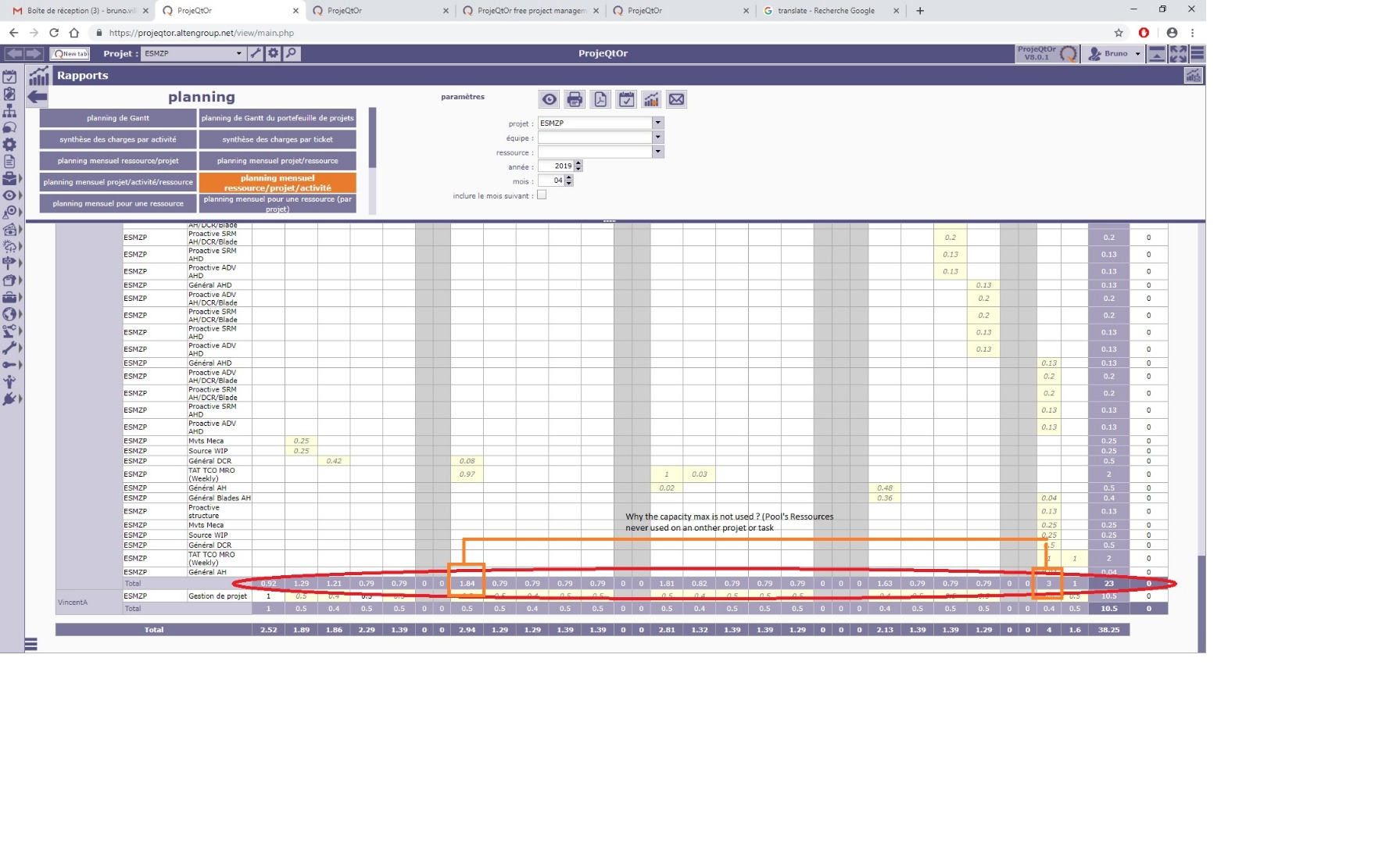
Of course, planned work on the Pool can only use avalability of the resources of the pool that is not already used.
Sum of planned work for Poll + Resources can not be more than sum of availability for resources.
Let's take an example : You have 2 resources RA and RB, with capacity =1, taking part to a pool P.
RA is booked for the week : | 1.0 | 1.0 | 1.0 | 1.0 | 0,5 |
RA is booked for the week : | 1.0 | 0.5 | 0.5 | 0.0 | 0,0 |
P can be booked max to the week : | 0.0 | 0.5 | 0.5 | 1.0 | 1,5 |
thanks for your answer, but if you look the last line "Total" the sum of all affectations is 3 days but the maximum of the pool is 4. (i repet all ressources is only affected on the broject, without direct affectation, only via the pool).
Why the calculation don't use the full pool capacity ?
It won't use more than what resources can do.
Also when you assign pool to activities, you take part of pool capacity (for instance 1 FTE) so you may not use full pool capacity.
Also, you may have dependencies, planning modes, and so on, that will have resource not fully busy.
Thanks,
I have create a test: New ressources, whitout other affectation, new ressources are in this pool "planification". All tasks are affected to the pool and only this pool. When i modify the pool with aditional ressource by aditional ressource, the result (after planning calcul) is coherent with 1, 2, 3 and 4 ETP, after the result is same (same for day planification and days available for the pool). I don't anderstand why numbers of days avaibale and planned days don't bouge after more 4 ETP. have you a limitation ? see the complete screens shots of all simulations in attachement.
Sorry, but seeing just availability result is not significant to me.
Could you please reproduce use case on Demo ?
Hello, Yes i can reprocuce with a online version.
Hello,
after an other test with the last version, i have this trace in log: (You can send me an email bruno.villedieu@gmail.com for some precisions in french for this use case complex)
2019-05-23 14:49:50.148 ===== TRACE ===== Error for planning mode '16' not found in Planning Mode table
2019-05-23 14:52:16.908 ===== TRACE ===== Error for planning mode '16' not found in Planning Mode table
2019-05-23 14:53:34.550 ===== TRACE ===== Error for planning mode '16' not found in Planning Mode table
2019-05-23 14:57:40.366 ===== TRACE ===== Error for planning mode '16' not found in Planning Mode table
2019-05-23 15:02:30.513 ===== TRACE ===== sendMailIfMailable : Mails without dest
2019-05-23 15:02:40.515 ===== TRACE ===== sendMailIfMailable : Mails without dest
2019-05-23 15:04:38.498 ===== TRACE ===== Error for planning mode '16' not found in Planning Mode table
2019-05-23 16:36:53.127 ** ERROR ** [V8.0.3] Exception-[42803] SQLSTATE[42803]: Grouping error: 7 ERROR: column "t2.sortorder" must appear in the GROUP BY clause or be used in an aggregate function
LINE 1: ...ject=t2.id group by month, t1.idProject order by t2.sortOrd...
^
2019-05-23 16:36:53.127 ** ERROR ** [V8.0.3] For query : select sum(work) as sumWork, month as scale , t1.idProject as idproject from work t1, project t2 where ((t1.idProject not in (0) or t1.idProject is null ) and (t1.idProject not in (0) or t1.idProject is null or (1=4) ) and (t1.idProject not in (0) or t1.idProject is null or (1=3) )) and t1.idProject in (0, 33) and t1.idProject not in (0, 39) and year='2019' and t1.idProject=t2.id group by month, t1.idProject order by t2.sortOrder asc
2019-05-23 16:36:53.127 ** ERROR ** [V8.0.3] Strack trace :
2019-05-23 16:36:53.127 ** ERROR ** [V8.0.3] #0 Sql->query called at [/var/www/html/report/globalWorkPlanning.php:135]
2019-05-23 16:36:53.127 ** ERROR ** [V8.0.3] Exception-[42803] SQLSTATE[42803]: Grouping error: 7 ERROR: column "t2.sortorder" must appear in the GROUP BY clause or be used in an aggregate function
LINE 1: ...ject=t2.id group by month, t1.idProject order by t2.sortOrd...
^
2019-05-23 16:36:53.127 ** ERROR ** [V8.0.3] For query : select sum(work) as sumWork, month as scale , t1.idProject as idproject from plannedwork t1, project t2 where ((t1.idProject not in (0) or t1.idProject is null ) and (t1.idProject not in (0) or t1.idProject is null or (1=4) ) and (t1.idProject not in (0) or t1.idProject is null or (1=3) )) and t1.idProject in (0, 33) and t1.idProject not in (0, 39) and year='2019' and t1.idProject=t2.id group by month, t1.idProject order by t2.sortOrder asc
2019-05-23 16:36:53.127 ** ERROR ** [V8.0.3] Strack trace :
2019-05-23 16:36:53.127 ** ERROR ** [V8.0.3] #0 Sql->query called at [/var/www/html/report/globalWorkPlanning.php:135]
2019-05-23 16:36:57.311 ** ERROR ** [V8.0.3] Exception-[42803] SQLSTATE[42803]: Grouping error: 7 ERROR: column "t2.sortorder" must appear in the GROUP BY clause or be used in an aggregate function
LINE 1: ...ject=t2.id group by month, t1.idProject order by t2.sortOrd...
^
2019-05-23 16:36:57.311 ** ERROR ** [V8.0.3] For query : select sum(work) as sumWork, month as scale , t1.idProject as idproject from work t1, project t2 where ((t1.idProject not in (0) or t1.idProject is null ) and (t1.idProject not in (0) or t1.idProject is null or (1=4) ) and (t1.idProject not in (0) or t1.idProject is null or (1=3) )) and t1.idProject in (0, 33) and t1.idProject not in (0, 39) and year='2019' and month='201905' and t1.idProject=t2.id group by month, t1.idProject order by t2.sortOrder asc
2019-05-23 16:36:57.311 ** ERROR ** [V8.0.3] Strack trace :
2019-05-23 16:36:57.311 ** ERROR ** [V8.0.3] #0 Sql->query called at [/var/www/html/report/globalWorkPlanning.php:135]
2019-05-23 16:36:57.311 ** ERROR ** [V8.0.3] Exception-[42803] SQLSTATE[42803]: Grouping error: 7 ERROR: column "t2.sortorder" must appear in the GROUP BY clause or be used in an aggregate function
LINE 1: ...ject=t2.id group by month, t1.idProject order by t2.sortOrd...
^
2019-05-23 16:36:57.311 ** ERROR ** [V8.0.3] For query : select sum(work) as sumWork, month as scale , t1.idProject as idproject from plannedwork t1, project t2 where ((t1.idProject not in (0) or t1.idProject is null ) and (t1.idProject not in (0) or t1.idProject is null or (1=4) ) and (t1.idProject not in (0) or t1.idProject is null or (1=3) )) and t1.idProject in (0, 33) and t1.idProject not in (0, 39) and year='2019' and month='201905' and t1.idProject=t2.id group by month, t1.idProject order by t2.sortOrder asc
2019-05-23 16:36:57.311 ** ERROR ** [V8.0.3] Strack trace :
2019-05-23 16:36:57.311 ** ERROR ** [V8.0.3] #0 Sql->query called at [/var/www/html/report/globalWorkPlanning.php:135]
2019-05-23 16:37:52.081 ** ERROR ** [V8.0.3] Exception-[42803] SQLSTATE[42803]: Grouping error: 7 ERROR: column "t2.sortorder" must appear in the GROUP BY clause or be used in an aggregate function
LINE 1: ...ject=t2.id group by month, t1.idProject order by t2.sortOrd...
^
2019-05-23 16:37:52.081 ** ERROR ** [V8.0.3] For query : select sum(work) as sumWork, month as scale , t1.idProject as idproject from work t1, project t2 where ((t1.idProject not in (0) or t1.idProject is null ) and (t1.idProject not in (0) or t1.idProject is null or (1=4) ) and (t1.idProject not in (0) or t1.idProject is null or (1=3) )) and t1.idProject in (0, 2, 32, 33, 34, 35, 36, 37, 38, 30) and t1.idProject not in (0, 39) and year='2019' and t1.idProject=t2.id group by month, t1.idProject order by t2.sortOrder asc
2019-05-23 16:37:52.081 ** ERROR ** [V8.0.3] Strack trace :
2019-05-23 16:37:52.081 ** ERROR ** [V8.0.3] #0 Sql->query called at [/var/www/html/report/globalWorkPlanning.php:135]
2019-05-23 16:37:52.081 ** ERROR ** [V8.0.3] Exception-[42803] SQLSTATE[42803]: Grouping error: 7 ERROR: column "t2.sortorder" must appear in the GROUP BY clause or be used in an aggregate function
LINE 1: ...ject=t2.id group by month, t1.idProject order by t2.sortOrd...
^
2019-05-23 16:37:52.081 ** ERROR ** [V8.0.3] For query : select sum(work) as sumWork, month as scale , t1.idProject as idproject from plannedwork t1, project t2 where ((t1.idProject not in (0) or t1.idProject is null ) and (t1.idProject not in (0) or t1.idProject is null or (1=4) ) and (t1.idProject not in (0) or t1.idProject is null or (1=3) )) and t1.idProject in (0, 2, 32, 33, 34, 35, 36, 37, 38, 30) and t1.idProject not in (0, 39) and year='2019' and t1.idProject=t2.id group by month, t1.idProject order by t2.sortOrder asc
2019-05-23 16:37:52.081 ** ERROR ** [V8.0.3] Strack trace :
2019-05-23 16:37:52.081 ** ERROR ** [V8.0.3] #0 Sql->query called at [/var/www/html/report/globalWorkPlanning.php:135]
2019-05-23 16:37:54.206 ** ERROR ** [V8.0.3] Exception-[42803] SQLSTATE[42803]: Grouping error: 7 ERROR: column "t2.sortorder" must appear in the GROUP BY clause or be used in an aggregate function
LINE 1: ...ject=t2.id group by month, t1.idProject order by t2.sortOrd...
^
2019-05-23 16:37:54.206 ** ERROR ** [V8.0.3] For query : select sum(work) as sumWork, month as scale , t1.idProject as idproject from work t1, project t2 where ((t1.idProject not in (0) or t1.idProject is null ) and (t1.idProject not in (0) or t1.idProject is null or (1=4) ) and (t1.idProject not in (0) or t1.idProject is null or (1=3) )) and t1.idProject in (0, 2, 32, 33, 34, 35, 36, 37, 38, 30) and t1.idProject not in (0, 39) and year='2019' and month='201905' and t1.idProject=t2.id group by month, t1.idProject order by t2.sortOrder asc
2019-05-23 16:37:54.206 ** ERROR ** [V8.0.3] Strack trace :
2019-05-23 16:37:54.206 ** ERROR ** [V8.0.3] #0 Sql->query called at [/var/www/html/report/globalWorkPlanning.php:135]
2019-05-23 16:37:54.207 ** ERROR ** [V8.0.3] Exception-[42803] SQLSTATE[42803]: Grouping error: 7 ERROR: column "t2.sortorder" must appear in the GROUP BY clause or be used in an aggregate function
LINE 1: ...ject=t2.id group by month, t1.idProject order by t2.sortOrd...
^
2019-05-23 16:37:54.207 ** ERROR ** [V8.0.3] For query : select sum(work) as sumWork, month as scale , t1.idProject as idproject from plannedwork t1, project t2 where ((t1.idProject not in (0) or t1.idProject is null ) and (t1.idProject not in (0) or t1.idProject is null or (1=4) ) and (t1.idProject not in (0) or t1.idProject is null or (1=3) )) and t1.idProject in (0, 2, 32, 33, 34, 35, 36, 37, 38, 30) and t1.idProject not in (0, 39) and year='2019' and month='201905' and t1.idProject=t2.id group by month, t1.idProject order by t2.sortOrder asc
2019-05-23 16:37:54.207 ** ERROR ** [V8.0.3] Strack trace :
2019-05-23 16:37:54.207 ** ERROR ** [V8.0.3] #0 Sql->query called at [/var/www/html/report/globalWorkPlanning.php:135]
2019-05-23 16:39:07.603 ===== TRACE ===== DISCONNECTED USER 'Thomas'
2019-05-23 16:40:01.956 ** ERROR ** [V8.0.3] Exception-[42803] SQLSTATE[42803]: Grouping error: 7 ERROR: column "t2.sortorder" must appear in the GROUP BY clause or be used in an aggregate function
LINE 1: ...oject=t2.id group by week, t1.idProject order by t2.sortOrd...
^
2019-05-23 16:40:01.956 ** ERROR ** [V8.0.3] For query : select sum(work) as sumWork, week as scale , t1.idProject as idproject from work t1, project t2 where ((t1.idProject not in (0) or t1.idProject is null ) and (t1.idProject not in (0) or t1.idProject is null or (1=4) ) and (t1.idProject not in (0) or t1.idProject is null or (1=3) )) and t1.idProject in (0, 2, 32, 33, 34, 35, 36, 37, 38, 30) and t1.idProject not in (0, 39) and year='2019' and t1.idProject=t2.id group by week, t1.idProject order by t2.sortOrder asc
2019-05-23 16:40:01.956 ** ERROR ** [V8.0.3] Strack trace :
2019-05-23 16:40:01.956 ** ERROR ** [V8.0.3] #0 Sql->query called at [/var/www/html/report/globalWorkPlanning.php:135]
2019-05-23 16:40:01.956 ** ERROR ** [V8.0.3] Exception-[42803] SQLSTATE[42803]: Grouping error: 7 ERROR: column "t2.sortorder" must appear in the GROUP BY clause or be used in an aggregate function
LINE 1: ...oject=t2.id group by week, t1.idProject order by t2.sortOrd...
^
2019-05-23 16:40:01.957 ** ERROR ** [V8.0.3] For query : select sum(work) as sumWork, week as scale , t1.idProject as idproject from plannedwork t1, project t2 where ((t1.idProject not in (0) or t1.idProject is null ) and (t1.idProject not in (0) or t1.idProject is null or (1=4) ) and (t1.idProject not in (0) or t1.idProject is null or (1=3) )) and t1.idProject in (0, 2, 32, 33, 34, 35, 36, 37, 38, 30) and t1.idProject not in (0, 39) and year='2019' and t1.idProject=t2.id group by week, t1.idProject order by t2.sortOrder asc
2019-05-23 16:40:01.957 ** ERROR ** [V8.0.3] Strack trace :
2019-05-23 16:40:01.957 ** ERROR ** [V8.0.3] #0 Sql->query called at [/var/www/html/report/globalWorkPlanning.php:135]