
Welcome to ProjeQtOr new Forum. We migrated old forum to the new website.
You will find all your posts here, with your usual account.
Just one point : you’ll have to reinitialize your password. Use “Lost password” feature.

Hello..1.How to make each resource control their own interface?2.How to identify the baseline days in planning?3.In the absence section telling me to "add some activities on some administrative projects", i don't know how to add these activities? as shown in attachment.
with respect


1.How to make each resource control their own interface?
Each user can change theme (colors) and organization (top right menu)
2.How to identify the baseline days in planning?
Save a base line and display it on the Gantt chart
3.In the absence section telling me to "add some activities on some administrative projects", i don't know how to add these activities?
Create a project with type "Administrative" and add activities on this project.
Hi...
1. Sorry, I mean how make each resource management their own interface (ex: sent massage, do it work in project...) with other user or resource (ex: manager, resource 2....)?
2. Of course i saved the baseline but how it dates (start and finish) assigned in the first step of project? does it assigned by the date of the "validated" or what? as shown in attachment.
3. Thank you.

1) I don't undestrand. Please show screenhsots, exemples, or else to explain.
2) Baseline save all the dates, but displays only planned ones (or real if tasks is started / ended)
3) you're welcome.
Hi...
1. I mean How communication occurs between the employee and the manager, i think i get it by setting up new user with a sign (is a resource) then the manager can send the work to the resources 🙂 ,as shown in attachment 1.

2. Yes, but i don't understand how the baseline selected these dates (started / ended) (the black bold line) ? as shown in attachment 2.
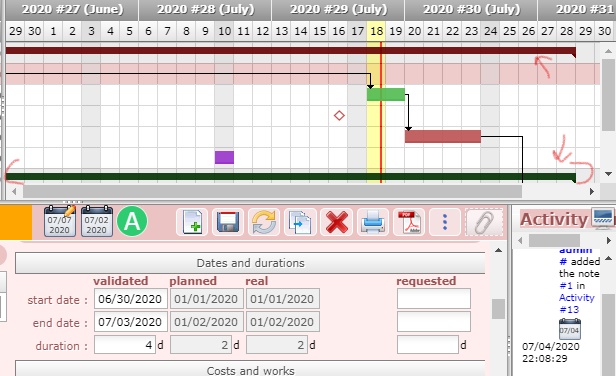
3. I can't see the beginning of the baseline project, how to show it? as shown in attachment 3.

with respect..
1) Project Manager plans activities, name a responsible and assign resources to the activities.
Then resource connect to the tool and see assigned work.
You can do the same for all items, naming the responsible, so the connected resource sees all items (risk, action, activity) he/she is responsible for.
(NB : this is basic of all collaborative tools)
2)Black line is not the baseline, it is the consolidation of sub-items.
For instance, it is the duration of the project from all activities of the project.
3) default display is from current date, just change "start" date' on Gantt planning view or check "show all project".
Reading you questions, I guess you don't have much experience in project management.
I would highly advise you to follow-up some training on the subject.
Project Management is not an easy task, and it's important to understand all the notions before concidering using a tool.
Thank you