
Welcome to ProjeQtOr new Forum. We migrated old forum to the new website.
You will find all your posts here, with your usual account.
Just one point : you’ll have to reinitialize your password. Use “Lost password” feature.

I have tried all what have been said about the configuration of Emailing but nothing worked.
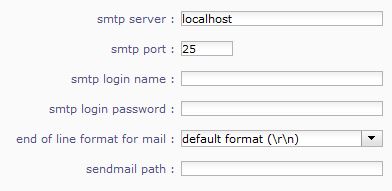

My version is the latest ProjeQtOr V4.3.1 (101)
Pls help what can I do now ??

What is your OS ?
On Windows, localhost will not work : you have to find a remote SMTP server.
On Linux/Unix, chck your sendmail configuration.
To help you, you may find information about error in log file.
My OS is Linux.
How to chck the sendmail configuration ?
Where is the error in log file located ?
Thks
Log file place is described in parameters.php file, which location is described in /tool/parametersLocation.php.
Hi, I am desperate as I tried all configuration possible but still am unable to make the email feature work.
It was working in the previous stable version, but I have reinstalled the latest version ProjeQtOr V4.3.1 (101) from scratch deleting the previous one.
Sorry but I did not know how to access the log file. I am somehow new to this application.
Can anybody assist me step by step on what to do and I will be very grateful.
Regards
Open file /tool/parametersLocatiopn.php
There you will find location of parameters.php file, as you defined in during install (default os /files/config/parameters.php)
Open this parameters.php file.
Here you'll find full name of log file (default location is /files/log)
Thanks this what I am getting:
2014-06-19 17:19:06 ** ERROR ** Error sending mail
2014-06-19 17:19:06 ** ERROR ** SMTP Server : localhost
2014-06-19 17:19:06 ** ERROR ** SMTP Port : 25
2014-06-19 17:19:06 ** ERROR ** Sendmail path : /usr/sbin/sendmail -t -i
2014-06-19 17:19:06 ** ERROR ** Mail stored in Database : #73
what to do next ?
You must now find your sendmail log file.
I my reminding is correct, should be /var/log/mail.log
When I tried to search for the file you are referring to what I could find is only the following :
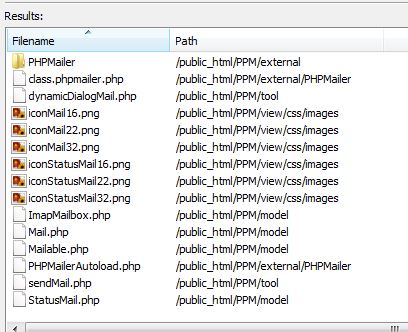
Any clew please ?

/var/log/mail.log is not part of projeqtor structure, '/var' is one of the main levels of linux folders (as /home, /etc, /usr, etc.)
Matter resolved. Email working.
Thank you for assistance.
Keep the good work. 😉