
Welcome to ProjeQtOr new Forum. We migrated old forum to the new website.
You will find all your posts here, with your usual account.
Just one point : you’ll have to reinitialize your password. Use “Lost password” feature.

Hi,
V7.4.2
On monday, february 25, a user entered time into is Timesheet and when he saved, received an error
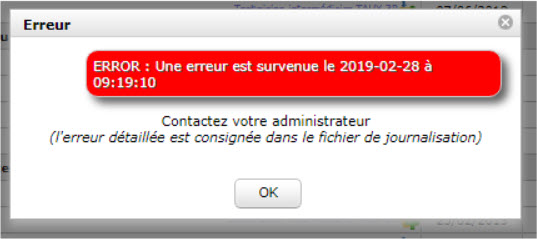
Look at the log file and saw this error
2019-02-25 09:44:12.612 ===== TRACE ===== WARNING - Left work not retrieved from screen
2019-02-25 09:44:12.612 ===== TRACE ===== - Maybe max_input_vars is too small in php.ini (actual value is 4000)
2019-02-25 09:44:12.612 ** ERROR ** [V7.4.2] ERROR **
2019-02-25 09:44:12.612 ** ERROR ** [V7.4.2] on file '/var/www/html/tool/saveImputation.php' at line (40)
2019-02-25 09:44:12.612 ** ERROR ** [V7.4.2] cause = Error - Maybe max_input_vars is too small in php.ini
so I went and change the value of max_input_vars to 5000, after changing this value, the issue was solved and the user is able to save is timesheet after entering is time.
But again, today, same error
2019-03-01 15:13:36.295 ===== TRACE ===== WARNING - Left work not retrieved from screen
2019-03-01 15:13:36.295 ===== TRACE ===== - Maybe max_input_vars is too small in php.ini (actual value is 5000)
2019-03-01 15:13:36.295 ** ERROR ** [V7.4.2] ERROR **
2019-03-01 15:13:36.295 ** ERROR ** [V7.4.2] on file '/var/www/html/tool/saveImputation.php' at line (40)
2019-03-01 15:13:36.295 ** ERROR ** [V7.4.2] cause = Error - Maybe max_input_vars is too small in php.ini
So my questions, do i just raise the max_input_var again to an higher value or the problem comes from somewhere else.
Note that it is not all users that cannot save there time.
Note that the user who cannot save is time has a lot of activity assigned to him
Also found out that after raising the php max_input_vars to 5000, it created another issue with screen customization plugin.
2019-03-01 14:43:26.857 ===== TRACE ===== === SCREEN CUSTOMIZATION ISSUE =====================================
2019-03-01 14:43:26.857 ===== TRACE ===== Certaines customisations d'écran ne sont pas cohérentes :
2019-03-01 14:43:26.857 ===== TRACE ===== - Projet
2019-03-01 14:43:26.859 ===== TRACE ===== Les customisations ont été corrigées automatiquement
2019-03-01 14:44:40.145 ===== TRACE ===== =====================================
2019-03-01 14:44:40.145 ===== TRACE =====
2019-03-01 14:44:40.145 ===== TRACE ===== PLUGIN SQL FILE : ../plugin/screenCustomization/temp.sql
2019-03-01 14:44:40.145 ===== TRACE =====
2019-03-01 14:44:40.334 ===== TRACE ===== Table "project" altered.
2019-03-01 14:44:40.334 ===== TRACE =====
2019-03-01 14:44:40.334 ===== TRACE ===== DATABASE UPDATED
2019-03-01 14:44:40.334 ===== TRACE ===== WITH NO ERROR
2019-03-01 14:44:40.334 ===== TRACE =====
2019-03-01 14:44:40.529 ===== TRACE ===== === SCREEN CUSTOMIZATION ISSUE =====================================
2019-03-01 14:44:40.529 ===== TRACE ===== Certaines customisations d'écran ne sont pas cohérentes :
2019-03-01 14:44:40.529 ===== TRACE ===== - Projet
2019-03-01 14:44:40.530 ===== TRACE ===== Les customisations ont été corrigées automatiquement
2019-03-01 14:50:17.278 ===== TRACE ===== === SCREEN CUSTOMIZATION ISSUE =====================================
2019-03-01 14:50:17.278 ===== TRACE ===== Certaines customisations d'écran ne sont pas cohérentes :
2019-03-01 14:50:17.278 ===== TRACE ===== - Projet
2019-03-01 14:50:17.280 ===== TRACE ===== Les customisations ont été corrigées automatiquement
2019-03-01 14:50:44.526 ** ERROR ** [V7.4.2] '' is not a valid length for a 'varchar'.
Value must be numeric and <=4000
I have attach log file for february 25 and today, march 1.
Regars

This issue occurs when user have many (several dozens and possibly hundreds) on lines in Timesheet.
You must ask yourself if it is normal : in my opinion, user with hundreds of lines will loose much time to identify the expected line.
So possibly :
- ended activities are not closed (think about closing old tasks)
- users should consider using display options (checkbnoxes on top of screen) to restrcit number of lines.
- possibly activities are too small (so too numerous) : don't forget is is project management, not production management
Hi,
After applying all your tips and knowing that your program is a project management and not a production management.
Would it be possible, to get rid of these limitations by programming a new way of how timesheet are displayed/saved or it's just not possible due to php limitations.
If something can be done we would probably be willing to pay for development.
Regards
This is just a PHP limit that can be changed.
Just set max_input_vars=100000 will make it work