
Welcome to ProjeQtOr new Forum. We migrated old forum to the new website.
You will find all your posts here, with your usual account.
Just one point : you’ll have to reinitialize your password. Use “Lost password” feature.

Hello,
The load of a resource is not counted in the calculation and the different views (planning, global planning, reports, ...). Version 7.3.3.
See example in attachment.

You just diudn't run planning calculation, that will update planned dates.
It's exactly what I did but same problem.
I also validate the planning.
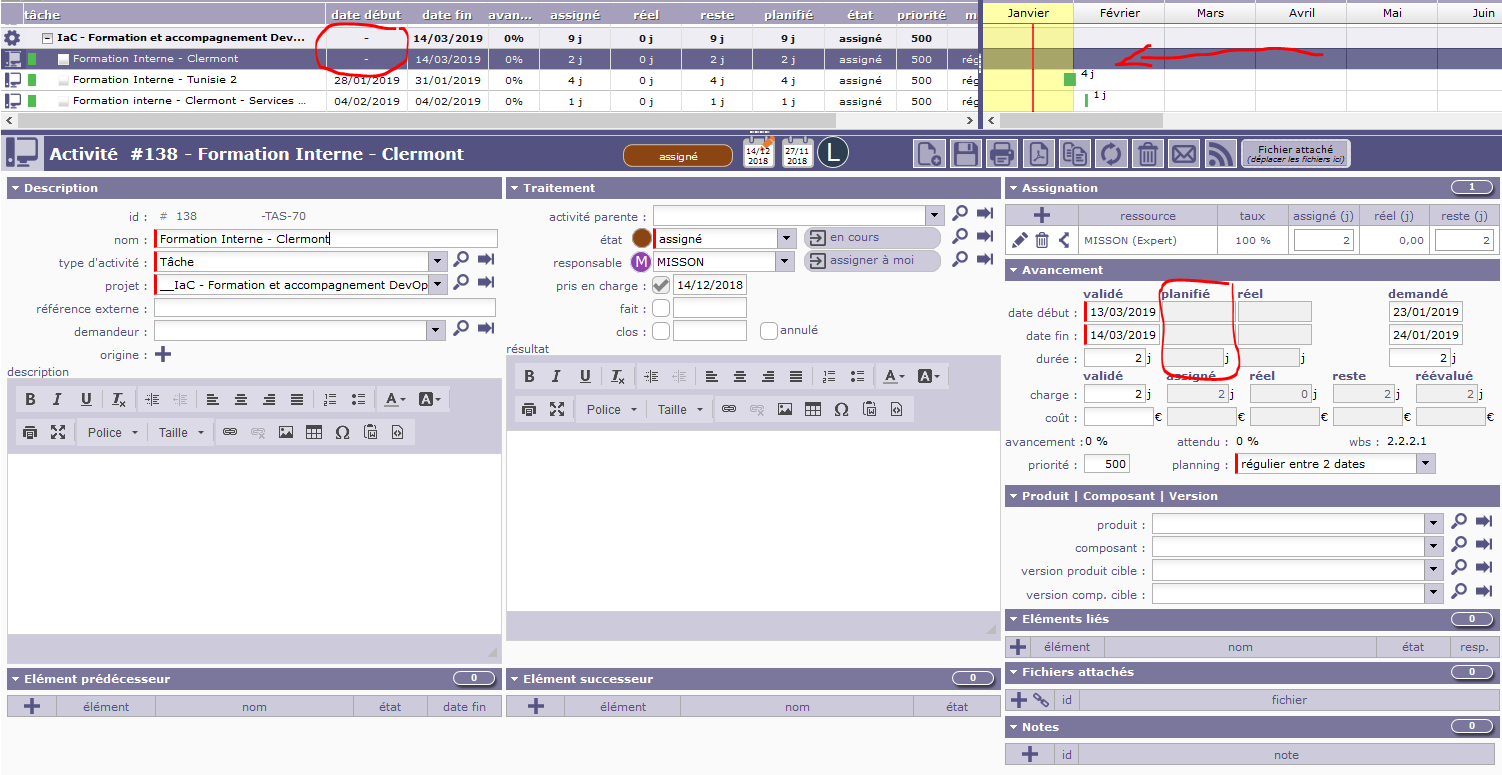
I haven't got any scheduled date in the task. Validate date (start and end) are inserted.
I guess you used "Administrative " for project type.
Administrative projects are not planned, there are used to store "out of duty" work (holidays, hillness, ...)
This is not an administrative project but an internal project.
Just to be sure your project is calculated : change something on allocation of a task (left work for instance).
The icon of the project should change : get an orange center.
Then calculate planning : does icon of project is still with orange center or does it go back to normal white center ?
I've change left work --> still have the project icon center white. (not orange)
Then i (re)calculate the planning --> still have the project icon center white. (not orange), no scheduled dates
Then I (re)change left work and (re)calculate the planning -->still have the project icon center white. (not orange), no scheduled dates.
New try today on another project.
Creating a new task then assigning a ressource (and charge) to this task.
Re calculate the project.
Still no scheduled dates.
(see the attached file)

You just did not run planning calculation.
Hi, Yes I did. I run it today but still same problem.
I've the same problem on differents projects. Same process to create project and task but on some task (not all) I have this problem.
1) Check if "fix planning" is checked on project.
Fixed project are not calculated.
2) Check that WBS of structure is correct : run Consistency Check on Administrative screen.
Be sure to use V7.3.3 are issues exist up toi 7.3.2
1) Fix planning isn't checked on project (and on project on superior level).
2) WBS structure seems correct. But Consistency Check report oan error and the script is unable to repare it. (see pictures in attached files)
I use v7.3.3


Hi,
Strange.
What is the Capacity of the resource ?
Capacity of the ressource : 1 ETP
Project assignment : 100%
Task assignment : 1 day
As you can see on the picture attached, some tasks don't have start date.

Are you sure you have rights to calculate planning for this project ?
Check specific access right for your profile, and possibly for the profile allocated to the project.
Also check for errors in log file.
I'm administrator and the specific ressource is "Team member"
Log file in attached file

There is nothing on log file that could explain the issue.
Only error logged is fixed on V7.3.4 and has no effect on planning.
Hi,
I had a llok a latet planning.
It is a "resource planning" view.
Does this issue occurs only for some resources ?
Can you post screenshot of resource definition.
Yes it's a resource view.
Some of resources are affected on some tasks.
Screenshot in attached file.
Upgrade to v7.3.4 version --> no more better result

If this resource is the one used on fist print, behavior is normal.
Resource is allocated to the corresponding project from 21/01/2019 to 08/03/2019
So this ressource cannot be planned of an activity "regular between dates" from 13/03/2019 to 14/03/2019.
Many thanks babynus. Everything works perfectly !
Evolution : is it possible to have a message when task can't be planned (with explanation) ?
If fact, it exists when planning cannot be "finished".
In your case, it cannot be even "Started".
We'll have a look to improve this to get message in both case (Ticket #3822).