
Welcome to ProjeQtOr new Forum. We migrated old forum to the new website.
You will find all your posts here, with your usual account.
Just one point : you’ll have to reinitialize your password. Use “Lost password” feature.

Hello
i have bought the plugin livemeeting. i can start the Meeting and mostly all functions are available at the first call. after the Second call the Buttons have a different look (see attachment). but in both cases the Buttons in the upper right (save and stop the Meeting) are not working and i must the Close the browser because the application wants that i save which i couldnt do.
thanks
Norbert

addtional:
i get this message if i use Screen customization on the form Meeting
Some screen customizations are not consistent any more with current version :
- Meeting
Screen customizations have been fixed automatically 😉

Hi,
I cannot reproduce the issue.
Can you please try again after cleaning browser cache ?
If issue persists, please post here any error logged on browser console and/or in projeqtor log file.
Can you also decribe step by step your use case (possibly I don't use the same way)
At last please post file projeqtor/model/custom/Meeting.php so that we can analyse it.
(It don't think customization is source of issue as I also tried it)
i have cleaned the browser Cache. no Change in behavior
description what i have done
i have installed the plugins Screen customization, kanban, live Meeting, backup, autoinstall
then i have created a Meeting and i have pressed the start Meeting button.
by the way Kanban doesnt Show the activities now. (by the first call i have seen my activities in the columns)
i have updated to 7.1.4. no Change.
correction: Kanban is working. i see my activities now
the activities in the KAnban are disappeared after i have invoked the Meeting Screen.
after reconnect the avctivities are normally displayed
Hi,
I just tested with same plugins on V7.1.4 and still cannot reproduce the issue.
Could you please check for errors in browser console (F12) and report them here ?
thanks.
NB : could you also tell which browser you are using ?
Internet Explorer 11
F12 Konsole Message
SCRIPT16389: Unbekannter Fehler.
Datei: ckeditor.js, Zeile: 101, Spalte: 478
with Firefox both Buttons are working and if i Switch in the Meeting to kanban instead of Action / decision /questions i see my activities.
everthings Looks good
Hi,
To fix on IE, add 1 line after line 4113 in projeqtor/view/projeqtor.js, like this : (line to add is the last one)
function CKeEnd(CkHeight,numEditor) {
  if (doNotTriggerResize) return;
  if (! dojo.byId('ckeditorObj'+numEditor)) return;
no Change. with Firefox still working
Did you clean browser cache ?
Do you still have error in browser console ?
browser Cache is deleted
error message see attachment
thanks
Norbert

Hi,
I just faced this issue on anoter workstation : it seemed the plugin was not detected as correctly installed.
Just reinstalling is worked fine.
I'm not sure it is your use case, but could you please try a,d re-install liveMeeting plugin ?
i have reinstalled it. no change
Strange, I cannot reproduce.
It works fine for me on IE11.
Do you have any plugin / extension / module on your IE ?
If so, could you try and disable all ?
Also try and axplain your use case step by step.
If I understand the begining :
-select meeting icon
- select a meeting
- click on "start meeting" :here, if I understand, display is correct...
- and then whet do you do ? quit live meeting ? how ?
please detail so that I can try and reproduce.
Strange, I cannot reproduce.
It works fine for me on IE11.Do you have any plugin / extension / module on your IE ?
If so, could you try and disable all ?Also try and axplain your use case step by step.
If I understand the begining :
-select meeting icon
Yes
- select a Meeting
Yes
- click on "start meeting" :here, if I understand, display is correct
No in the Kanban columns are no activities (But there Must be two activities which are Shown in the kanban form)
- and then whet do you do ? quit live meeting ? how ?
I Press the button in the Upper Right corner (caption is „stop Meeting“ which should leave the livemeeting, but nothing happens
When i use Firefox and i Press that button the livemeeting Form is closed
please detail so that I can try and reproduce.
Later on i am Looking for IE Extension.
deactivating IE Extensions has no effect.
I have tested a second Installation of IE on our Terminal Server with the same behavior.
What is the exact version of IE ?
On which OS ?
Do you use some compatibility mode ?
What is the exact version of IE ?
11.0.9600.18053
On which OS ?
Win 8.1 Pro
Do you use some compatibility mode ?
No
Hi,
I just tested with same versions as yours.
Had Win 8.1 run on VM, with IE 11.0.9600
(only patch level different from yours)
All works fine on my side.
So it can be : server issue or side effect of extensions.
To check server side issue, please test your use case on https://test.projeqtor.org.
You can use account admin/admin
Do you reproduce on this instance ?
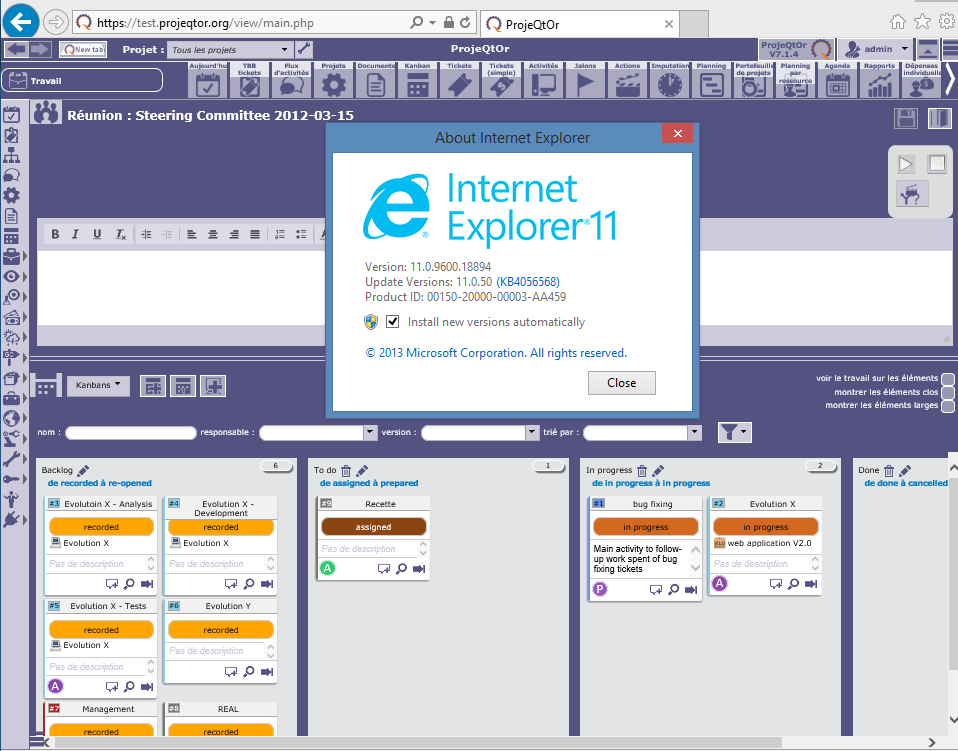
on your instance it works fine.
on my instance with Firefox it works fine.
only on my instance with IE it doesnt work.
i have also installed the plugins KANBAN and the LIVeMeeting on my second Installation on the same Server. Same effect.
OK, as it works fine on our test instance, it seems to be a server side (or network) issue.
What is the configuration of your server :
- OS
- Apache version
- PHP version
- MySql Version
Do you have any network devides between you and your server (proxy, firewall, VPN, ...) ?
OK, as it works fine on our test instance, it seems to be a server side (or network) issue.
What is the configuration of your server :
- OS
Ubuntu 16.04.3
- Apache Version
Apache 2.4.29
- PHP Version
7.1.13
- MySql Version
5.7.20
Do you have any network devides between you and your server (proxy, firewall, VPN, ...) ?
azure Firewall