
Welcome to ProjeQtOr new Forum. We migrated old forum to the new website.
You will find all your posts here, with your usual account.
Just one point : you’ll have to reinitialize your password. Use “Lost password” feature.

We can add any of the reports to the Today screen of ProjeQtor.
However, this control (clockface) is provided only in the concerned Reports screens.
A more intuitive place for this control is right on the Today screen itself!
In other words, if we want to customize the Today page, that control should be provided on that same page!
Suggestion:
Please provide an "Add section..." button at the bottom of the Today screen.
If we click on it, ProjeQtor should show the list of reports.
Let the user select the report and press the clockface button there.
Note that once a section is added like this, it should also have a X button to remove it from the Today page.

It's not so simple, as you can add a report "with selected parameter" (and possibly add several times the same report with differnet parameters)
That's why this can be done only on report page.
Note that once a section is added like this, it should also have a X button to remove it from the Today page.
This already exists
I must also add, it's alway a good option to dispay the report before adding it on today page...
Note that once a section is added like this, it should also have a X button to remove it from the Today page.
This already exists
I checked this out.
Indeed, the reports added to Today page cannot be removed, as there is no button provided to remove a report from the Today page.
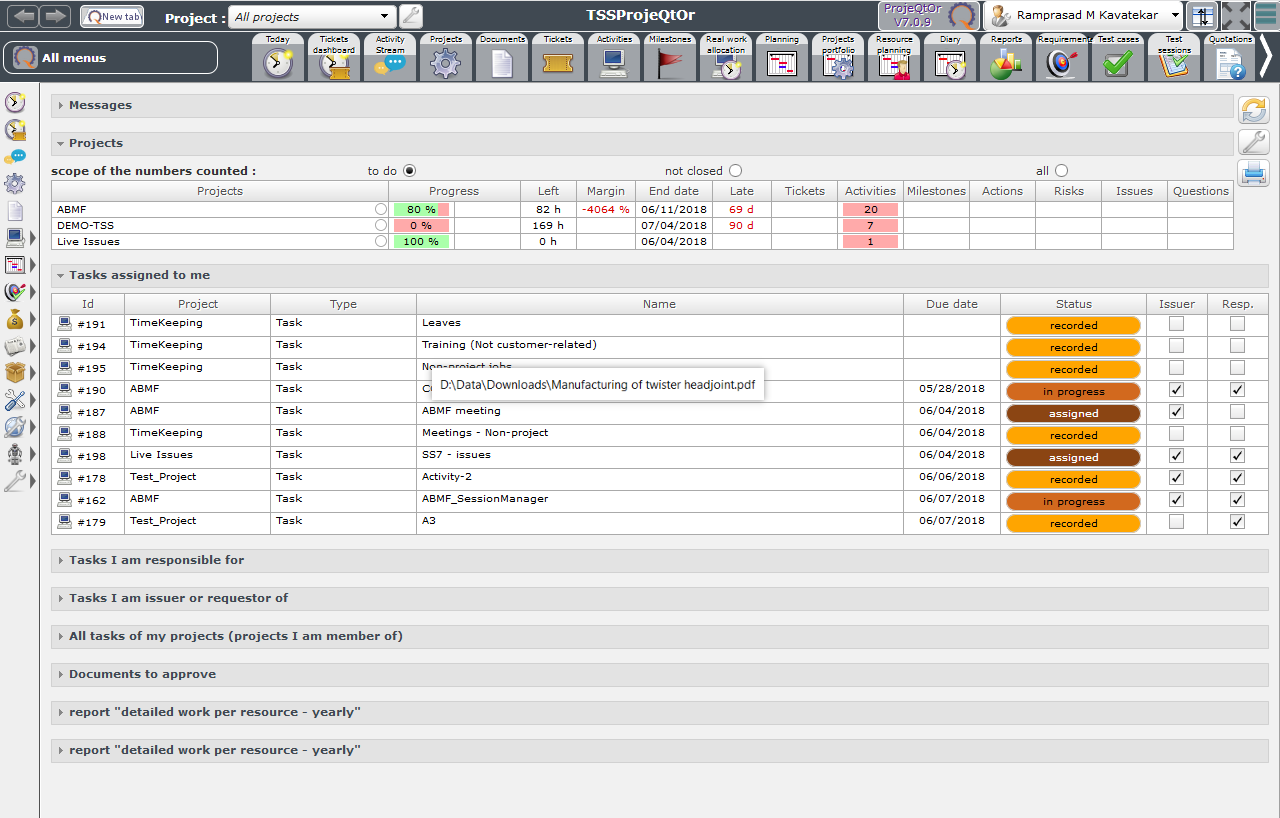
Even if I expand the reports, the buttons are not visible.

This is s bug. [BUG#1]
Secondly, when I expand the reports, they show an error (see the last screenshot).
The original report shows valid results on the Report page.
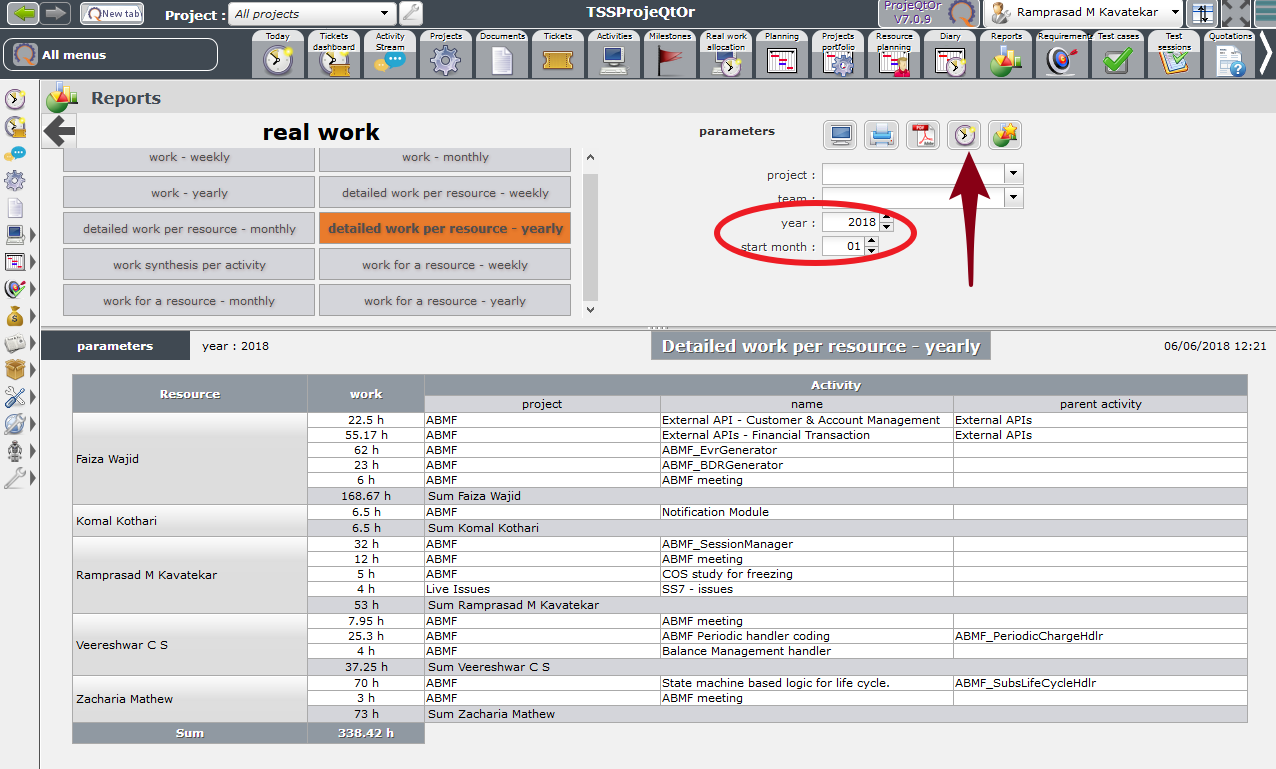
The screenshot highlights that I have chosen Jan of 2018.
But if the same report is added to the Today page, it states that I have not selected a month.
This is a strange error, because it does not let me even select a month. How do I get rid of this error??
[BUG#2]
While trying to troubleshoot, I ended up inserting two identical reports on the Today page, which I cannot remove!
I checked this out.
Indeed, the reports added to Today page cannot be removed, as there is no button provided to remove a report from the Today page.
TodayPageCannotRemoveReports.png
Even if I expand the reports, the buttons are not visible.
ReportsInTodayPage.png
This is s bug. [BUG#1]
Please don't call it a Bug unless you are sure you read the f..g user guide.
It is clearly explained that Today parameters are available throught the parameter button (on top right)
The screenshot highlights that I have chosen Jan of 2018.
But if the same report is added to the Today page, it states that I have not selected a month.
This is a strange error, because it does not let me even select a month. How do I get rid of this error??
This looks like an issue.
Ticket #3425 recorded
Note that once a section is added like this, it should also have a X button to remove it from the Today page.
This already exists
Hey my suggestion was to have an X button in the section, to which you clearly replied that the X button already exists.
I never suggested to have the button in the Parameters dialog, neither did you refer to it in your reply.
Thus I looked for the X button in the Report section itself. And didn't find it there.
So where is the question of reading the f..g user guide??
Besides, the f..g user guide does NOT say anything about the reports added to the Today pages.
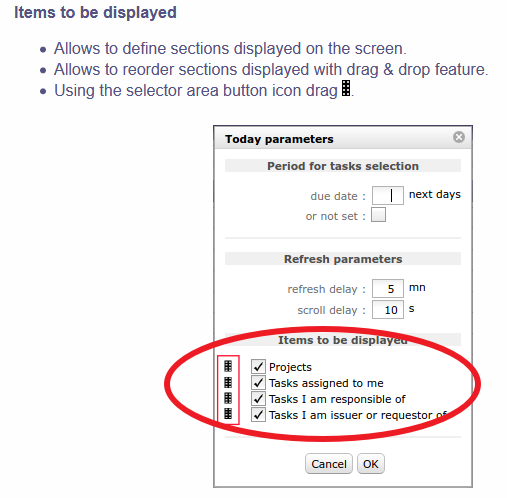
A user cannot intuitively know that if he adds some reports, they would be added to that list!
The understanding of a product should not be left to user's trial and error.
Suggestion: Add the following line to the bullet list:
Now you can hide or delete any or all reports.
Entry added to user manual