
Welcome to ProjeQtOr new Forum. We migrated old forum to the new website.
You will find all your posts here, with your usual account.
Just one point : you’ll have to reinitialize your password. Use “Lost password” feature.

Hello,
First of all, sorry for my poor english !
I tried to re-order my projects in the project view by drag'n drop projects lines : it wotks well !
Now, in the planning view :
- if i select one specific project, the project header appear at the bottom of the list (in the rigth side of the screen)
- if i select "all projects", it's "the bordel". I see project header, then activities of other projects and so on.
I saw a topic about wbs numbering that says that v4.2 version solves this issue.
I just install V4.2.3 version but still have this issue.
When I try to drag'n drop project headers, a message appear "Déplacement impossible ici"
Thanks for your help !

Could you please post some print screens ?
First screenshot : the planning view
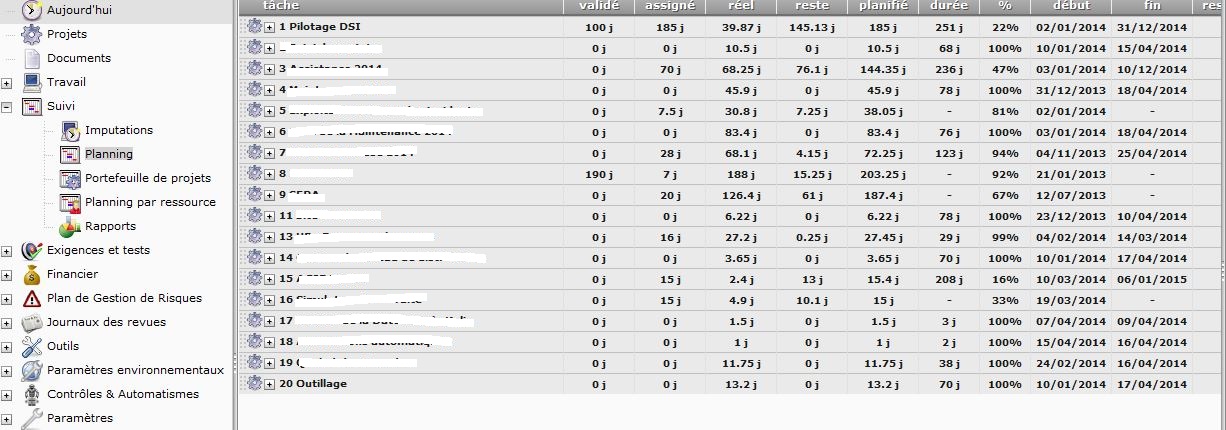
Second screenshot : the project "Pilotage DSI" is expanded, the tasks of this project appears under the project #16 and not below the project #1 !
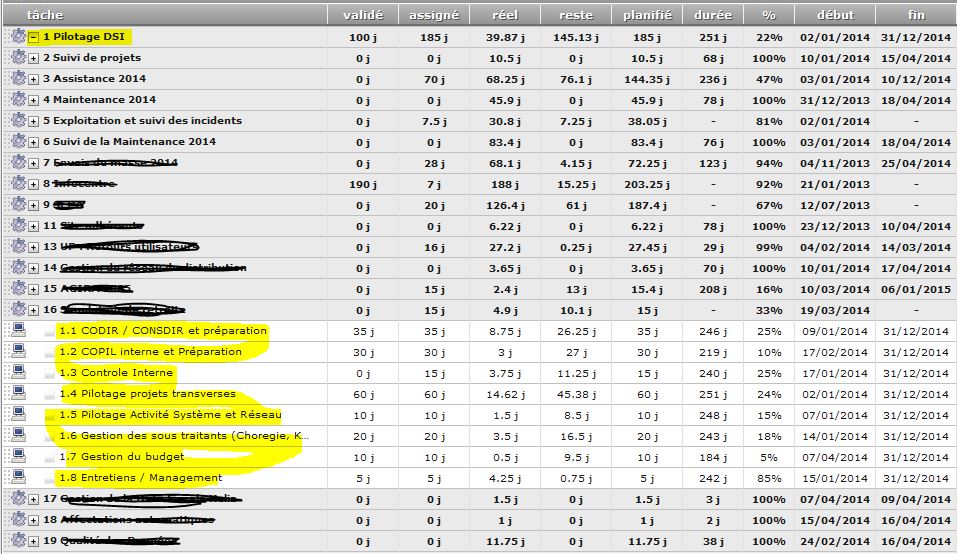
I found a "solution" : by editing then saving each activity, they get back to the "right" place in the project hierarchy !
If you came to the issue with version < 4.2, you had to move project again with V4.2 to retrieve correct display.
That's why saving activities fixed the issue.

You can use the "multiple update" to fix this in a single operation.
Just select all activities and press "save" button, it will update WBS and fix it.
It works to with milestones.
The better way is, of course, upgrading your version but, in our case, the process to upgrade operationnal version is quite long and we use this solution instead.
Thanks to all of you for your quick answers !