
Welcome to ProjeQtOr new Forum. We migrated old forum to the new website.
You will find all your posts here, with your usual account.
Just one point : you’ll have to reinitialize your password. Use “Lost password” feature.

Reporting for v 7.0.2
I have the Auto-planning check box selected, as shown below.
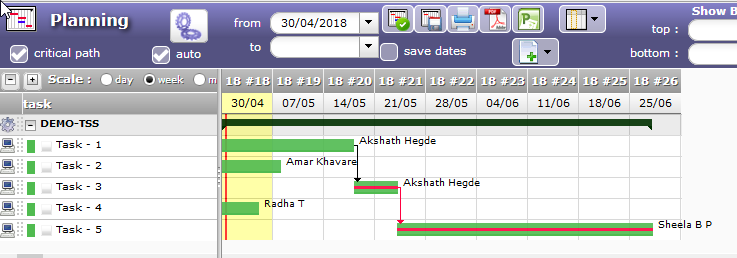
In an experiment, I selected task-5 and deleted the resource, which was assigned at 100% rate.
I again added the same developer, and assigned 40 hours of work at 20% rate.
Then I saved the task.
Since the auto plan check box was selected, I expected the task to be recalculated automatically.
But this did not happen.
Finally I had to press the Calculate activities planning button manually.
The screenshot shows the final result.
Thus there is a bug in Pr5ojeQtor: The auto-recalculation checkbox does not work in some cases.

In an experiment, I selected task-5 and deleted the resource, which was assigned at 100% rate.
I again added the same developer, and assigned 40 hours of work at 20% rate.
I tested, planning is recalculated after each update
Then I saved the task.
This has no impact (it should say "no change to update")
But take care : this check is active only when you see it !
It means only when you are on the planning screen...
Sure, user manual is not clear about that. We'll change this to be more clear.
I will test this again, and revert.
@check box being active only when visible:
I am sorry, but I did not understand this caution.
I was on the same screen (but working in the lower half, where I can change the assignment).
Which are the other use cases when we are NOT on this page, and therefore the recalculation does not automatically happen?
Our PMs must understand this tip properly.
Which are the other use cases when we are NOT on this page, and therefore the recalculation does not automatically happen?
If you are on screen Activity
I checked this feature, and confirmed that it works fine.
However, during the testing, I noticed that tasks for a resource were overlapping. This was unusual, so I investigated by right-clicking on each task. I found that the resource (Akshath Hegde) was assigned 100% to each task, yet ProjeQtor split his daily hours among three tasks.
The screenshots below explain this situation:
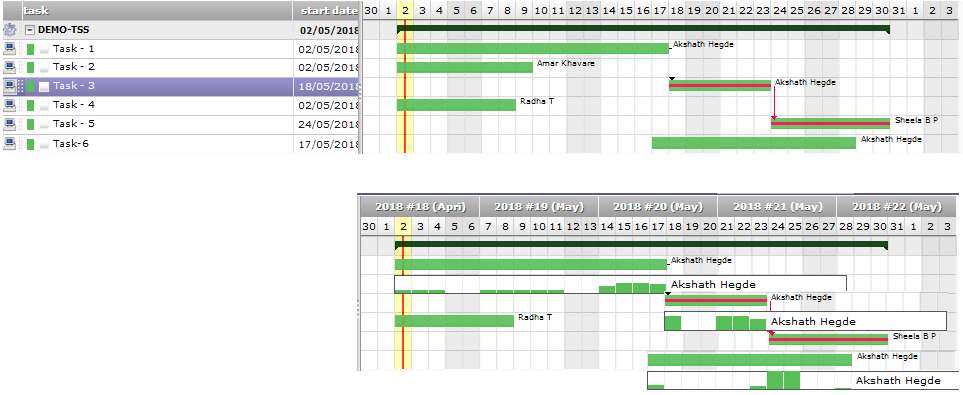
So the question is, how exactly did ProjeQtor reduce the number of hours on a daily basis (from a constant 8 hours/day)?
Does this method ensure that these three tasks are finished in least amount of time? (Two of the three tasks were on critical path.)
It may depend on assignment rate of planning mode.