

Online
manual

Online manual

All features are explained in the user manual (in English).

Frequently Asked Questions

    • ProjeQtOr is a web based application with simple components: Apache, MySQL or PostgreSQL, and PHP.
      ProjeQtOr does not require a large infrastructure: 2 CPUs, 100 MB of disk space, and 4 GB of RAM are sufficient.


    • ProjeQtOr is available in both modes.

      As an open-source application, it can be installed on-premises, on your own servers, for complete control over your data and infrastructure.
      We also offer a turnkey cloud hosting solution: your instance is installed in SaaS mode, maintained, secured, and backed up by the ProjeQtOr team, without any technical management required from you.

    • ProjeQtOr can be installed on your server (Linux, Windows) or used via our hosted service. Installation requires a web server, PHP, and a MySQL/MariaDB database.

      Download the application and unzip it into your web server directory.

      See installation video
      See prerequisites

    • Yes. The tool is fully customizable.

      While it's particularly well-suited to IT professionals (IT services, IT companies, CTO), it can be used in all sectors.

      We have examples in industry, construction, services, engineering, healthcare, logistics, training, consulting firms, and food industry.

      But there are no limits, and ProjeQtOr is adaptable to all contexts.

    • Yes. ProjeQtOr allows you to import projects, resources, activities, tickets, or any other type of object from other systems using several mechanisms:

      • Importing CSV or Excel structured files,
      • REST web service API for automated data exchange,
      • Import projects from MS-Project XML files using our add-on plug-in

      This allows for a gradual transition and integration into your information system.

    • Yes, ProjeQtOr automatically calculates dates based on workload, availability, constraints, resources, and milestones.

      It's possible to schedule a global calculation for all projects at frequencies you define, allowing you to reallocate resources according to project priorities.

    • ProjeQtOr offers several ways to interface with an external system

      • CSV and XLSX exports and imports
      • Automatic imports
      • A REST web services API
      • Webhook publishing with an additional plug-in
      • GitHub integration with an additional plug-in

    • ProjeQtOr does not include any specific modules for interfacing with a given ERP system—there are simply too many: SAP, Sage, Oracle ERP, Microsoft Dynamics, Zoho One, Dolibarr, Odoo, Excel, internal tools, and more. However, ProjeQtOr offers a secure REST web services API that can be called from any third-party application.

      We can also assist you in implementing such interfaces or develop a custom interface for you. Contact us.

    • Each object (project, activity, ticket, deliverable, etc.) has an integrated discussion thread. You can also attach files, track the history, and automatically notify your colleagues.

    • Yes. The Documents module allows you to manage versions, reviews, validations and access restrictions per project.

    • Yes. Thanks to our User Qlub, you can vote on priority of improvements, share your feedback, and directly influence the future orientation of ProjeQtOr.

      You can also suggest improvements in the dedicated section of our forum.

    • No, the services we offer are the same for everyone, with the same commitments.

      We do not adapt our services and commercial terms to public, non-profit, or other organizations.
      The software is open-source; you can use it for free, but our services are non-negotiable.

      See our general terms and conditions of sale.

    • We offer free support without any guarantee on our forum.

      We also propose a professional support service with a guaranteed response time to ensure your secure use of ProjeQtOr.

      Our experts can also provide assistance with installation, configuration, and best practices for use.

    • Yes: ProjeQtOr is compatible with Scrum terminology. You can manage Sprints, User Stories, Epics, Product Backlogs, and Sprint Backlogs.

      But ProjeQtOr is also compatible with traditional methodologies, waterfall modeling, and hybrid approaches.

      You can get more information on Agile features and how they work in ProjeQtOr.

    • Yes. You create your User Stories, group them into Epics, and distribute the User Stories across Sprints through the Product Backlog.

      You can then easily manage the progress of your current Sprint in the Sprint Backlog, using Kanban board.

    • You can control the coverage of requirements, validate deliverables, record non-conformities and automatically generate compliance reports.

    • Yes. The software includes dedicated modules: requirements, testing, risks, indicators, deliverable management, and complete traceability.

      You can track everything on your projects in ProjeQtOr.

      In addition, all updates are logged: you know who changed what and when.

Submitted Successfully

We will respond soon

Can't find what you're looking for?

Our forum is full of information that may interest you, and for more information about our services,
software coverage or terms of use, you can contact us directly.

To get started with ProjeQtOr

Software installation

Install your preferred PHP/MySQL stack and enjoy collaborative mode!

Technical information & prerequisites

ProjeQtOr is a web application. Therefore, you will need:

  • An HTTP server: Apache or NGINX
  • A database: MySQL, MariaDB, or PostgreSQL
  • A web server: PHP

Consult the compatibility tab to check the compatible versions of these infrastructure elements based on the ProjeQtOr version.

Compatibility Matrix
ProjeQtOr Versions PHP Versions MySql Versions
ProjeQtOr V1.0 to V6.4 PHP 5.2 to PHP 7.0 MySql 5.6 to MySql 8.0.19
ProjeQtOr V6.5 PHP 5.2 to PHP 7.1
ProjeQtOr V7.0 to V8.3 PHP 5.4 to PHP 7.3
ProjeQtOr V8.4 à V8.5 >PHP 5.4 to PHP 7.4
ProjeQtOr V8.6 MySql 5.6 to MySql 8.3
ProjeQtOr V9.0 to V9.5 PHP 5.6 to PHP 8.0
ProjeQtOr V10.0 PHP 5.6 to PHP 8.1
ProjeQtOr V10.1 to V10.2 PHP 7.0 to PHP 8.1
ProjeQtOr V10.3 to V11.1 PHP 7.0 to PHP 8.2
ProjeQtOr V11.2 to V12.0 PHP 7.4 to PHP 8.2
ProjeQtOr V12.1 to V12.2 PHP 7.4 to PHP 8.3
ProjeQtOr V12.3 PHP 8.0 to PHP 8.3
ProjeQtOr V12.4 and above PHP 8.0 to PHP 8.4

ProjeQtOr requires some PHP extensions to function correctly.

  • gd ⇒ for graphical reports
  • imap ⇒ to import tickets through emails
  • mbstring for UTF-8 compatibility
  • mysql  for access to the database
  • openssl for email sending if using authentified SMTP server
  • pdo_mysql ⇒ for access to the database
  • pdo_pqsql  for access to the database
  • pgsql ⇒ for access to the database
  • php-xml ⇒ for XML parsing
  • zip ⇒ for plug-ins management and for exports to Excel format
  • curl ⇒ for some plugins

Overall, your server sizing will depend on your use of ProjeQtOr, specifically:

  • how many users are connected simultaneously,
  • what operations they perform (calculating plannings for many projects is more resource-intensive than viewing tickets),
  • how many projects, activities, tickets, etc.

To give you an idea, here are recommendations for the minimum configuration for reasonable use by an average team (ten to twenty users).

Processors
– Minimum 2 CPUs – especially if MySQL and Apache/PHP are on the same server.
– Choose the best possible CPU frequency.

Disk Space
– Minimum 100 MB for the application
– 100 MB to 1 GB for the database and attached files
– We recommend using SSD drives

Memory
– Minimum 4 GB of RAM

Configuration for MySql

To be modified in the my.ini or my.cnf file:

  • innodb-default-row-format=dynamic
  • Collation at database creation
    For ProjeQtOr < V10.0: utf8_general_ci
    For ProjeQtOr >= V10.0: utf8mb4_general_ci

Configuration for PHP

To be modified in php.ini (the one for the Apache module):

  • max_input_vars = 4000;
    This must be greater than 2000 for the Timesheet screen to function correctly.
  • max_execution_time = 30;
    Recommended minimum.
  • memory_limit = 512M;
    Recommended minimum for PDF generation.
  • file_uploads = On;
    To allow adding files and managing documents.
  • error_reporting = E_ALL & ~E_DEPRECATED & ~E_STRICT

Version history

Transparency and continuous improvement are part of ProjeQtOr’s DNA.
Consult the complete version history to follow, step by step, all the changes made to the tool.

New version of Projeqtor V12.4

A version focused on governance, agility, and operational efficiency

Version 12.4 of ProjeQtOr marks a significant evolution of the solution, introducing key features for multi-project governance, agility, and planning, along with numerous ergonomic improvements.

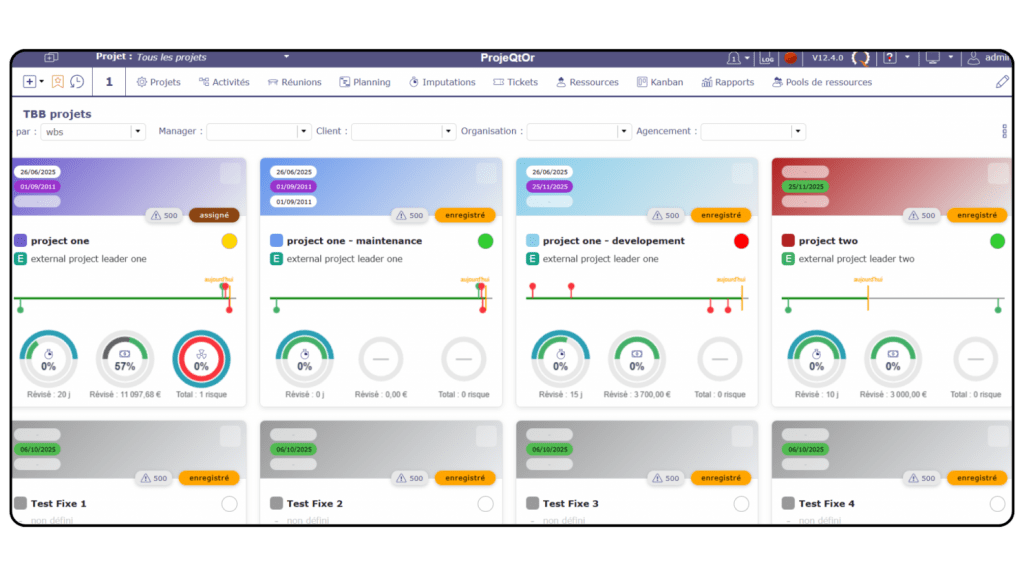
 New Project Dashboard (Project TBB)

 The new Project TBB has been designed to provide a clearer and more actionable view of the project portfolio.

Key enhancements:

    • A new graphical and synthetic dashboard dedicated to projects

    • Project filtering via the selector to improve readability

    • Configurable display according to user needs

    • Three savable views, allowing different layouts depending on context (governance, monitoring, overview)
Agile / Scrum: dedicated screens and objects

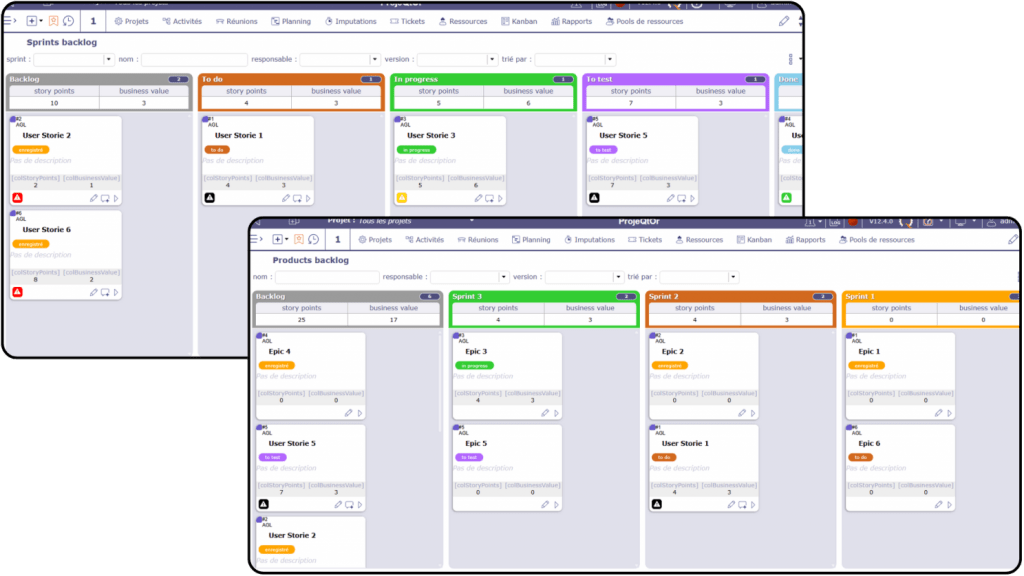
ProjeQtOr strengthens its support for Agile methods, particularly Scrum, with dedicated screens and objects that integrate standard terminology and practices.

Key mappings:

    • User Story: Use Case

    • Epic: Grouping of User Stories

    • Sprint: Planning of User Stories

    • Sprint Backlog: Sprint progress tracking

    • Product Backlog: Distribution across sprints and overall progress overview

These enhancements facilitate the adoption of Scrum while maintaining consistency in hybrid project governance.
Based proportional planning

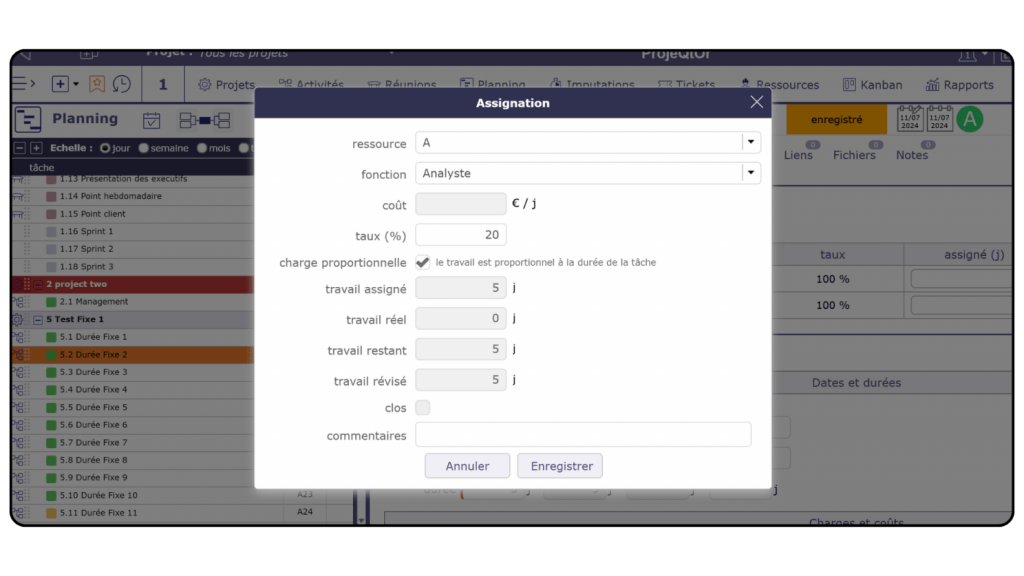
Version 12.4 introduces a new planning option for activities with a fixed duration.

Main features:

    • Automatic workload calculation based on duration

    • Available for “fixed duration” and “regular” planning modes

    • Support for “sliding” durations

    • Absence management taken into account

    • Option can be enabled by default per planning mode

This approach improves consistency between duration, workload, and actual capacity.
Minor evolutions and ergonomic improvements

Version 12.4 also delivers numerous improvements focused on user comfort and day-to-day efficiency.

Ergonomics:

    • Time tracking: name filter always visible

    • Calendar: “no-hours” area dynamically adjusted to content

    • New option to hide the menu on TBB-type screens

Miscellaneous:

    • Automatic update of technical progress

    • Time entry validation: new filter for weeks with or without errors

    • “Forgot password” option (can be disabled)

API:

    • Ability to select returned fields

Reports:

    • Colored planning with editing over a full year

Meetings:

    • Added button to purge assignments

These adjustments enhance usability and improve analysis quality.

Download latest version of ProjeQtOr

Version 12.4 is now available here

Scroll to Top