
Welcome to ProjeQtOr new Forum. We migrated old forum to the new website.
You will find all your posts here, with your usual account.
Just one point : you’ll have to reinitialize your password. Use “Lost password” feature.

Greetings
I am in my first attempt at installing projeqtor. This looks like a very useful and interesting project AND it seems to be alive - - - - thank you!
In the process of setting up the configuration files I am running into something that I do not understand how to fix.
The error message is:
> impossible to write '../tool/parametersLocation.php' file, cannot write to such a file : check access rights
I have a directory called ../files/config/ that contains both an empty directory /parameters and a file called parameters.php .
Both the directory and the file are set to open permissions (0777 (not the best for security but this is attempt #1)).
What do I do/change to satisfy the configuration template?
TIA

Issue concerns directory projeqtor/tool
During configuration process tha application will write a file in this fomder to complete the configuration.
Issue concerns directory projeqtor/tool
During configuration process tha application will write a file in this fomder to complete the configuration.
This I understand (that a file will be written in a specific folder).
So I then need to create a directory 'tool' in the projeqtor directory?
Regards
Dee
Issue concerns directory projeqtor/tool
During configuration process tha application will write a file in this fomder to complete the configuration.This I understand (that a file will be written in a specific folder).
So I then need to create a directory 'tool' in the projeqtor directory?
So I found the directory 'tool' in the /web/projeqtor .
Reset the permissions of /web, /web/projeqtor/ and /web/projeqtor/tool to 0777 .
Error impossible to write . . . still appears.
AFAIK I cannot have more open permissions than chmod 0777.
What can I do to complete the configuration?
Error impossible to write . . . still appears.
Are you sure it's on same folder ?
try
cmod -R 777 /web/projeqtor
Error impossible to write . . . still appears.
Are you sure it's on same folder ?
try
cmod -R 777 /web/projeqtor
Thank you for your responses!
tried your suggestion
added using ~/web/projeqtor/files/config/parameters.php as the value for 'Parameter file name'
error is now
>incorrect value for 'Parameter file name', does not include a valid directory name (~/web/projeqtor/files/config)
sorry - - - I'm confused.
>incorrect value for 'Parameter file name', does not include a valid directory name (~/web/projeqtor/files/config)
This parameter expectx a file name, not a directory
Try (absolute path)
/web/projeqtor/files/logs/projeqtor_${date}.log
or (relative path)
../files/logs/projeqtor_${date}.log
>incorrect value for 'Parameter file name', does not include a valid directory name (~/web/projeqtor/files/config)
This parameter expectx a file name, not a directory
Try (absolute path)/web/projeqtor/files/logs/projeqtor_${date}.logor (relative path)
../files/logs/projeqtor_${date}.log
Please see attachments (screenshots).
I think I have answered the configuration screen requests but the error is different.
Sorry - - - how do I fix this?


Hello,
"max_input_vars=1000 is too small - value should be at least 2000, 4000 recommended - check your php configuration (php.ini)."
You have to open php.ini and change the value of "max_input_vars" to 2500.
Hello,
"max_input_vars=1000 is too small - value should be at least 2000, 4000 recommended - check your php configuration (php.ini)."
You have to open php.ini and change the value of "max_input_vars" to 2500.
I had used the following:
# locate php.ini
/etc/php/7.0/apache2/php.ini
/etc/php/7.0/cli/php.ini
/etc/php/7.0/fpm/php.ini
/usr/lib/php/7.0/php.ini-development
/usr/lib/php/7.0/php.ini-production
/usr/lib/php/7.0/php.ini-production.cli
and had changed the value of this:
; How many GET/POST/COOKIE input variables may be accepted
; max_input_vars = 4000
to 4000 - - - - which was the recommended number.
So you are suggesting to change all 6 of the php.ini files so that they all read 2500 for this variable NOT 4000?
Please advise.
(This posting couplet actually belongs to a different question that I asked - - - - I do not know how to move things to more accurately reflect the thread. That's an admin function sorry.)
Hi,
Don't focus on max_input_vars, it's not a major issue (pink message, not red)
I think Issue on directories is due to incorrect access rights to these folders.
Check rights and owner.
Possibly they belong to user who unzipped projeqtor zip instead of belonging to PHP user (apache or www-data depending on distro)
About max_input_vars, you need to change only file
/etc/php/7.0/apache2/php.ini
and set value to 4000 (2500 will be good, but 4000 should be best)
Don't forget to remove the comment character (;) and restart apache to take new parameter into account.
Hi,
Don't focus on max_input_vars, it's not a major issue (pink message, not red)
I think Issue on directories is due to incorrect access rights to these folders.
Check rights and owner.
Possibly they belong to user who unzipped projeqtor zip instead of belonging to PHP user (apache or www-data depending on distro)About max_input_vars, you need to change only file
/etc/php/7.0/apache2/php.ini
and set value to 4000 (2500 will be good, but 4000 should be best)
Don't forget to remove the comment character (;) and restart apache to take new parameter into account.
OK - - - - sorry learning what pointers mean and being a noob . . .
I used chmod -R and changed /web/projeqtor to 0777 which, aiui change things so that anyone can do anything.
Perhaps I need to chown the same to 0777 or ?????
Please advise.
chmod -R 777 should be enough to finish correct install
Please poste loggued error, if any.
chmod -R 777 should be enough to finish correct install
Please poste loggued error, if any.
No logs available in any location /projeqtor .
Should I check in /var/log files?
If so, where?
See screenshots with previous message for system responses in the configuration process.
TIA
Hi,
I just tested on Linux.
It seems there in an issue on latest step of DB generation.
Check content of table parameter.
First line has parameterCode='dbVersion';
If parameterValue='V0.0.0' , it is source of issue.
Just change to V7.2.4, all should work fine then.
We'll soon provide a fix for this issue.
Hi,
I just tested on Linux.
It seems there in an issue on latest step of DB generation.
Check content of table parameter.
First line has parameterCode='dbVersion';
If parameterValue='V0.0.0' , it is source of issue.
Just change to V7.2.4, all should work fine then.We'll soon provide a fix for this issue.
I've been quite busy so hadn't time to try and complete the install - - - trying to complete things this evening.
I was able to do the changes required in the php.ini files and that worked well.
Sorry - - - it is not clear where I find this 'content of table parameter' .
Where do I find this file (directory)?
I am on Debian stretch running postgresql 9.6 and php7.0.
TIA
Hello,
Sorry - - - it is not clear where I find this 'content of table parameter' .
Where do I find this file (directory)?
This is not a file, it is in your database, in table " parameter ".
Hello,
Sorry - - - it is not clear where I find this 'content of table parameter' .
Where do I find this file (directory)?This is not a file, it is in your database, in table " parameter ".
(Sorry I copied the information from a text screen and it doesn't look good but I don't know how to edit it to look like on my machine - - - - sorry!!!)
>postgres=# l
List of databases
Name | Owner | Encoding | Collate | Ctype | Access privileges
-----------+----------+----------+-------------+-------------+-----------------------
postgres | postgres | UTF8 | en_CA.UTF-8 | en_CA.UTF-8 |
projeqtor | postgres | UTF8 | en_CA.UTF-8 | en_CA.UTF-8 | =Tc/postgres +
| | | | | postgres=CTc/postgres+
| | | | | admin=CTc/postgres
template0 | postgres | UTF8 | en_CA.UTF-8 | en_CA.UTF-8 | =c/postgres +
| | | | | postgres=CTc/postgres
template1 | postgres | UTF8 | en_CA.UTF-8 | en_CA.UTF-8 | =c/postgres +
| | | | | postgres=CTc/postgres
test1 | postgres | UTF8 | en_CA.UTF-8 | en_CA.UTF-8 | =Tc/postgres +
| | | | | postgres=CTc/postgres+
| | | | | admin=CTc/postgres
(5 rows)
postgres=# c projeqtor
You are now connected to database "projeqtor" as user "postgres".
projeqtor=# dt
No relations found.
I'm no database expert but the above command sequence is what I find to list any and all tables.
The screenshot attached shows where the config page (in projeqtor) indicates that there IS a database but with errors for the various directories where setup is needed.
Please advise re: next step(s).
TIA
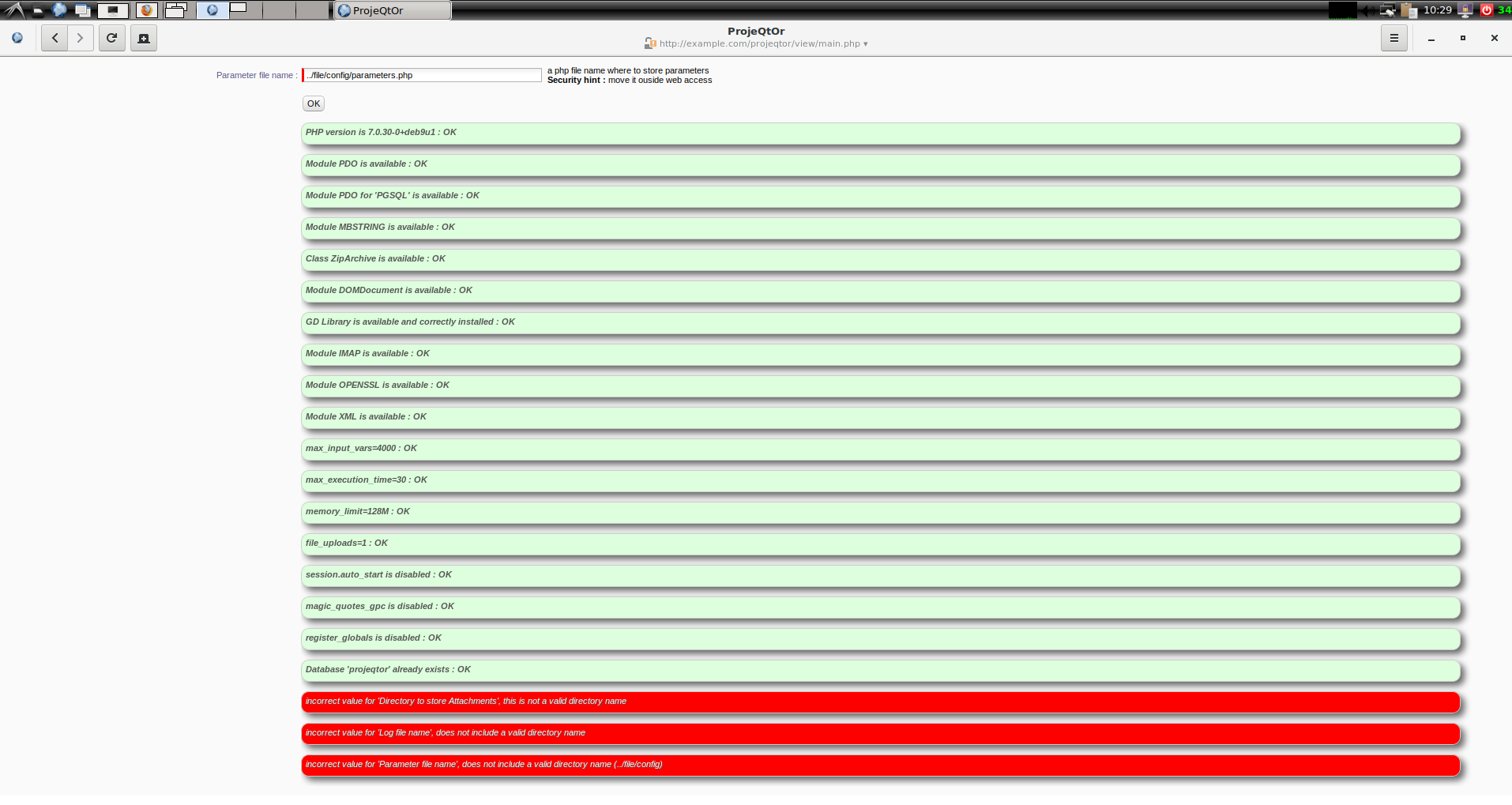
Your configuration is not complete.
Resolve issues pointed ou in red.
There you'll a a button "Continue".
At last, first connection of admin will populate database
Your configuration is not complete.
Resolve issues pointed ou in red.
There you'll a a button "Continue".
At last, first connection of admin will populate database
Worked on removing the problems but am now stuck on what I think might be the last issue.
Used
># chmod -R 777 /home/projeqtor/files/
root@machine4:/home/projeqtor/files# ls -l
total 0
drwxrwxrwx 1 root root 0 Oct 8 07:03 attach
drwxrwxrwx 1 root root 0 Oct 8 07:03 attachments
drwxrwxrwx 1 root root 48 Oct 9 08:30 config
drwxrwxrwx 1 777 root 0 Oct 9 08:36 logs
drwxrwxrwx 1 root root 0 Oct 8 06:00 reports
so I think the permissions are wide open. Yet
> incorrect value for 'Log file name', cannot write to such a file : check access rights
I am not sure how to have more open access rights.
Please advise on how to resolve this issue.
(Running on Debian stable using apache2 and postgresql9.6)
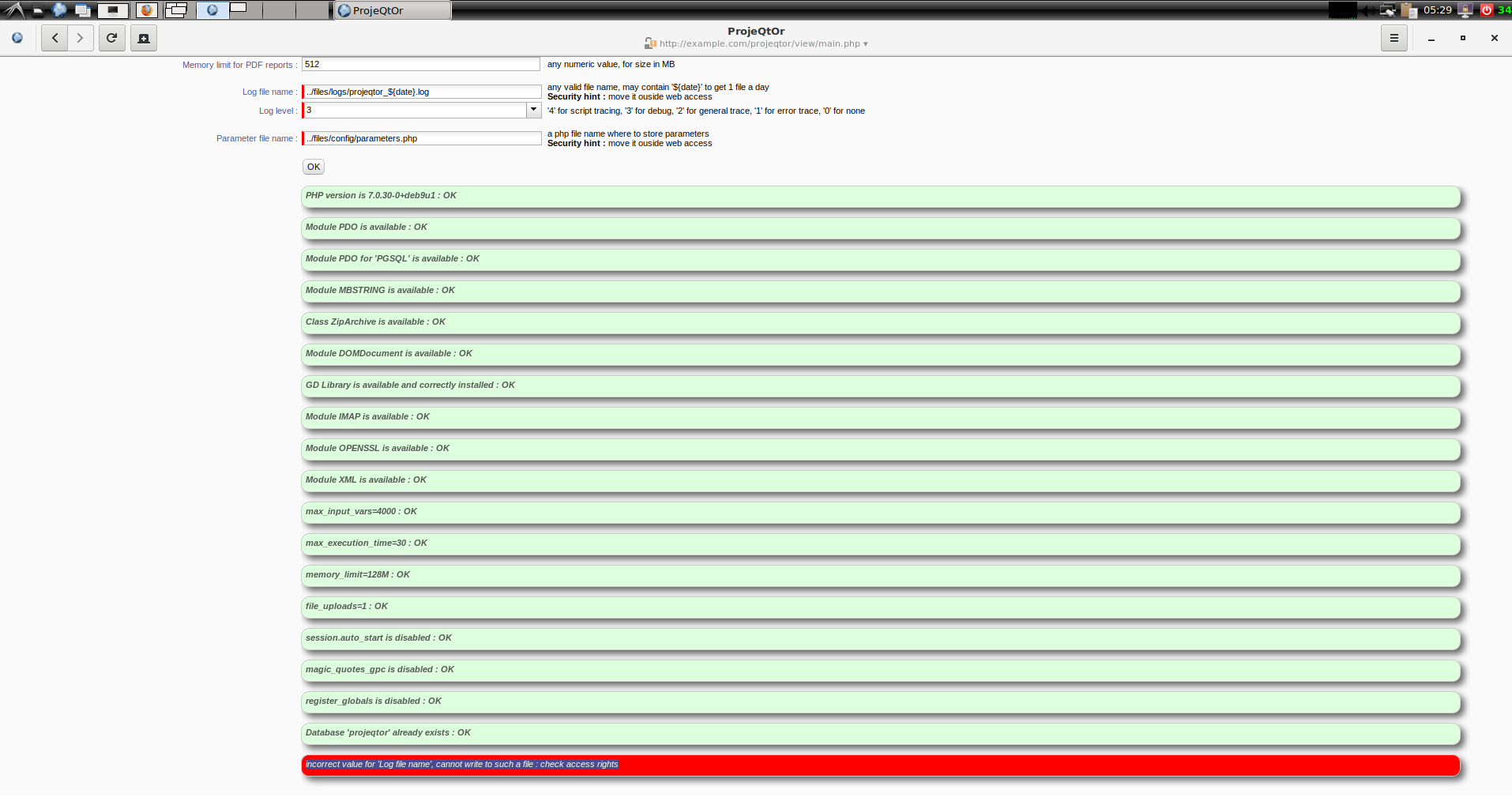
Look at your folders description.
you made a "chown 777" on files/logs
I guess user 777 is unknown
NB : you should make a
chown -R www-data: /var/www/hrml/projeqtor
adapt path to your config,
and change www-data to apache if you are on red-hat like distro.
Idea is to give onwnership of whole folder to php user.
Then you may
chmod -R 755 /var/www/hrml/projeqtor
(read access is enought for other users)
Look at your folders description.
you made a "chown 777" on files/logs
I guess user 777 is unknown(Interleaving for clarity)
Sorry - - - -had also done chmod 777 on the same files (directories).>NB : you should make a
chown -R www-data: /var/www/hrml/projeqtoradapt path to your config,
and change www-data to apache if you are on red-hat like distro.
Idea is to give onwnership of whole folder to php user.So www-data is what ???? (a user, a group, a directory or ????)
>Then you may
chmod -R 755 /var/www/hrml/projeqtor(read access is enought for other users)
OK - - - I understood that I only need to have 0755 permissions but as things just aren't installing very well I thought to throw things wide open in the hope that would allow the install to proceed (not happening though!).
I'm not understanding how with wide open permissions I'm still getting responses like:
incorrect value for 'Log file name', cannot write to such a file : check access rights
I hope my questions are not too stupid but I have no real experience in managing a server so some of the self evident items are for me quite opaque (question on what www-data is).
root@machine4:/home/projeqtor/files/config# chmod -R apache2: /home/projeqtor/files/
chmod: invalid mode: u2018apache2:u2019
Try 'chmod --help' for more information.
root@machine4:/home/projeqtor/files/config# chmod -R root: /home/projeqtor/files/
chmod: invalid mode: u2018root:u2019
Try 'chmod --help' for more information.
root@machine4:/home/projeqtor/files/config# chmod -R admin: /home/projeqtor/files/ (admin is master postgresql user for projeqtor)
chmod: invalid mode: u2018admin:u2019
Try 'chmod --help' for more information.
root@machine4:/home/projeqtor/files/config# chmod -R www-data: /home/projeqtor/files/
chmod: invalid mode: u2018www-data:u2019
Try 'chmod --help' for more information.
The just previous is my attempts to implement your suggestions.
Thanking you for your assistance
Look at your folders description.
you made a "chown 777" on files/logs
I guess user 777 is unknown>NB : you should make a
chown -R www-data: /var/www/hrml/projeqtoradapt path to your config,
and change www-data to apache if you are on red-hat like distro.
Idea is to give onwnership of whole folder to php user.Then you may
chmod -R 755 /var/www/hrml/projeqtor(read access is enought for other users)
Sorry - - - -doing some more experimenting and finding things.
Wow is it obvious that I really don't know what I'm doing.
It wasn't clear that there are files in directories controlled by apache, then there are the directories controlled by php, then there are the directories controlled by projeqtor, then there are the directories that the system uses - - - maybe not for control but they are also involved.
I tried your above suggested chown and chmod (to www-data in the /var system) that didn't achieve completion.
Also tried the same using root - - - that also didn't achieve completion.
So I have wide open permissions on the directories:
/home/projeqtor/
/var/www/example.com
~/web/projeqtor/
are there more directories that are part of this 'system' (all the pieces that make up the website and the specific software) that need to have the permissions changed?
TIA
are there more directories that are part of this 'system' (all the pieces that make up the website and the specific software) that need to have the permissions changed?
No, unless you move some projeqtor folders, that are by default on /var/www/html/projeqtor/files, but that you can (and possibly should) move outside web reach through global parameters screen
are there more directories that are part of this 'system' (all the pieces that make up the website and the specific software) that need to have the permissions changed?
No, unless you move some projeqtor folders, that are by default on /var/www/html/projeqtor/files, but that you can (and possibly should) move outside web reach through global parameters screen
I am quite prepared to have these directories outside of web reach but I'm thinking that it would be quite useful to actually have something working before I try to modify things even more. Just know that I'm quite confused and that nothing that I have been able to find or do has allowed the configuration and set up of projeqtor to run to completion.
Any suggestions as to what else needs doing?
TIA