
Welcome to ProjeQtOr new Forum. We migrated old forum to the new website.
You will find all your posts here, with your usual account.
Just one point : you’ll have to reinitialize your password. Use “Lost password” feature.

Hello
First of all I excuse my English, I'm Spanish .... 🙁 🙁
Second I am running the new application and especially in new projects. Projeqtor I really liked but I could not move much.
I read the manual but did not find a step by step and very urgent need to do ... I will implement in my work
Can you help me with the information, and displays it on a video Nose
thanks
Marcela

Unfortunately, there is no Step by Step manual.
Maybe later on, but I'm much too busy with versions to spend time on manual 🙁
Few hints :
Begin to define Customers, Contacts, Resources and Users
Then you can run into Projects, Affectations, Activities and Milestones
At this step, you can start planning
Then resources can run into tickets, activities and real work allocation
You will then be able to discover other functionalities step be steps.
Hello
If we say that customers and users opment resources and made for a small project. The issue is not how it's done to generate the planned dates and assigned to projects and activities. Since I'm starting from scratch when I'm plannig not add projects or activities ... Out emptied and shows me
I think I'm missing something :blush:
Please can you help me ....
Sorry, I don't catch what you mean.
The issue is not how it's done to generate the planned dates and assigned to projects and activitie
So what is the issue ?
Hello
The exact problem is that I can not place the plannig projects and activities. I did not find the bar to add a project or activity
I did not find the bar to add a project or activity
Maybe because you are using the planning view : it is not possible to create an object from empty planning.
You have to use the "Project" and "Activity" screens.
How to generate the planning if is empty?
How to generate activities and projects the date planned in the the "Project" and "Activity" screens?
How will generated the planned duration in the "Project" and "Activity" screens?
I already created a project and some activities but can not find how to assign these dates and how they relate to the time display
I appreciate your help .....
Oncee you have activities, you must assign resource to the activities and define some work (ProjeQtOr implements work driven planning).
Then you can go to planning screen and run planning calculation.
How to generate the planning if is empty?
How to generate activities and projects the date planned in the the "Project" and "Activity" screens?
How will generated the planned duration in the "Project" and "Activity" screens?
I already created a project and some activities but can not find how to assign these dates and how they relate the project and activity to the planning screens
I appreciate your help ..... 😳 😳
Again I
I did that already, allocate resources to activities. Actually I created only two.
How to generate the planning if is empty? This is what I do not understand.
I will like to do:
the planning screen
create the planned date and planned duration in the project and activity screens
I did not understand much........ forgiveness
Just go to planning screen and click the "Calculate planning" button (running gears)
All this is explained in the online user manual (you can access it with "F1" key)
:silly: :silly: :silly:
I've done it too many times of generate to planning screen and I click the "Calculate planning" button (running gears)
Selected the project in the planning screen (running gears)
I select a date
I select generate
And does nothing ........
The screen shows nothing. The screen remains the same, empty

Hello,
what Babynus said is that you have to create project first.
Use PROJECT screen, then create a new project (you need only name and short description to do this, you can fill other fields later...).
When your project is created, you need to describe project team (use affectations to add ressources to project), then you can create activities and milestones (tou can only affect ressources which have been affected to project).
Use previous and next element in activities and milestone to link then, so you will get your planning.
So, according to your way to plan project, you can at choice drive your project by delay (using fixed duration mode) or charges (using by exemple as soon as possible). If you drive by delay you only need to describe duration of tasks (or start and end date), if you drive by charges, you need to describe assigned charge for each ressources you put on duty.
I apologize for my english, but, cause you're spanish, i thnik you will understand me.
Regards,
Hello jmmbb and babynus
I've done
Creating several projects
Creating resources
Allocation of resources to projects
Creation of actividades
Allocation of resources to activities
Allocation of activities to projects
Creating milestones
Assignment of milestones
The problem is: :whistle: :whistle:
I generate to planning screen and I click the "Calculate planning" button (running gears)
Selected the project in the planning screen (running gears)
I select a date
I select generate
And does nothing ........
The screen shows nothing. The screen remains the same, empty
Please help
Is there some work for activities ?
If activities as no work allowed, you can't have a planning.
For exemple, see attachment (activity completed for "as soon as possible" planification)
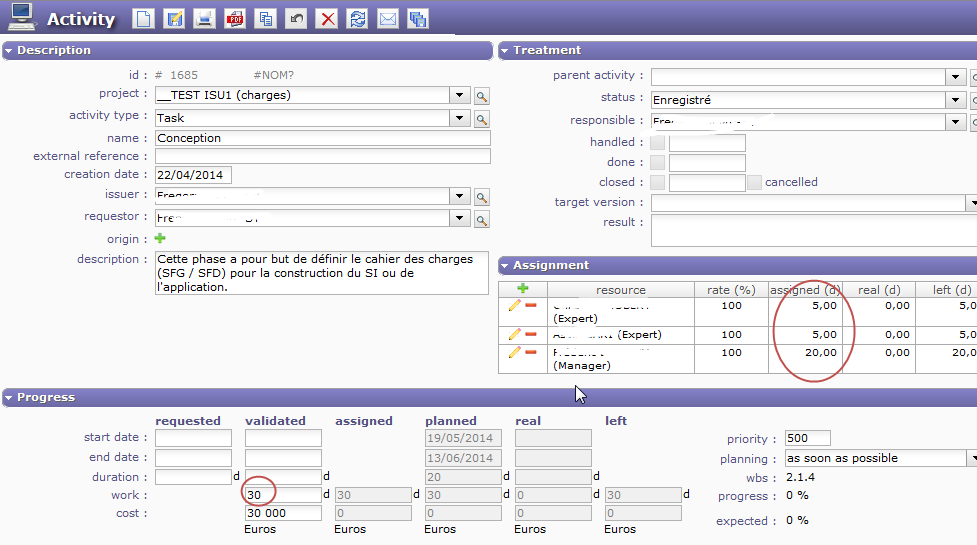
Hello
I checked and the activities have some work
I went back to get to planning screen and nothing ..
I have done everything you told me and I can not
help me
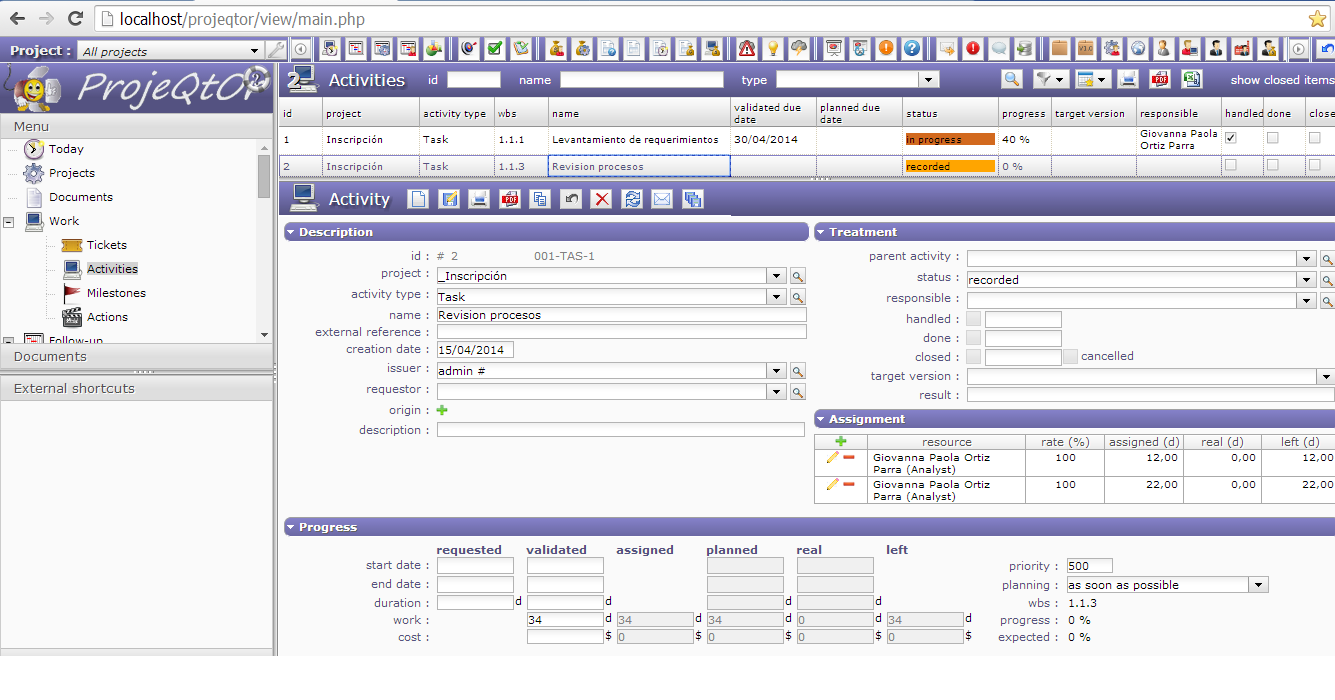
It's clear your activity has alll needed to get some planning.
So we only have two options :
1) you're facing and issue
=> then you should retrieve an error, either in the log file or in the browser console.
=> please report any error
2) your project is in one of the cases that forbid planning
=> there are 3 cases when a project is not planned
1) the project is closed : this is noit the case as your activity is not closed, and you cannot close a project with non-closed activities
2) the type of your project is "Administrative" : administrative projects are never planned. Just change project type will solve your issue.
3) you checked "fix planning" on your project : this is a function to avoid planning of a project (when planning is correct and you want to be sure it is not changed)
Hello Babynus
Finally!! 😛 😛 😛 😉 😆 😆 😆
I could build to planning screen. Considering its recommendations. I will continue developing the project
Note: It was the type of project.
thanks
And
Thanks to Jmmbb