
Welcome to ProjeQtOr new Forum. We migrated old forum to the new website.
You will find all your posts here, with your usual account.
Just one point : you’ll have to reinitialize your password. Use “Lost password” feature.

Hi Team!
I tried to export csv file a few tickets from PJ with estimated and real work. Files are in attachements.
However, when I exported the file, estimated and real hours were converted to percentage of daily working time (The file is in attachements).
Is it supposted to be like this? Or is it a bug?
A few weeks ago, export did not not work like this.
Thanks in advance.

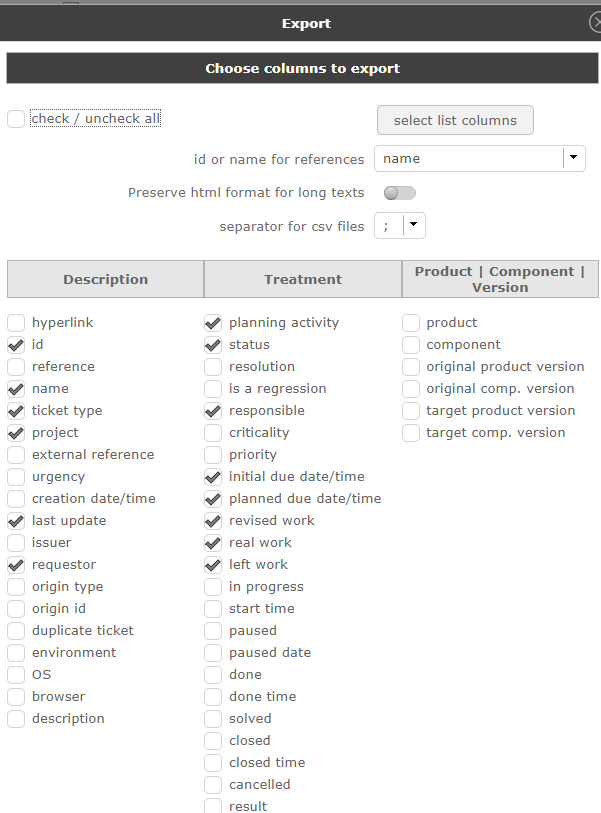
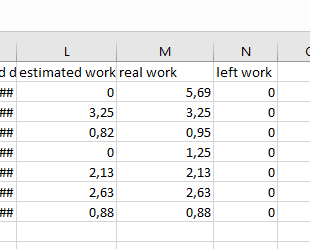

No, it is not %, it is work in Days.
The default unit for work in projeqtor is days, and work data is always stored (in DB) in days.
So export is also in days.
No, it is not workimg like you said. Please check my uploaded files/
I attached 2 files again. One file it is how I see estmated, real and left time for 2 tickets in PJ. And second file how I see tickets after exporting to csv.


You "uploaded file" is not enough.
We don't see id of items in the export.
We don't know how many hours per day you defined in global parameters.
Export is exactly how I explained, and I can guess you defined days with 8 hours per day.:
Ticket 7111 : estimated = 20 hours = 2,5 days, real = 0 hour = 0 day
Ticket 7061 : estimated = 14 hours = 1,75 days, real = 7 hours = 0,875 day
It is the values that are exported, in days (with rounding at 2 decimals)