
Welcome to ProjeQtOr new Forum. We migrated old forum to the new website.
You will find all your posts here, with your usual account.
Just one point : you’ll have to reinitialize your password. Use “Lost password” feature.

I have the situation now where a Ticket is marked as in progress by one "responsible person" but I now need to transfer ticket to a second person due availability. I cannot seem to work out how to achieve this?


Just change responsible ...
Thank you for the reply.
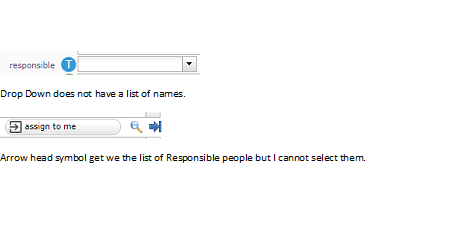
I cannot select from the Responsible Drop-down box (see fig).
If I go for Magnifying glass I get a summary of current Responsible.
If I go For Arrow head I see the people list but cannot select them.
My work around (or possibly the correct way) is to change the current Responsible to just "Blank" via the Drop-down, hit Save Icon.
Now I can go back and change Responsible using the Magnifying glass Icon.
If new responsible is not is the combo list, it is because he is not allocated to the project.
So selecting a resource not allocated is possible, but possible user won't have access rights to ticket...
NB : when responsible is selected, magnifier show detzil of selected item, but then (on detail display) new magnifyer gives access ti full lsit.
I have tried out your suggestions and all is good now.
Item Closed.
Many Thanks