
Welcome to ProjeQtOr new Forum. We migrated old forum to the new website.
You will find all your posts here, with your usual account.
Just one point : you’ll have to reinitialize your password. Use “Lost password” feature.

Hello,
congratulations for this application !
i try to understand as more as possible how to run this application.
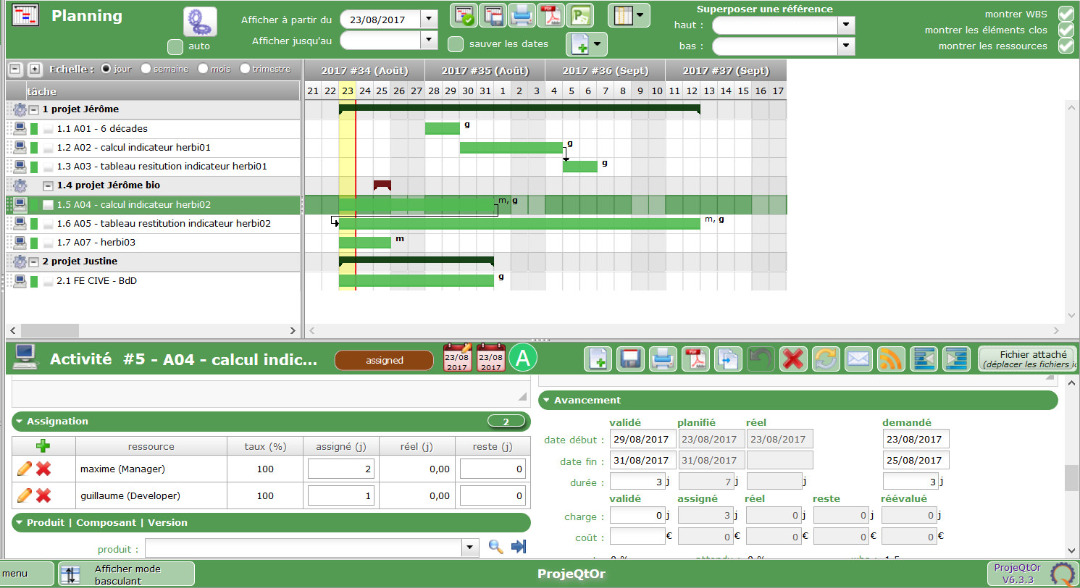
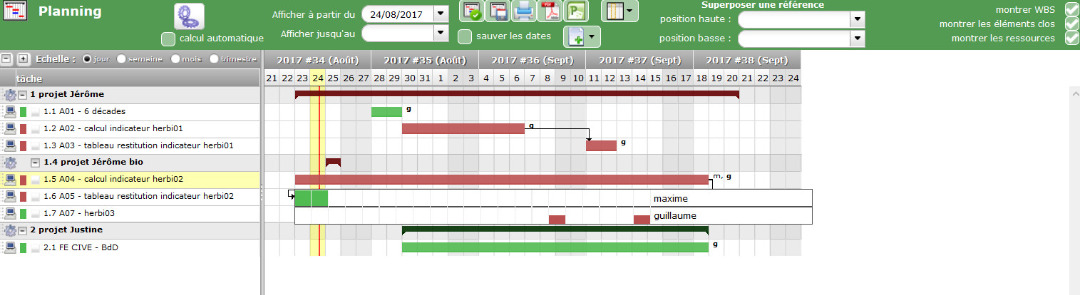
Below, many projects with tasks.
2 resources (Maxime,Guillaume) work on this tasks.
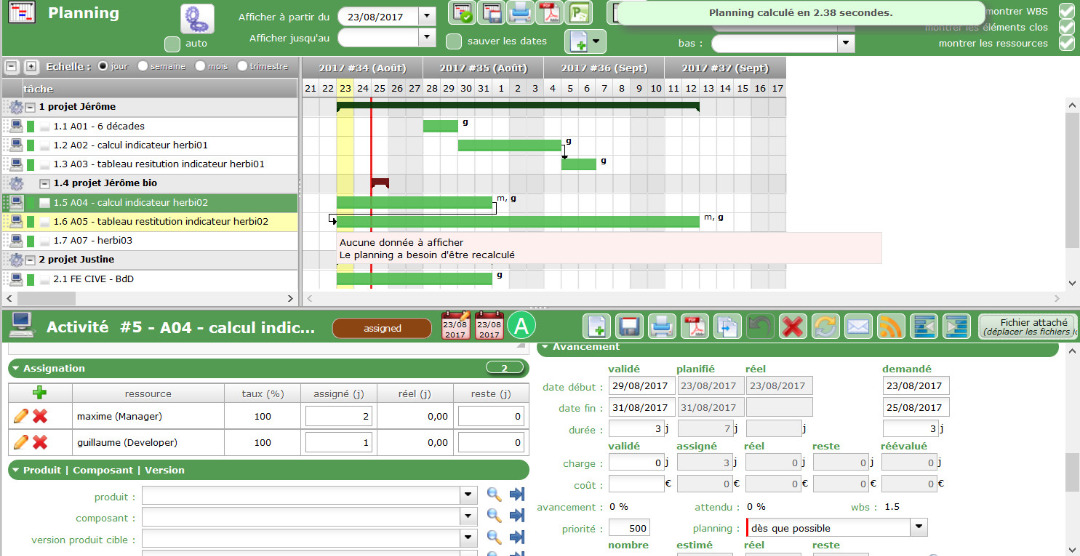
task 1.5 -> on the bottom of this picture, 2 days for Maxime, 1 day for Guillaume.
Why the planning defined the 1.5 task on this period ?
Maxime, Guillaume are days off 23,24,25 August.
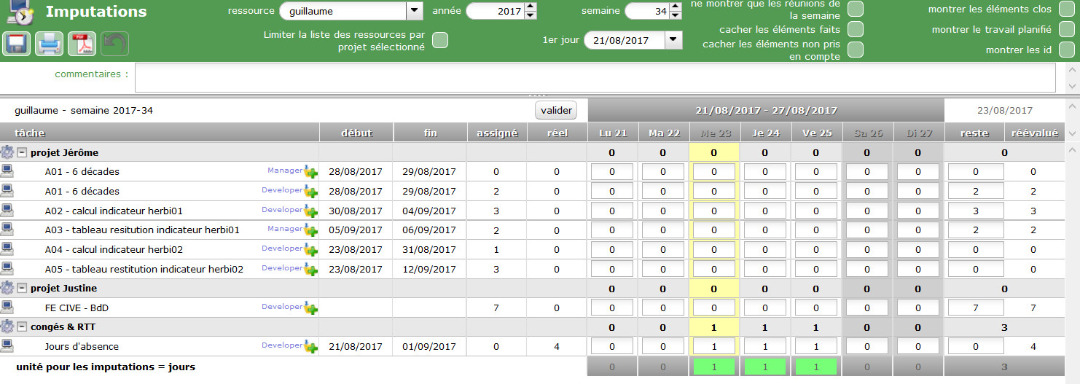
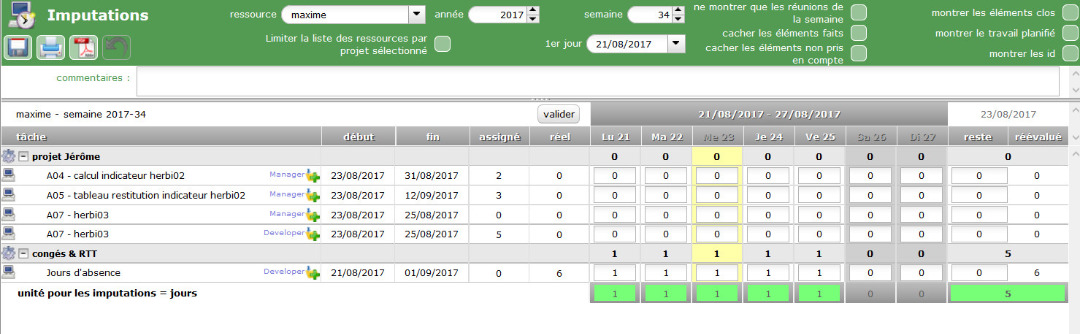
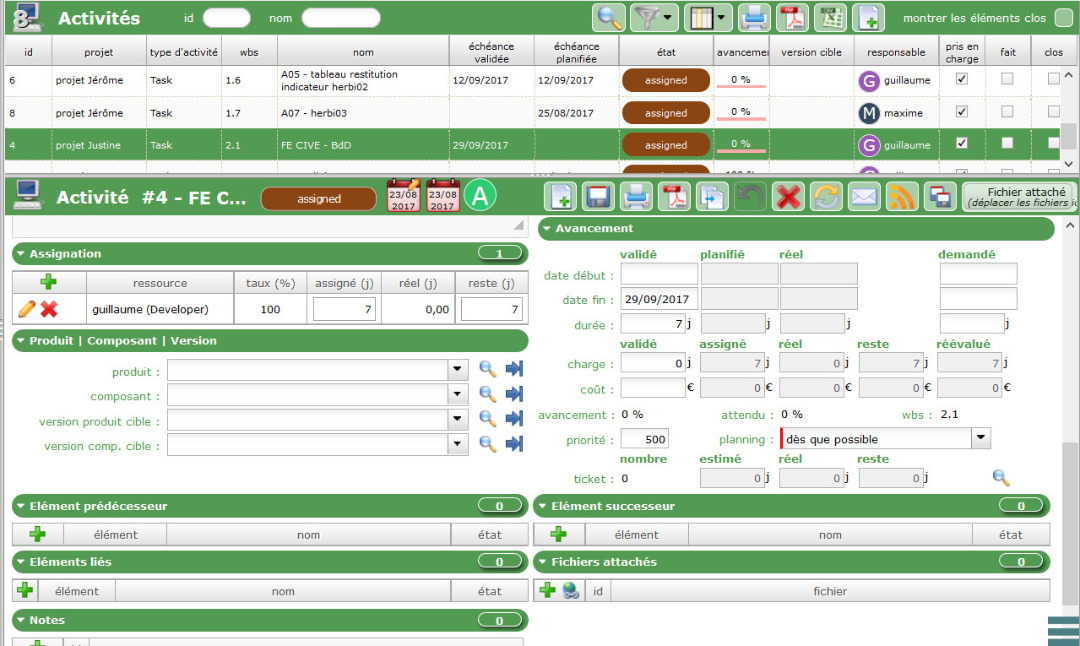
Why the 2.1 task doesn't represent by a bar on this picture below ?
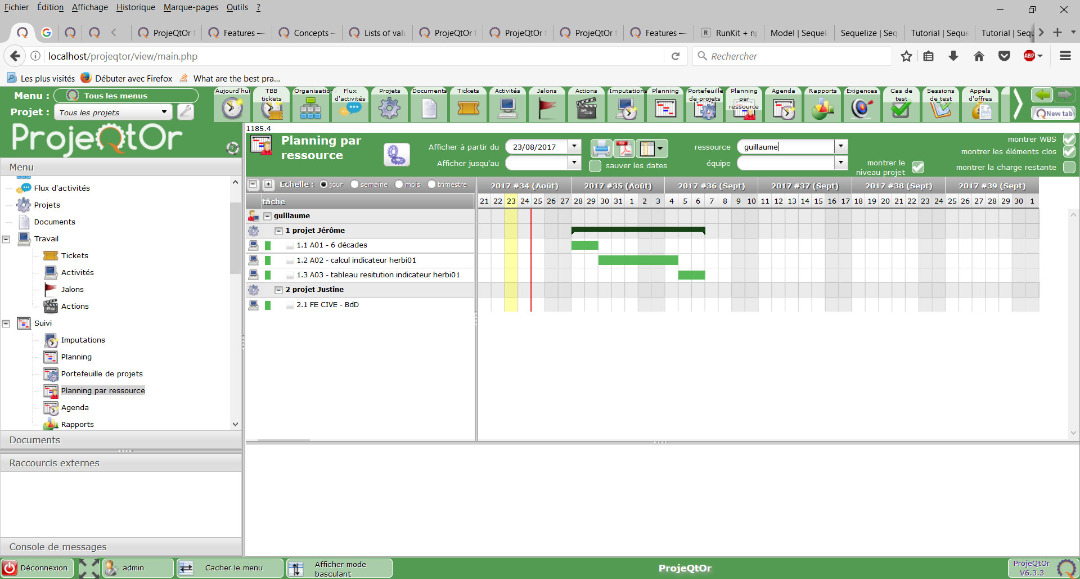
Thanks a lot.

Why the planning defined the 1.5 task on this period ?
1) Check planning mode : by default it is as soon as possible...
2) Right click on task bar : you'll have detail of planned work
3) Use reports in catagory "planning" to analyse planned work
Why the 2.1 task doesn't represent by a bar on this picture below ?
Please show detail of task with all details of "progress" section.
Thanks for yours responses.
1) this 1.5 task seems to be "as soon as possible" (shown on the picture)
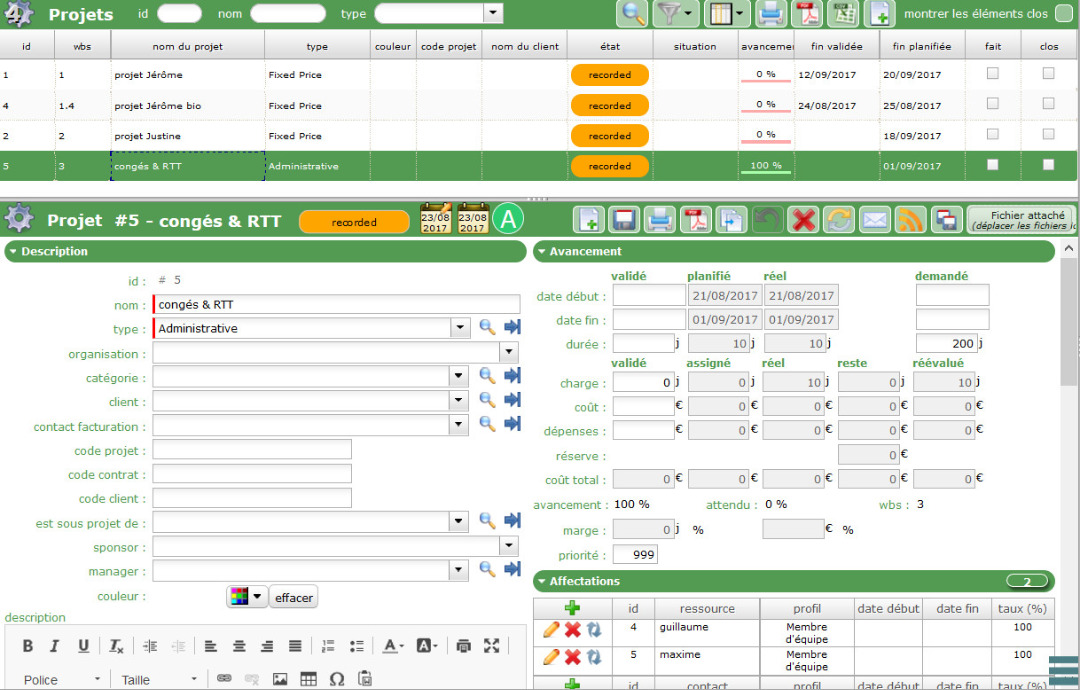
the "congés & RTT" project defined on "Administrative project".
2) i tried the right click on the bar of 1.5 task : i have had a message (shown on this picture)
3) i'm trying to see reports now
4)
It seems you just did not run planning calculation : use button with gears
i had clicked on the button "calculate activities planning" and i havec this message.
But i don't get this message on all bars.
For example, not for 1.1 1.2 1.3 tasks. i get more details information.
with a report "monthly project activity resource", i don't get all tasks of projects :
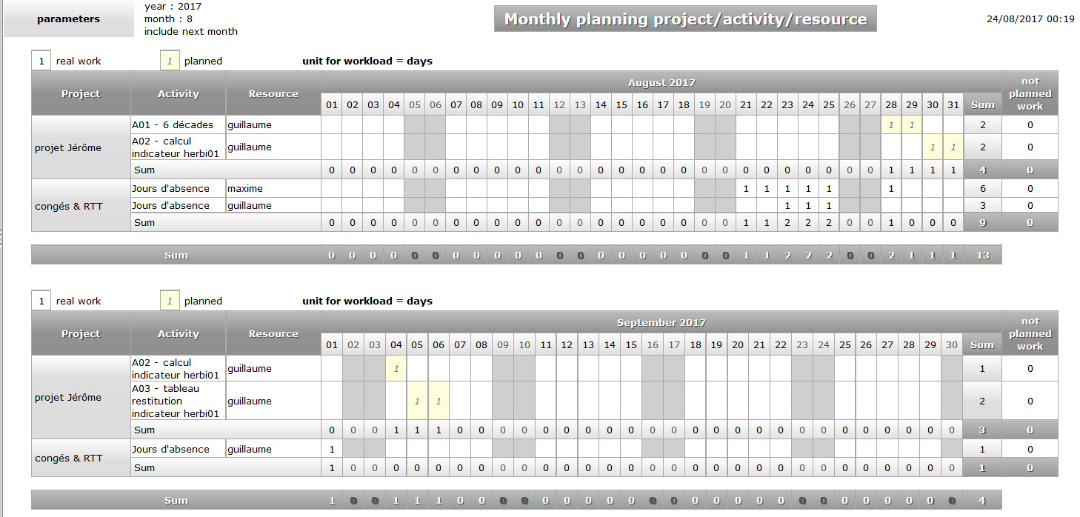
i'm seeing 1.1 1.2 1.3 tasks.
Do i click on validate planning ? I don't know consequences ...
Possibly you did not calculate all projects, but only current one 😉
Hello,
yes but i launch each time, the scheduling calculation.
2.1 task
i didn't fill the field "rate (%)" for the resource "Guillaume".
I set an value.
Now, this task integrate the planning.
Q : right click on each bar permits to validate than the scheduling calculation ran correctly, isn't it ?
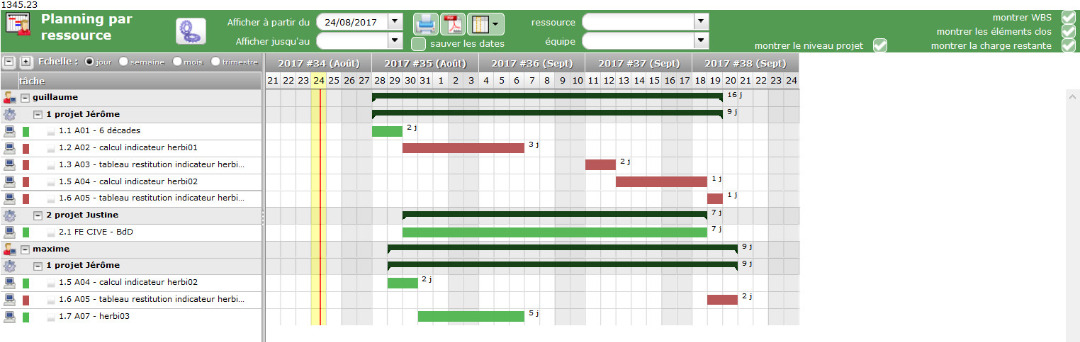
differences between "planning" and "planning per resource"
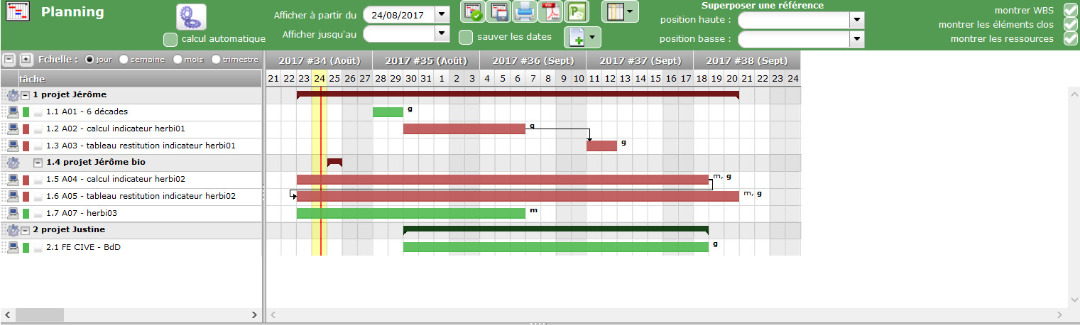
Below, the planning and the planning with a right click on 1.5 task.
The planning planned for Maxime, to work on 1.5 task the 23,24,25 August, while he is on days off .
Planning resource takes on board days off of Maxime.
I wonder if the click of the "validate planning" button explains that. If this the problem, i don't know if i can init again.
Planning :
Planning and right click on 1.5 task :
planning per resource :
project "rtt&congés" :
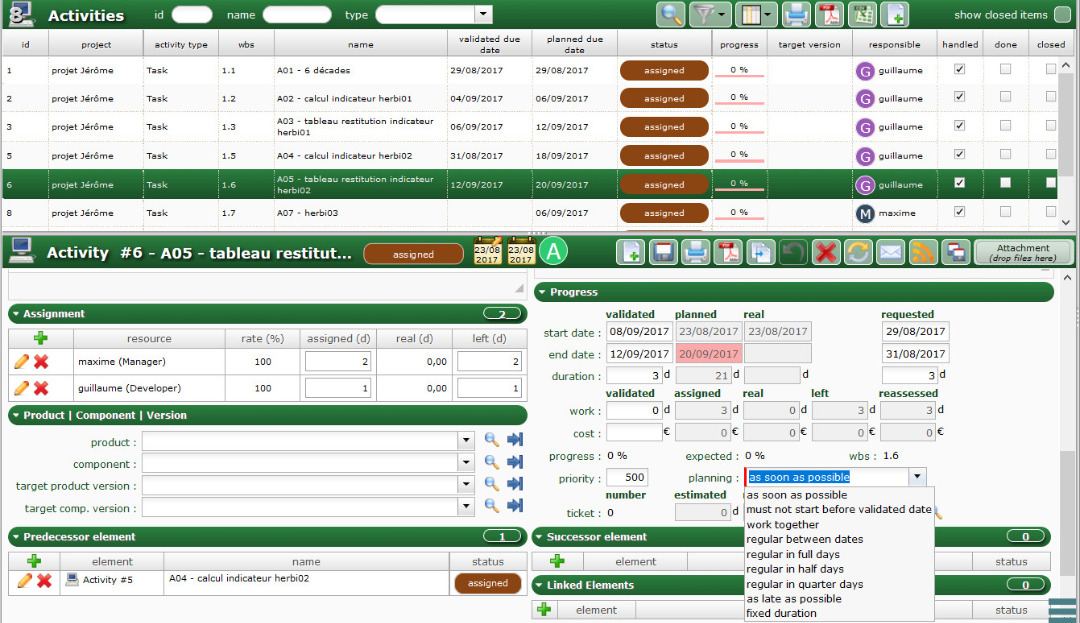
2 resources on the same time of an task
1) constraint to skip than 2 resources on the same time work on an task ?
2) Can i set empty to "assigned" for 1.6 task, for Maxime and Guillaume ? I wonder if i can assign 2 resources on a task, and according to availability of resources, scheduling calculation assign number of days to each resource.
For example, task "C042", 3 days defined to terminate this task, scheduling calculation according to availability of resources, assign 2.5 days for Maxime and 0.5 day for Guillaume.
It is possible ? Assign task at a team (composed by Guillaume and Maxime) ?
Below, A05 task, 19 september, Maxime and Guillaume planned to work.
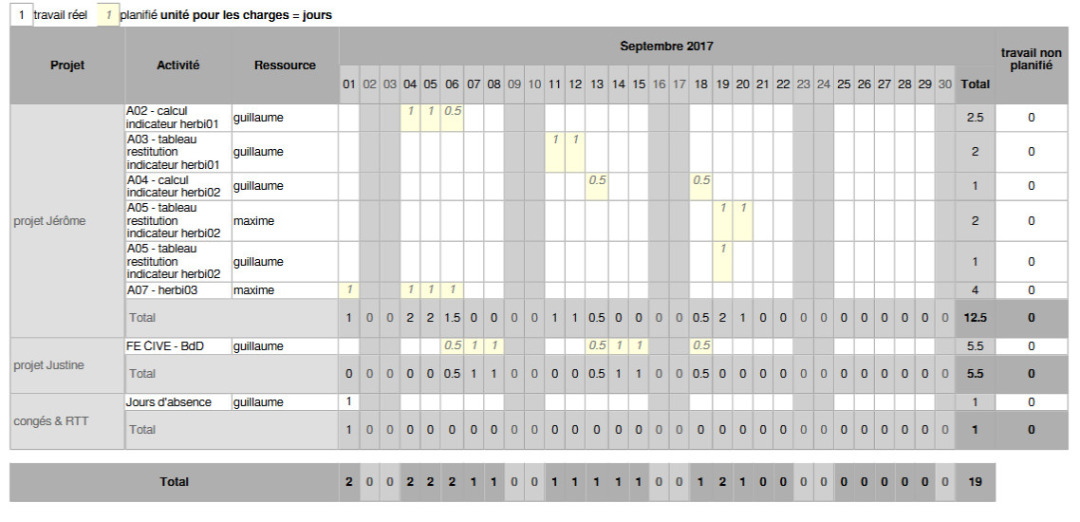
Thanks a lot, good afternoon.
i didn't fill the field "rate (%)" for the resource "Guillaume".
Rate = 0% means resource cannot work (or at least won't be planned) on the task.
right click on each bar permits to validate than the scheduling calculation ran correctly, isn't it ?
Right click on bar show, day by day, the exact planing for resources. It helps understand what was calculated.
The planning planned for Maxime, to work on 1.5 task the 23,24,25 August, while he is on days off .
How did you enter "off days" for him in projeqtor ?
I wonder if the click of the "validate planning" button explains that
Of course not. Validation of planning is juist copy of planned dates to validated dates (some kind of initial baseline)
1) constraint to skip than 2 resources on the same time work on an task ?
Not possible.
I wonder if i can assign 2 resources on a task, and according to availability of resources, scheduling c
No, ProjeQtOr won't decide it for you. It's your Project Leader job to decide how will work.
Remember that even if softwares like ProjeQtOr are call Project Management Tools, they are only project organisation tool. The project management is your job, ot's not done by the tool.
i didn't fill the field "rate (%)" for the resource "Guillaume".
Rate = 0% means resource cannot work (or at least won't be planned) on the task.
ok. i didn't set 0 for the field "rate" but i understand here, that it means "empty" value = 0
right click on each bar permits to validate than the scheduling calculation ran correctly, isn't it ?
Right click on bar show, day by day, the exact planing for resources. It helps understand what was calculated.
ok. it's very interesting to see that (good idea ! 🙂 )
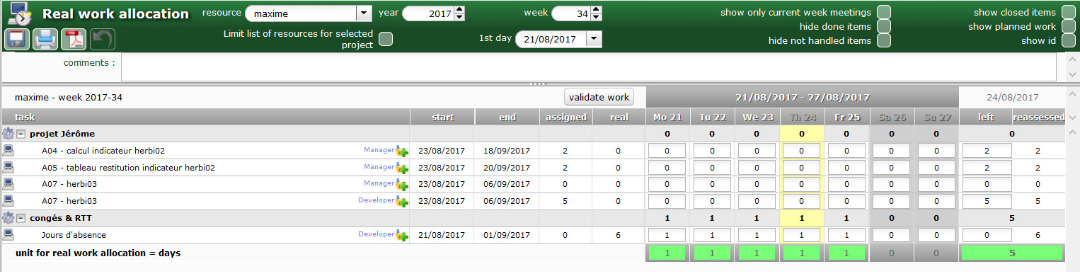
The planning planned for Maxime, to work on 1.5 task the 23,24,25 August, while he is on days off .
How did you enter "off days" for him in projeqtor ?
i input in the menu "Follow-up > Real work allocation" (shown below)
I wonder if the click of the "validate planning" button explains that
Of course not. Validation of planning is juist copy of planned dates to validated dates (some kind of initial baseline)
Well-graded
1) constraint to skip than 2 resources on the same time work on an task ?
Not possible.
ok. Then, the solution is going to assign only one resource.
I wonder if i can assign 2 resources on a task, and according to availability of resources, scheduling c
No, ProjeQtOr won't decide it for you. It's your Project Leader job to decide how will work.
Remember that even if softwares like ProjeQtOr are call Project Management Tools, they are only project organisation tool. The project management is your job, ot's not done by the tool.
Well-graded.
The manager can change in real time, assignation, the most important is to move forward the project.
I would assign tasks for Maxime, according to vagary, i would change the assignation, to affect the task for Guillaume.
It's the good method ?
Thanks a lot for the spend time to respond.
It's the good method ?
Yes
perfect.
Do you know the reason whose explains that the scheduling calculation planned for Maxime the 23,24,25 August ?
perfect.
Do you know the reason whose explains that the scheduling calculation planned for Maxime the 23,24,25 August ?
As you entered some real work for him for his whole capacity on these days, the only possibility is that planning calculation was not executed for the project.
Hello,
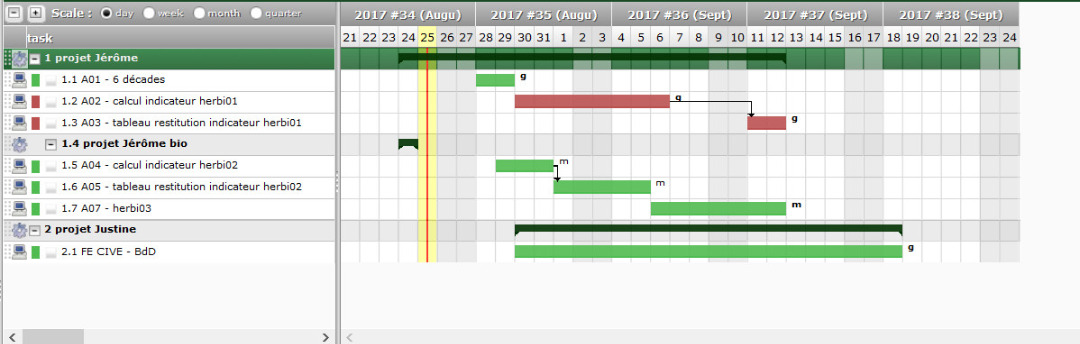
Maxime has been assigned on 1.5,1.6,1.7 tasks.
Scheduling calculation didn't take into the fact of Maxime is days off and come back to 29 August.
The difference between (1.5,1.6 tasks) and (1.1 task) for example :
- 1.1 -> only resource assigned
- 1.5,1.6 -> 2 developers resources assigned (1.5 : 3days for this task | 2 days for Maxime, 1 day for Guillaume)
CHANGE : delete Guillaume's assignment of 1.5,1.6 tasks | add 1 day of Guillaume to Maxime
The difference between (1.7 task) and (1.1 task) for example :
- 1.1 -> only resource assigned
- 1.7 -> 2 resources assigned (1.6 : 3days for this task | it's twice the same resource : Maxime (manager) : 0 day, Maxime (developer) : 3 days)
REMARKS : strange, Maxime (manager) with 0 days shouldn't be a problem, so what.
CHANGE : delete Maxime (manager)'s assignment of 1.7 tasks
i run scheduling calculation (even if it run automatically after assignments changes).
Now, planning seems to be correct, and Maxime begin to work 29 August, and not any task overlaps with other task.
i try to understand
- i must skip to assign many resources on a same task ?
- if yes, i wouln't assign a developer, and a manager on an same task then.
Thanks a lot.
i must skip to assign many resources on a same task ?
You can assign several resources to same task, but be aware that with default planning mode (asap) resource may work on different days on the task. To force to have them work on same days, you must use planning mode "work together".
i wouln't assign a developer, and a manager on an same task then.
The function of resource on the assignment has no effect on planning, it only defined cost for the resource.
Thanks ! I'm in progress due to your help !
Well graded for the function of resource on the assignment.
I edited my previous post, because i have done a bad copy/paste.
if i understand, many possibilities concerning assigment of a/many resource(s) on a task :
- 1) only one resource assigned
- 2) 2 resources with mode planning "as soon as possible" : in this case, it's possible that 2 resources are planned to work in the same time on this task
- 3) 2 resources with mode planning "work together" : in this case, scheduling calculation planned days work whose 2 resources have availability days.
Q it's ok for you ?
i think that for 1.5,1.6,1.7 tasks, we were in the second case. However Maxime planned to work 23,24,25 august while he was in days off.
And i don't know why. that's why i try to test again with 2 resources on a task.
Following some modifications, i modified again the 1.5 task like that :
- guillaume (developer) : assigned with 1 day
- maxime (developer) : assigned with 2 day
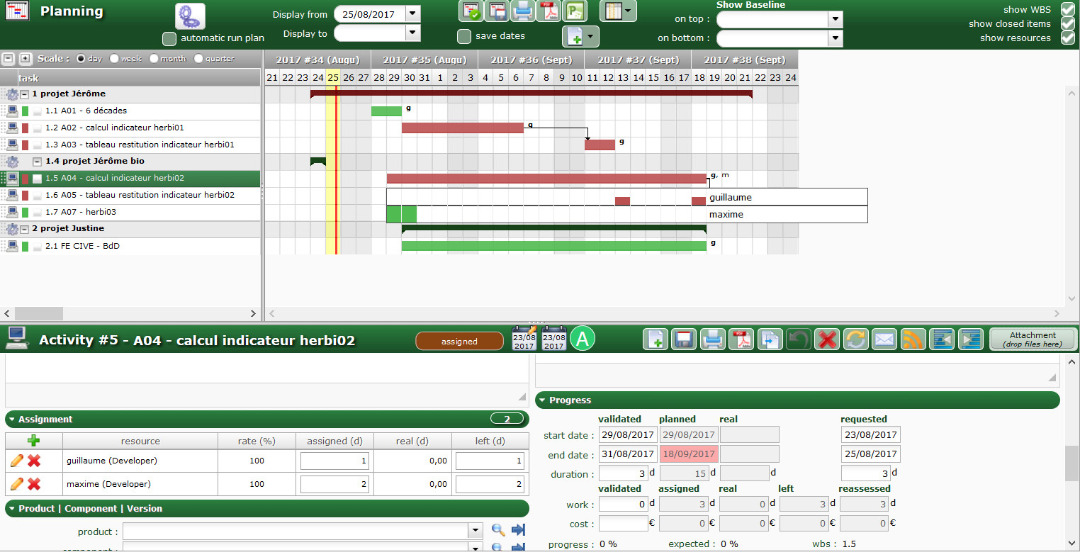
Now, planning seems to be ok.
Q Do you know the reason ?
Thanks a lot.
- 2) 2 resources with mode planning "as soon as possible" : in this case, it's possible that 2 resources are planned to work in the same time on this task
- 3) 2 resourc
it is possible, but possibly they will not work the same days (this is the "work together" feature)
Q it's ok for you ?
Yes
Q Do you know the reason ?
Difficult to analyse without steps by steps use case and all conditions identified.
Thanks for all @babynus.
Sure,and i wouldn't know to remember each step that i have made at the beginning, to get problems observed.
Thanks again, your help has been very important.
In consequence, i'm going to continue to use projeqtor.