
Welcome to ProjeQtOr new Forum. We migrated old forum to the new website.
You will find all your posts here, with your usual account.
Just one point : you’ll have to reinitialize your password. Use “Lost password” feature.

Hello,
In resource planning, we want to identify the days that are over the validated workload.
Ex: if an activity has :
- a validated workload of 5 days,
- and the reassessed workload (real + left) is 7
-> we want the 2 last planned days to be flagged as "overspent".
What modification should be done to support this ? Adding a new field (flag) in PlanningElement and adding code somewhere to set the flag to true or false when calculating planning ? Would it be possible to have some hints on how to implement this ?
Thanks

You can do this just defining an indicator such as "reassessed work compared to validated work.
This will raise an alert with or without notification via email and/or pop-up) and display a flag icon on the item.
You then can upgrade code to highlight specific indicator.
Hello
If I understand your explanation :
- I define an indicator on activity ("reassessed work compared to validated work"), with the threshold of 100%
- I dont select mail or internal alerts if I am not interested by those
- then, when the reassessed work is higher than validated work, a flag will be set
Is there a flag set per day ? (on the planningelement entry ?)
I want to distinguish the planned days in normal validated days from the planned days that are overspent
(in my report : 5 days in green, 2 days in red)
Where can I find this flag in the DB ?
Is there a flag set per day ? (on the planningelement entry ?)
No, the flag is on the activity, to indicate an issue on it.
I want to distinguish the planned days in normal validated days from the planned days that are overspent
You cannot. Only margin will give you the information, at project level.
Where can I find this flag in the DB ?
In the indicatorvalue table.
I want to distinguish the planned days in normal validated days from the planned days that are overspent
You cannot. Only margin will give you the information, at project level.
OK, so that it is not possible currently
What needs to be done if I need this ? Is my orginal idea correct ?
- add a flag in planningelement table
- during planning calculation, in the code, set the flag to true if the day is over the validated number of days
Why have it on planning element as you have it on Activity ?
(this is a 1on1 link between both)
Why have it on planning element as you have it on Activity ?
(this is a 1on1 link between both)
Sorry, rather in in PlannedWork or in Work table, so to have the flag set on specific days (or portion of days)
Tagging every day will not be a good idea I think (very heavy and time consuming in calculation, update and read).
I don't see an "easy" way to do what you expect (and don't know any tool that tries to do this)
Would it be easier to have 1 field in work and plannedwork table that would indicate the progress in the activity ? (so for Activities only)
Progress in number of days would be ok : in an entry of work/plannedwork table, one field would indicate the number of days already done or planned before this planned or worked day.
Example :
An activity is assigned for 5 days, and the following lines are created in plannedwork :
day 1 : progress=0
day 2 : progress=1
day 3 : progress=2 (only 0.5d planned on that day)
day 4 : progress=2.5
day 5 : progress=3.5
day 6 : progress=4.5 (only 0.5d planned on that day)
Would it be easier to do ?
The alternative, for me, would be to add extra code in the report : do a select for each activity that I want to display, to retrieve all days planned for this activity and do my own calculation to find when we reach the number of validated work. But this would be very time consuming on large reports.
Note : this is a use case we have, and I also saw this exact kind of reporting in Sopra. A lot of other companies must think this way too probably.
The KPI is : the number of "billed days" each month (or week)
And by "billed days", it means : days spent on activities billed to the client. So if only 5 days have been sold, the 6th days is considered as non billable. In Sopra those extra days are called TNF (Temps Non Facturé)
What you propose will not work.
It will if you enter days correclty day by day and never enter work backward.
But in real life (yes ProjeQtOr is for real life B) ) you often store
on day 1
day 1 : 1
on day 2
day 1 : 1
day 2 : 0.5
on day 3
day 1 : 0.5 (I made a mistake)
day 2 : 1
day 3 : 1
But instead of thinging of the solution, what exactly do you need ?
A display of "extra worked days" in red.
For sure it will not be done on Gantt : this display is already heavy to draw, and will not be completed with such details.
So maybe you need a specific report.
But if you just need the "TNF" information, it is just a negative margin. So data is displayed and highlighted.
What you propose will not work.
It will if you enter days correclty day by day and never enter work backward.
OK that's true :-/
But instead of thinging of the solution, what exactly do you need ?
A display of "extra worked days" in red.
For sure it will not be done on Gantt : this display is already heavy to draw, and will not be completed with such details.
So maybe you need a specific report.But if you just need the "TNF" information, it is just a negative margin. So data is displayed and highlighted.
Yes we already have various interesting project reports, and in particular reassessed work vs validated work. That is great for project management.
But we need a view that is more oriented on the team management : work "produced" by the team every month.
So the important KPI is : the "billed days" per month and this is what is difficult
Here is the team view that I try to build for each month :
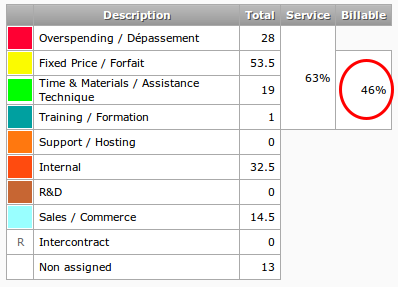
The "billable" info is what I need to measure, and this is directly linked to the number of "overspent days" in the month.
In mt understanding, what you try to do is very complex : count non billed days on elementary task level.
This may lead to error about non billable globally on project.
Exemple : Project A with 2 tasks : T1 and T2.
Project A : command = 10 days
T1 = 5 days to bill
T2 = 5 days to bill
If you have really spend
T1 = 7 days
T2 = 4 days
If you loose 2 days on T1, and win 1 day on T2.
Your way to count will tell 2 days not billable.
But in fact only 1 is lost...
So it's easy to tell you're loosing 1 day, but it's quite impossible (IMO) to tell on witch month you loosed this day.
Hint : I thing you can get what you expect woth project history.
NB : I think I could build a report looking like the one you've posted.
Just tell me if you're interested in a quotation.