
Welcome to ProjeQtOr new Forum. We migrated old forum to the new website.
You will find all your posts here, with your usual account.
Just one point : you’ll have to reinitialize your password. Use “Lost password” feature.

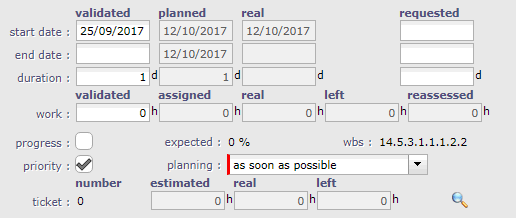
In activity form there is section called "Progress" looking more and less like this: [attachement1]
but as you see, in our installation fields "progress" and "priorty" are boolean type (normally they are integer(3)).
What we did... in customization we tried to change int(3) to int(1) and in result field automatically starts to be boolean and we loose any possibility to turn it back.
Please tell me how can we restore int(3) ?
Another questions to this point are:
- can we customize field priority to have not int(3) but just values 0, 1, 2, 3... or even P0, P1, P2, P3 ? How can we do that ?
- can we define 'progress' manually ?
Let me explain our case... we have some tasks which are necessary to monitor on the planing but this tasks are attached to machines (for example converter cluster).
Project is one-shot, means there will be no similar project in a future so we do not want declare garbages like another resourse "VirtualCoverter1" to declare time of the task.
So idea was that we do not report time of this task but from time to time we update field 'progress' to see planing updated.
Problem is, field 'progress' is read-only.
Can you tell me how can we solve this issue in projeqtor ?

Hi,
What we did... in customization we tried to change int(3) to int(1) and in result field automatically starts to be boolean and we loose any possibility to turn it back.
This is an issue we did not see : int(1) should be set only for booleans
We should have locked the possibility to change from int(3) to int(1).
This will be fixed on patch of plugin.
To revert, only possibility is to act directly on the database :
ALTER TABLE `planningelement` CHANGE `priority` `priority` INT(3) UNSIGNED NULL DEFAULT NULL;
You may change to INT(2) but may face an issue as defaut value is 500 : you'll have to define defaut value on every activity type.
- can we customize field priority to have not int(3) but just values 0, 1, 2, 3... or even P0, P1, P2, P3 ? How can we do that ?
This is not possible without coding a restriction.
- can we define 'progress' manually ?
No, not possible on activity : manual progress could not be consolidated on top level to get Project progress.
Only possibility to get the "weight" and "consilidable" progress of activity is work driven management.
Manual progress can be defined on project only (in completion to real progress, work driven)
Thanks for query.
Regarding:
- can we customize field priority to have not int(3) but just values 0, 1, 2, 3... or even P0, P1, P2, P3 ? How can we do that ?
This is not possible without coding a restriction.
You mean, projeqtor code must be changed or using customization/plugins we can achieve this ?
You mean, projeqtor code must be changed or using customization/plugins we can achieve this ?
Needs some coding
Hello,
I found one issue more which can refers to problem described above.
Of course we appliyed scripts you listed and all practically is working fine except one issue.
When I'm not ADMINISTRATOR and open Activity view column PRIORITY is display as checkboxes:
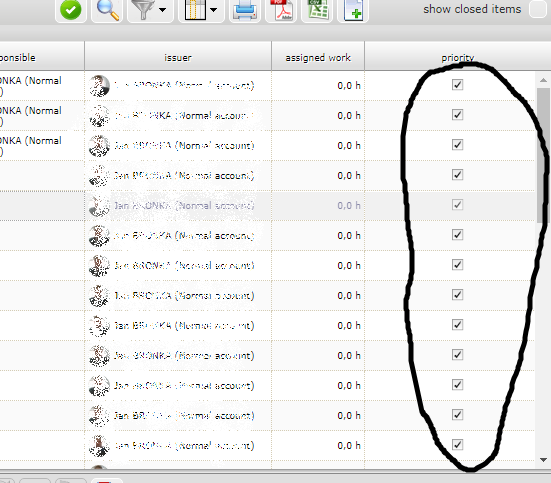
Similar we had in other placed before we applied your scripts.
Can you tell me how to solve this issue ? (on Administrator account all looks fine).
Each user must clear / refresh the column description for activities : in the column selector, check refresh.
Another way to globally refresh for everyone is to execute Sql Script :
Delete from columnselector where objectClass='Activity'
Thanks, solution works perfectly.
By the way, seems on 7.0.2 changing order of columns (at least on Activity view) is no longer working.
Additionally last right column (if it is rightside text justified) is not visible becasue it is covered by scroll bar.
By the way, seems on 7.0.2 changing order of columns (at least on Activity view) is no longer working.
Cannot reproduce.
It's working fine on Chrome, FF, IE11 and Edge (I just tested)
Additionally last right column (if it is rightside text justified) is not visible becasue it is covered by scroll bar.
Yes, the component is working this way, and has always worked this way. If it was not the case, headers would not be aligned with columns.
That's why we place "idle" field on last column, as it is centered and so visible.
Avoid putting numbers on right most field.