
Welcome to ProjeQtOr new Forum. We migrated old forum to the new website.
You will find all your posts here, with your usual account.
Just one point : you’ll have to reinitialize your password. Use “Lost password” feature.

Hello,
My ressource "Pilote Testeur" is allocated to the project "Harmony" with a rate of 40%.
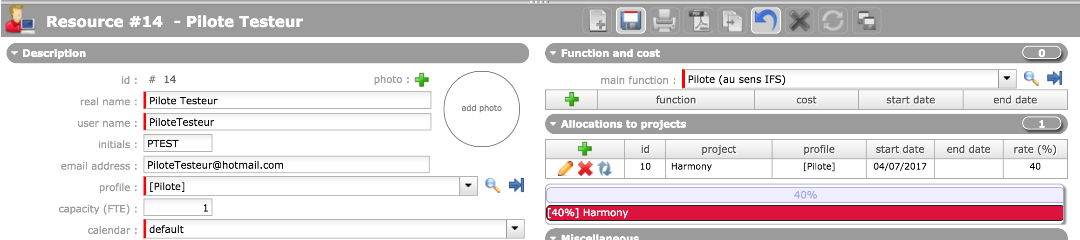
What is the period of the rate?
In my team, most of the pilotes are dedicated for 40% a week, how can I set that?
I plan a meeting where "Pilote Testeur" with the rate of 40%. The meeting is lasting 2hours => 0,25 day.
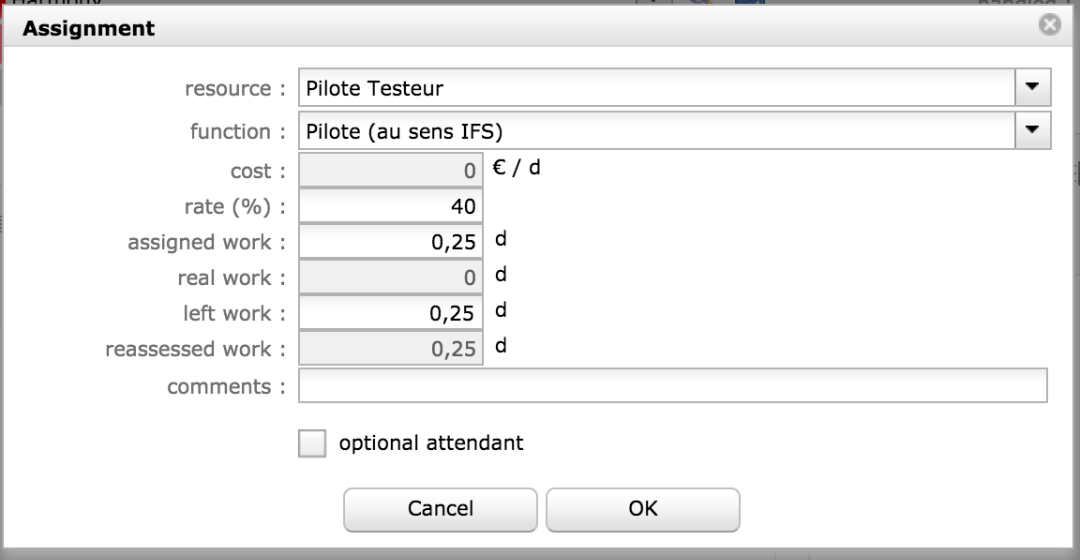
What is the link beetween the rate and the assigned work?
I presume that it means "Pilote testeur" must work 0,25 day for this meeting lasting 0,25 day in the limit of 40% of (what)?
Seems that I can put any value for this rate... nothing change in the planning (was trying to find what is wrong with the situation described in the very next sentence).
I am asking because on some occasion I got the "Following tasks could not be completely planned" error message, even if the ressource has declared no real work for the week and have nothing planned for the week... so it must be refering to some other period?
Thank you.
Kitcat711

My ressource "Pilote Testeur" is allocated to the project "Harmony" with a rate of 40%.
What is the period of the rate?
In my team, most of the pilotes are dedicated for 40% a week, how can I set that?
It is exactly what you need : allocation rate to project defines a limit per week : 40% on a 5 days week will limit to 2 days per week on this project.
I plan a meeting where "Pilote Testeur" with the rate of 40%. The meeting is lasting 2hours => 0,25 day.
What is the link beetween the rate and the assigned work?
I presume that it means "Pilote testeur" must work 0,25 day for this meeting lasting 0,25 day in the limit of 40% of (what)?
Seems that I can put any value for this rate... nothing change in the planning (was trying to find what is wrong with the situation described in the very next sentence).
On meeting, assignment rate has no real meaning. It is here just because it is the same screen as for Activities.
Assignement rate will manage a limitation per day : 40% will limit to 0,4 days each day on this activity (or meeting)
I am asking because on some occasion I got the "Following tasks could not be completely planned" error message, even if the ressource has declared no real work for the week and have nothing planned for the week... so it must be refering to some other period?
This message occurs when planning cannot plan all work for the activity / meeting : resource is off, or leaving project (allocation end date restricts planning)
Hello,
Still having some problem with the "Following tasks could not be completely planned" error message:
"Pilote Testeur" is dedicated 45% to the project, and there is no "end date" to his participation.
His real work allocation sheet looks like this for the considered week:
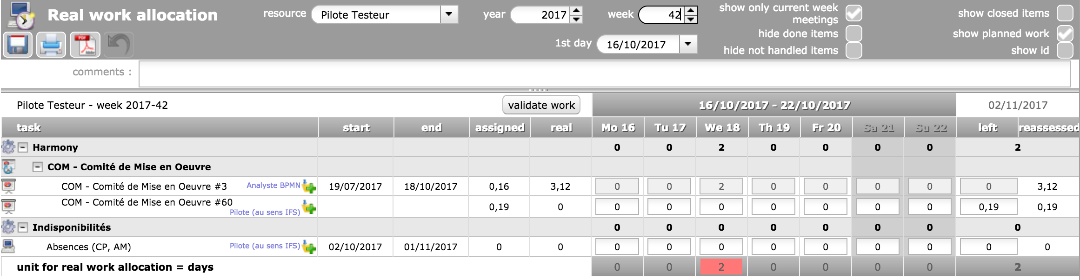
When looking at activity : "COM - Comité de Mise en Oeuvre #60" it appears that the error message is displayed: "not planned wok"

Does this mean that the planned work not put into "real work" is adding from one week to another, making the maximum reached for all the following weeks?
I am reading the online manual again and again but with no more understanding.
Kitcat711
It means that resource still has 0,19 d left to do on this meeting, but possibly it is a passed meeting, and resource azlready entered real work for the corresponding day.
He should just set left to zero.
It means that resource still has 0,19 d left to do on this meeting,
=> true.
but possibly it is a passed meeting,
=> true
and resource azlready entered real work for the corresponding day.
=> I understand that just saving the "pre-real work" means that the real work for the day is entered, even if I set remove the "0" value for the day.
Is that correct?
He should just set left to zero.
=> I understand that "he" means the ressource. When you put "0" to "left work" , this does not give any information about the "real work" right? not even by adding the "assigned work".
One more thing: I tried to put a "0" in "left", then I realized that "no real work" was counted, so I put a "0,19" in the "real work" for this line, it then set the "reassessed" to "0,19".
So I removed the "0" from the "left work" => reassessed went to "0,38".
I removed the "real work", the "left work", and saved:

I add "0,19" in real work

Now I got the "reassed" to "0,19"
What does this mean? What and where are the impacts?
Kitcat711
=> I understand that just saving the "pre-real work" means that the real work for the day is entered, even if I set remove the "0" value for the day.
Is that correct?
I don't understand what you call "pre-real" work
This notion does not exist.
There is Assigned and Real but no "pre-real"
I removed the "real work", the "left work", and saved:
Now I got the "reassed" to "0,19"
That's not what screenshot shoes : you have O,19 real work...
This is sure because Reasseseed = Real + Left (always !)
juste un test de réponse pour mon propre paramétrage