
Welcome to ProjeQtOr new Forum. We migrated old forum to the new website.
You will find all your posts here, with your usual account.
Just one point : you’ll have to reinitialize your password. Use “Lost password” feature.

ProjeQtor does not allow us to open an mpp file. Neither does it allows us to import the basic WBS data.
So, as a workaround I created an xls (excel 97-2003) file that contains only two fields: Id number and task name.
The rest of the fields are left blank.
But the structure of the file meets the template structure (in fact, I copied the header line from the template).
But I am unable to import this data as "Activity":
1. If I try to import Excel, it reports "ERROR - Provided file type and selected file format do not match" and aborts the import.
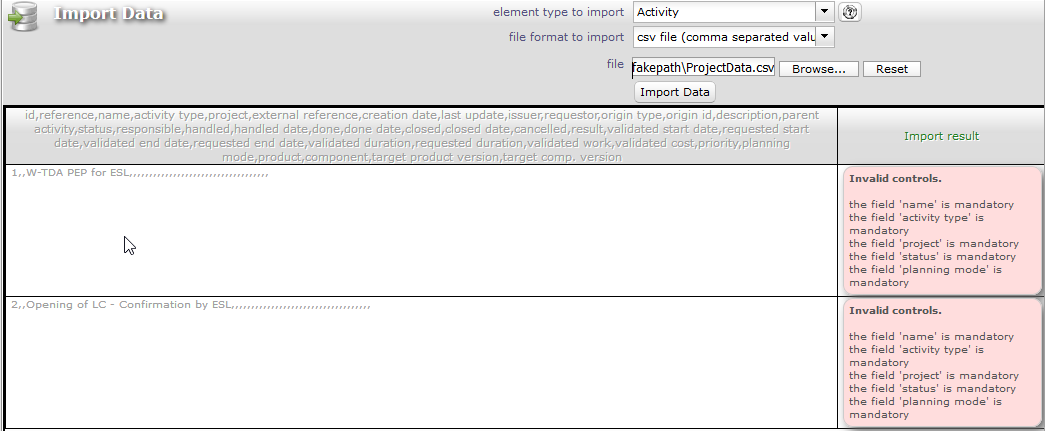
2. If I try to import using CSV, it reports specific fields are mandatory.
I am enclosing all the files (Excel, CSV, error screenshots).
Please let me know what is wrong.
Note: I just noticed that the screenshot shows "fakepath" in the file path field.
This is because the xls and CSV files are in C:UsersnjarasDocuments folder.

I resolved the issue through trial-and-error, and found that this process is complicated, but does not have adequate help text.
I have prepared a help file (attached). I hope that the other users will find it useful.
(Please feel free to copy this into the main help file.)

1. If I try to import Excel, it reports "ERROR - Provided file type and selected file format do not match" and aborts the import.
IF you want to import from Excel files, you must use XLSX format (not old XLS format)
2. If I try to import using CSV, it reports specific fields are mandatory.
Issue is due to separator : change parameter "separator for csv files" in global parameters to ","
Thanks for sharing your help file.