
Welcome to ProjeQtOr new Forum. We migrated old forum to the new website.
You will find all your posts here, with your usual account.
Just one point : you’ll have to reinitialize your password. Use “Lost password” feature.

V 5.4.2. I am getting an unusual error. The red-colored error pop-up does not have any text message! But the log file has captured error stack trace which I reproduce below.
Origin of error: I have customized a workflow for Tickets, along with certain actors at each stage. On one approval stage for this Ticket, I get this error.
Note: The only way I can move forward in my workflow is by deleting this particular row from the workelement database table. This obviously is not the solution. So please help!!
Log file contents:
2016-08-02 17:40:51.810 ** ERROR ** Exception-[23000] SQLSTATE[23000]: Integrity constraint violation: 1062 Duplicate entry 'Ticket-16' for key 'workelementReference'
2016-08-02 17:40:51.810 ** ERROR **    For query : insert into workelement ( refType , refId , idProject , refName , idUser , ongoing , done , idle ) values ('Ticket', '16', '12', 'Request #3 raised by Samish on 0208', '24', '0', '0', '0')
2016-08-02 17:40:51.810 ** ERROR **    Strack trace :
2016-08-02 17:40:51.810 ** ERROR **    #0 Sql->query called at [C:wampwwwprojeqtorV5.4.2modelpersistenceSqlElement.php:823]
2016-08-02 17:40:51.810 ** ERROR **    #1 SqlElement->insertSqlElement called at [C:wampwwwprojeqtorV5.4.2modelpersistenceSqlElement.php:630]
2016-08-02 17:40:51.810 ** ERROR **    #2 SqlElement->saveSqlElement called at [C:wampwwwprojeqtorV5.4.2modelpersistenceSqlElement.php:478]
2016-08-02 17:40:51.810 ** ERROR **    #3 SqlElement->save called at [C:wampwwwprojeqtorV5.4.2modelWorkElementMain.php:175]
2016-08-02 17:40:51.810 ** ERROR **    #4 WorkElementMain->save called at [C:wampwwwprojeqtorV5.4.2modelpersistenceSqlElement.php:1107]
2016-08-02 17:40:51.810 ** ERROR **    #5 SqlElement->saveDependantObjects called at [C:wampwwwprojeqtorV5.4.2modelpersistenceSqlElement.php:1065]
2016-08-02 17:40:51.826 ** ERROR **    #6 SqlElement->updateSqlElement called at [C:wampwwwprojeqtorV5.4.2modelpersistenceSqlElement.php:624]
2016-08-02 17:40:51.826 ** ERROR **    #7 SqlElement->saveSqlElement called at [C:wampwwwprojeqtorV5.4.2modelpersistenceSqlElement.php:478]
2016-08-02 17:40:51.826 ** ERROR **    #8 SqlElement->save called at [C:wampwwwprojeqtorV5.4.2modelcustomTicketMain.php:475]
2016-08-02 17:40:51.826 ** ERROR **    #9 TicketMain->save called at [C:wampwwwprojeqtorV5.4.2toolsaveObject.php:77]
2016-08-02 17:40:51.967 ** ERROR ** Exception-[23000] SQLSTATE[23000]: Integrity constraint violation: 1062 Duplicate entry 'Ticket-16' for key 'workelementReference'
2016-08-02 17:40:51.967 ** ERROR **    For query : insert into workelement ( refType , refId , idProject , refName , realCost , idUser , ongoing , done , idle ) values ('Ticket', '16', '12', 'Request #3 raised by Samish on 0208', '172042.22', '24', '0', '0', '0')
2016-08-02 17:40:51.967 ** ERROR **    Strack trace :
2016-08-02 17:40:51.967 ** ERROR **    #0 Sql->query called at [C:wampwwwprojeqtorV5.4.2modelpersistenceSqlElement.php:823]
2016-08-02 17:40:51.967 ** ERROR **    #1 SqlElement->insertSqlElement called at [C:wampwwwprojeqtorV5.4.2modelpersistenceSqlElement.php:630]
2016-08-02 17:40:51.967 ** ERROR **    #2 SqlElement->saveSqlElement called at [C:wampwwwprojeqtorV5.4.2modelpersistenceSqlElement.php:478]
2016-08-02 17:40:51.967 ** ERROR **    #3 SqlElement->save called at [C:wampwwwprojeqtorV5.4.2modelWorkElementMain.php:175]
2016-08-02 17:40:51.967 ** ERROR **    #4 WorkElementMain->save called at [C:wampwwwprojeqtorV5.4.2modelWorkElementMain.php:295]
2016-08-02 17:40:51.967 ** ERROR **    #5 WorkElementMain->save called at [C:wampwwwprojeqtorV5.4.2modelpersistenceSqlElement.php:1107]
2016-08-02 17:40:51.967 ** ERROR **    #6 SqlElement->saveDependantObjects called at [C:wampwwwprojeqtorV5.4.2modelpersistenceSqlElement.php:1065]
2016-08-02 17:40:51.967 ** ERROR **    #7 SqlElement->updateSqlElement called at [C:wampwwwprojeqtorV5.4.2modelpersistenceSqlElement.php:624]
2016-08-02 17:40:51.967 ** ERROR **    #8 SqlElement->saveSqlElement called at [C:wampwwwprojeqtorV5.4.2modelpersistenceSqlElement.php:478]
2016-08-02 17:40:51.967 ** ERROR **    #9 SqlElement->save called at [C:wampwwwprojeqtorV5.4.2modelcustomTicketMain.php:475]
2016-08-02 17:40:51.967 ** ERROR **    #10 TicketMain->save called at [C:wampwwwprojeqtorV5.4.2toolsaveObject.php:77]
I am an Eagle. On a mission to help those who want to help themselves...

Can you check that is is produced for users who don't see work on tickets.
It it is the case, this issue is solved on V5.4.3.
I have used 5.4.3 and I am still getting the same error. Tried to find out why, but no success. :unsure:
Please help!
I am an Eagle. On a mission to help those who want to help themselves...
Czn you please give more hint.
For instance, about "approval stage" that leads to error : does the approval is done by user with specific access rights ?
Does this user see "work" data on the tickets ?
Does the "approval stage" lead to email sending ?
What you can do to help investigate : if approval profile is specific, try and change to use another one and tell us if it changes things. If so, give as amny information about profile as you can (access rights, specific access rights,...)
Also try and disable email sending and tell us if it changes things.
Regards.
Czn you please give more hint.
For instance, about "approval stage" that leads to error : does the approval is done by user with specific access rights ?
Does this user see "work" data on the tickets ?
Does the "approval stage" lead to email sending ?What you can do to help investigate : if approval profile is specific, try and change to use another one and tell us if it changes things. If so, give as amny information about profile as you can (access rights, specific access rights,...)
I have created a few user id's with different access rights. In my workflow, specific users can take certain actions. An administrator can take all the actions. In this particular case of error, the ticket is created by Guest and the Administrator is trying to Cancel the ticket. That's the point when I get this error.
Also try and disable email sending and tell us if it changes things.
I am not sure about this. I will try that and will let you know if it improves things in any way.
I am an Eagle. On a mission to help those who want to help themselves...
the ticket is created by Guest and the Administrator is trying to Cancel the ticket
Does the admionistrator see "work" data on the tickets ?
Does the admionistrator see "work" data on the tickets ?
Please explain how do I confirm this? I am not sure where I should see if admin sees work on tickets.
This is normal administrator - I have not made any changes in access rights to admin.
I am an Eagle. On a mission to help those who want to help themselves...
Additional information:
While scouting for possible reasons -- because these errors started suddenly -- I found something that is not an expected behaviour.
I have created a workflow that has stages like:
Initiated (#1) -> Ticket Approved (#2) -> Requirement Gathering (#3) -> Requirement Signed-off (#4) -> Ticket Prioritized (#5) -> Closed (#6)
#1 to #2 == Approver & Admin
#2 to #3 == BA & Admin
#3 to #4 == PM & Admin
#4 to #5 == Approver & Admin
#5 to #6 == PM & Admin
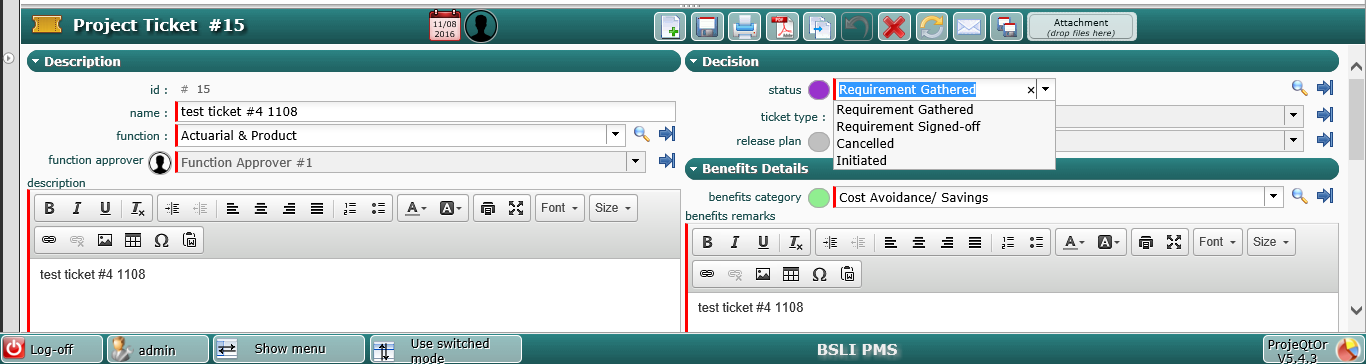
I have ensured that #1 (Initiated) does not occur at all throughout this workflow. That means, there is no workflow condition that will take the status back to "Initiated". However, in my case, I have seen that "Admin" can move the status back to "Initiated"!!!
Refer the screenshot. I have tried selecting "Initiated" status and saved, and there was an entry in "workelement" table. Before this, there was no entry in the "workelement" table. After this, whatever status I choose, it gives the same SQL error "Integrity constraint violation,,,"
I think this has something to do with why this error is occurring. I have checked my workflow again and again, but visibly there is no command to move status back to "Initiated"... i am wondering why could this have happened...
EDIT:
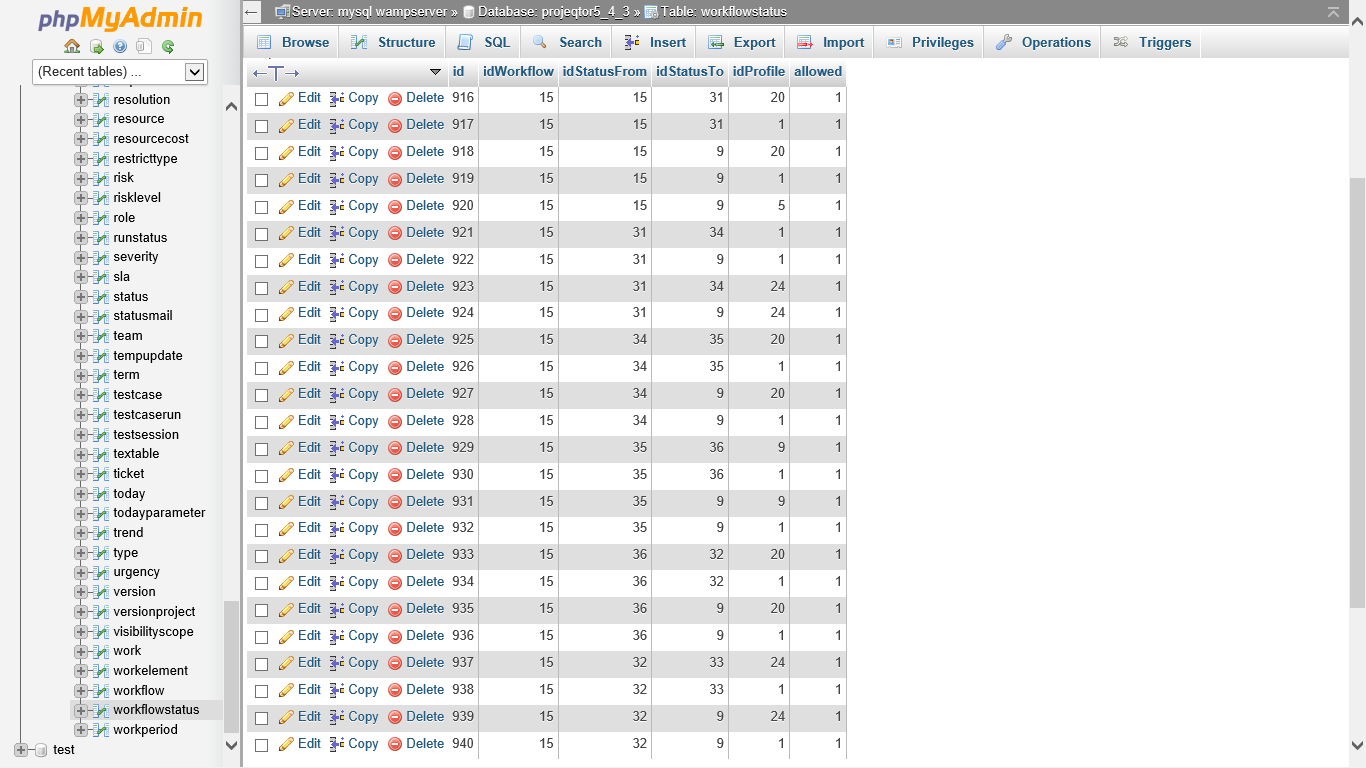
Also adding screenshot of actual SQL table "workflowstatus"... My workflow id is 15 and the id of "initiated" status in database is 15. As you could see, this id 15 is not present in idStatusTo column!!! Then why is the workflow taking me back to "Initiated" status?
I am an Eagle. On a mission to help those who want to help themselves...
This is really strange behaviour of the tool, not sure where I am going wrong.
I have installed fresh version of 5.4.3 as Test and created few user profiles, created few users for these profiles, created a project, created affectations & access rights to these users. Then I created a simple workflow -- renamed "recorded" as "Initiated" and created few new statuses, and defined the status change mechanism.
All this gone well pretty smooth. The workflow is simple and is expected to flow correctly. However, when I run this, I still see "Initiated" as one of the status change options!! I am damn sure that this "Initiated" status is used in my workflow only in the beginning. Still not sure why it is popping up in the dropdowns...
Any help is appreciated.
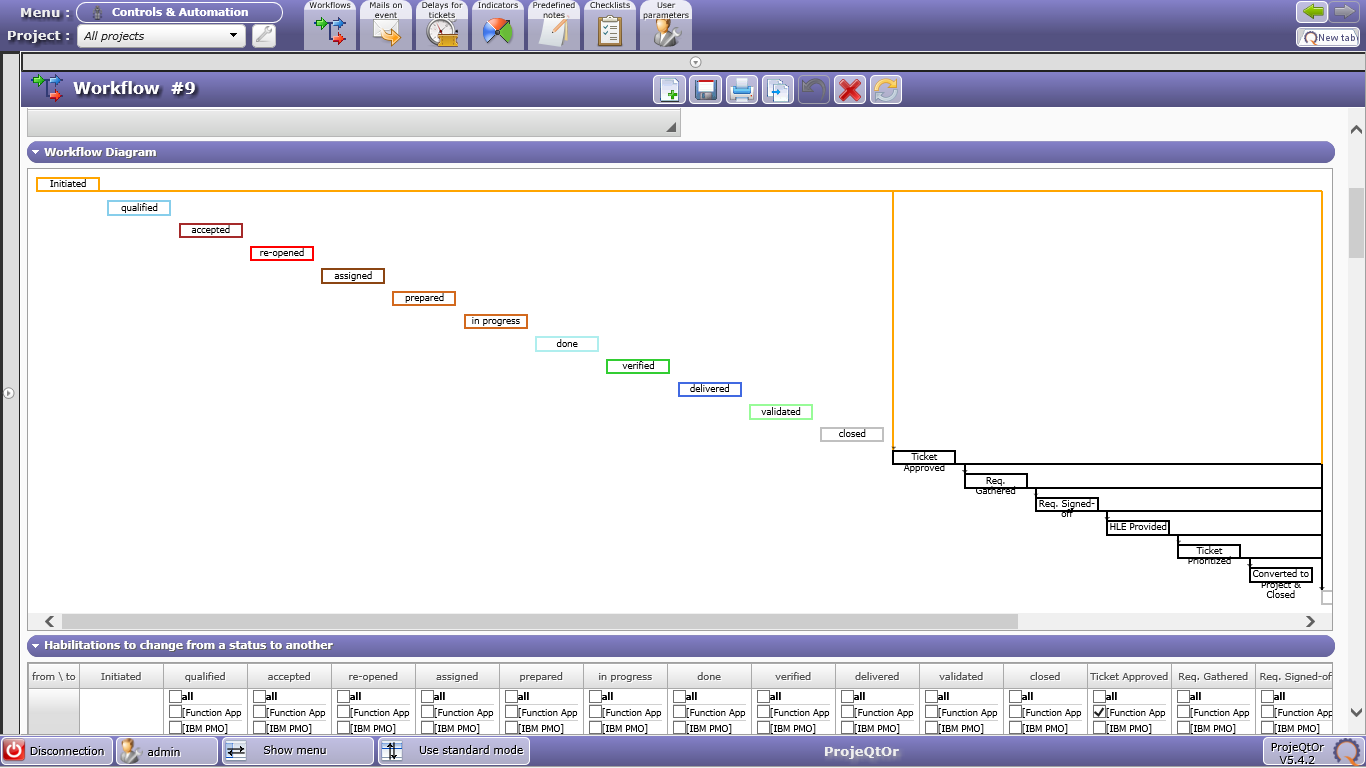
Add-On: I am attaching screenshot of the actual workflow that I am using on the test version. Even with this simple workflow, the status "Initiated" is shown starting from second status change onwards...
This is the vanilla version supplied by you. I have made no changes, just added statuses, user profiles, users, and affectations. Everything else remains pretty much default. Your help to fix this issue is highly appreciated.
I am an Eagle. On a mission to help those who want to help themselves...
Hi,
I can see from screenshot that you made some changes to Ticket screen.
Maybe your issues come from this... you are not using standard version.
Could you try and reproduce with "standard" community version.
I guess the issue will not be reproduces as it is fixed on V5.4.3.
Then possibly you can investigate on the changes you made...
I can see from screenshot that you made some changes to Ticket screen.
Maybe your issues come from this... you are not using standard version.Could you try and reproduce with "standard" community version.
I guess the issue will not be reproduces as it is fixed on V5.4.3.
When I posted my earlier comment, I was using modified version of 5.4.3.
However, in my latest comment (which is posted before yours), I have used "fresh" version of 5.4.3 - as-is version with no modifications. I still get the same error in Workflow.
Request you to please investigate.
I am an Eagle. On a mission to help those who want to help themselves...
I tried fresh installation, one more time. This time, with 5.4.4 version. I have not changed anything in the code/ screens. But I still get the same error. Suddenly the "Initiated" status pops in, but it is not at all included in the workflow.
Note: All of these versions are operational on the same server (even on my localhost). Does that create this issue??
I am an Eagle. On a mission to help those who want to help themselves...
Can you reproduce this issue on Demo ?
If so, please describe how to acces the test case so that I can reproduce.
If not, is it possible to get a dump of your database ? (if required, we can provide Anonymized Backup plugin)
I am attaching full SQL export of my database.
I have taken following steps, in version V5.4.4:
1) Values of "Statuses"
2) Values of "Profiles"
3) Values of "Users", "Contacts", "Resources"
4) Created new "Workflow"
5) Change ticket type for "Incident" to the newly created workflow
6) Access rights to "Forms"
7) Access rights to "Project dependent data"
8) Create new "Project" of T&M type
9) Add "Affectation" to the project -- add newly created user/ resource/ contact
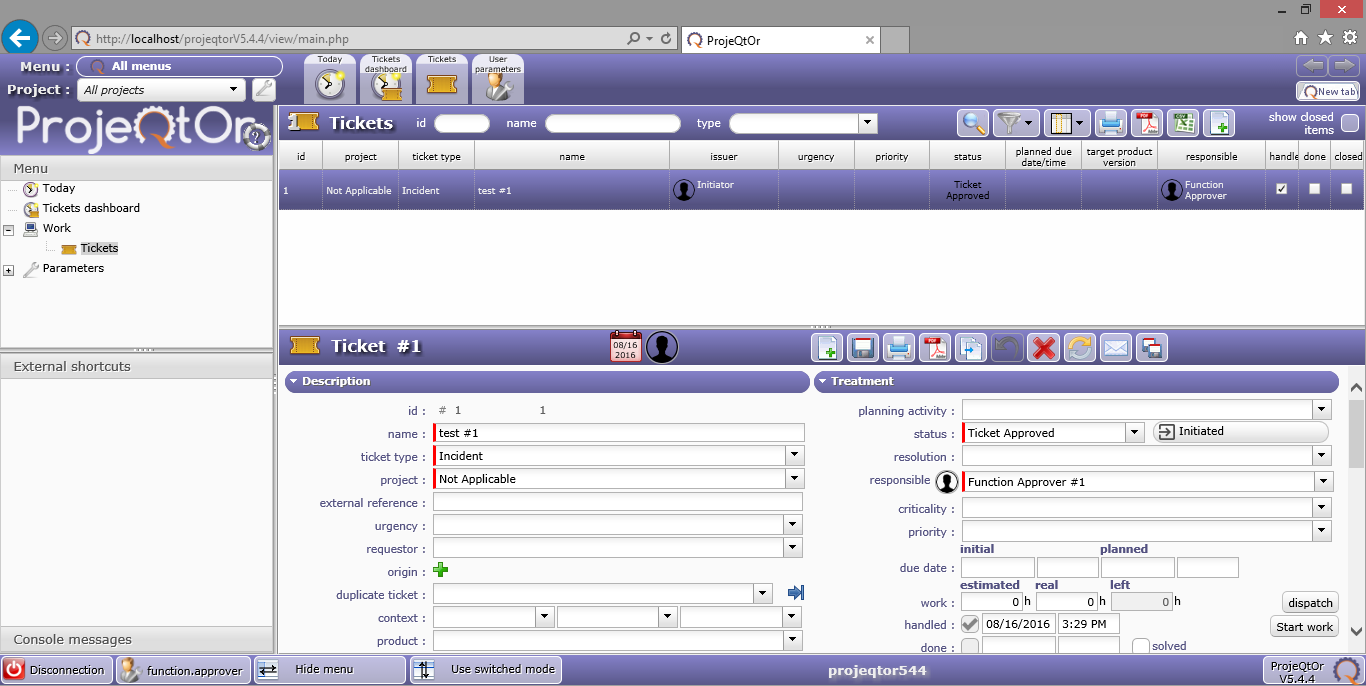
Also, attaching screenshot of what I get. You can see "Initiated" status as next one. This is not the status that should come next, as per the workflow.
I am an Eagle. On a mission to help those who want to help themselves...
Thanls for sharing the database.
This helped me found the issue.
It appears that new status is created with flag isCopyStatus set to 1, and this is an error that lead sto your issue, and will also generate issues on copy.
To fix your problem, execute script :
UPDATE `${prefix}status` set isCopyStatus=0 where id!=14;
Issue is recorder as Ticket #2271 and will be fixed with a patch.
Thanks Babynus. This has resolved the issue. Now my workflow is functioning as desired.
I am an Eagle. On a mission to help those who want to help themselves...